Custom software vs SaaS is a choice between adapting your process to a product and adapting software to your process. SaaS is faster and cheaper to start; custom software fits better and costs more up front. Most businesses should start by asking how standard their process really is.
1Custom software vs SaaS at a glance
| SaaS (ready-made) | Custom software | Buy with source code | |
|---|---|---|---|
| How you pay | Monthly or yearly, often per user | A project fee, then maintenance | One licence fee, then your own hosting and changes |
| Time to go live | Days | Weeks to months | Days to weeks |
| Fit to your process | You adapt to it | Built around you | Close to the product, changeable |
| Who changes it | The vendor, on its roadmap | You decide, your developer builds | You or your developer |
| Updates and security | Included | Part of maintenance | Your responsibility |
| Cost as you grow | Rises with users | Mostly flat | Mostly flat |
| Main risk | Vendor controls price and roadmap | Depending on one team | Keeping it maintained |
2When does SaaS make sense?
Ready-made software fits when your workflow is common to your industry. You can be live in days, the subscription is predictable, and hosting, security updates and new features are included.
The trade-off is that you adapt to the product instead of the other way round. A simple test: can the product handle your three most important daily tasks without workarounds? If yes, start there.
3When is custom software worth it?
Custom software pays off when the workflow is unusual and central to how you make money: a special approval chain, an unusual costing or pricing method, strict permissions between teams, or a need to connect several systems that no single product covers.
Cost and timeline depend on scope, integrations, data migration and how much customisation you need, so a short written brief is the best first step.
4Questions to ask before you decide
- Which tasks take the most manual work today, and would a product remove them?
- Does an existing product cover about 80% of what you need out of the box?
- Who owns the data, and can you export all of it if you leave?
- Who maintains the system after launch, and what does support cost?
- How many people will use it, and what should each role see?
5Can you combine both?
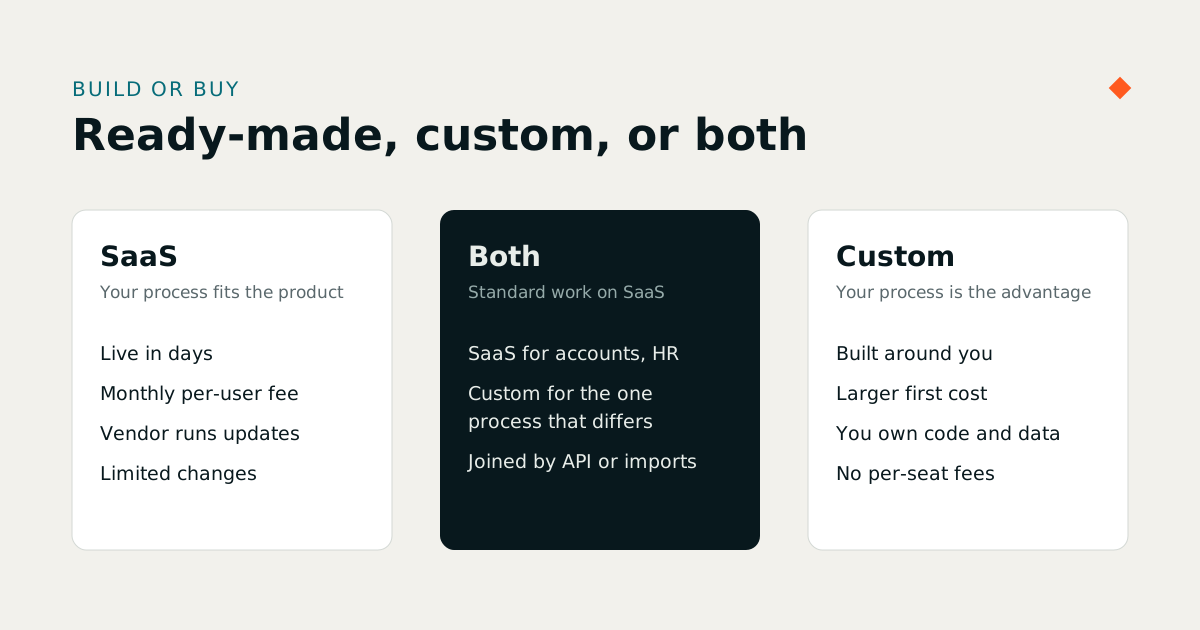
Yes, and it is common. Run standard functions such as accounting or HR on a ready-made product, and build a focused custom layer for the one process that sets you apart, connected through imports, exports or an API. This keeps the custom part small, which keeps it affordable to maintain.
6What does each route really cost?
Compare the full cost over three to five years, not the first invoice. A subscription spreads the cost out and includes hosting, security patches and upgrades, but it grows with every user you add. Custom software has a larger first cost, then ongoing hosting and maintenance, and it does not charge per seat. To budget a build, see software developer hourly rates in Pakistan; for a middle route, some working systems can be bought with their source code.
Also count the cost of working around a poor fit: the spreadsheets, double entry and manual checks that staff do because the product cannot do something. That hidden labour is often larger than the licence fee.
7A five-year comparison you can run yourself
Prices make the trade-off concrete. Take a company of 60 employees choosing HR and payroll software, using Treevoxa's own published prices as the example:
| Route | Year one | Five years |
|---|---|---|
| MatrixHR subscription, Growth plan ($69 a month, up to 100 employees) | $690 if paid yearly | About $3,450 at today's price |
| MatrixHR source code licence ($2,500 one-time) | $2,500 plus hosting | $2,500 plus five years of hosting and any changes you make |
| A custom HR and payroll build | The project fee | The project fee plus five years of maintenance |
The subscription is cheapest to start and includes updates, including new tax slabs each budget. The source-code route only wins if you need to change the product or want no dependency on the vendor. A custom build only wins if your HR process is genuinely different. Run the same table for your own case, with your own quotes. Our custom software cost guide collects published build prices to plug in.
8Signs you have outgrown a SaaS product
- Staff keep a spreadsheet beside the product for the same work.
- A rule that matters (an approval, a price, a costing method) cannot be changed, and the vendor has no plan to change it.
- You pay for more users than ever log in, or per-user fees grow faster than the business.
- Data you need for a decision cannot be exported or reported on.
- Two or more products have to be kept in step by hand.
One sign is a reason to raise it with the vendor. Three or more are a reason to price the alternatives.
9What are the risks of each route?
- SaaS: the vendor controls the roadmap, pricing and uptime; you may be unable to change a screen or a rule that matters to you.
- Custom: you depend on the team that built it, so insist on source-code ownership, documentation and a handover plan.
- Both: data locked in a format you cannot export. Ask for a full export before you sign or commit.
10A simple way to decide
List your ten most important workflows. Mark each one as standard (most companies in your industry do it the same way) or distinctive (it is how you win). If nine are standard, buy a product. If three or four are distinctive and central to revenue, build those parts yourself and buy the rest.
Then test with a small pilot: one team, one branch or one workflow, for a month or two. A pilot costs little and gives you real evidence instead of opinions.
11Questions to ask any vendor before you sign
| Question | Why it matters |
|---|---|
| Can I export all my data, in a format I can open, at any time? | Your exit route, whichever way you go |
| What does the price do when I add users, branches or modules? | The cost that grows quietly |
| Who decides what changes, and how fast? | Control over the rules that matter to you |
| Where is the data hosted, and who can see it? | Confidentiality and compliance |
| What happens if the vendor or developer stops? | Continuity: source code, documentation, handover |
| Can I try it on my own data first? | Evidence instead of a demo |
12How Treevoxa approaches it
We build both. Our own SaaS products cover manufacturing, HR and payroll, gyms, pharmacies, real estate and small-business offers. For anything different we build custom ERP, CRM, HRM and accounting software, then host and support it. If you are unsure which route fits, send us a brief and we will say honestly which one we would choose. When the question is an ERP, our comparison of custom ERP vs Odoo vs ERPNext sets the three routes side by side.