
What comes after AI? For a business, the honest answer is not a new technology with a new name. It is AI disappearing into ordinary software: assistants and agents built into the systems a company already runs, reading its records and taking actions within rules, with people approving the decisions that matter and every step logged. This guide explains what that shift looks like, what it demands of your systems, and how to prepare. If you are planning a system with AI built in, see our custom software development services.
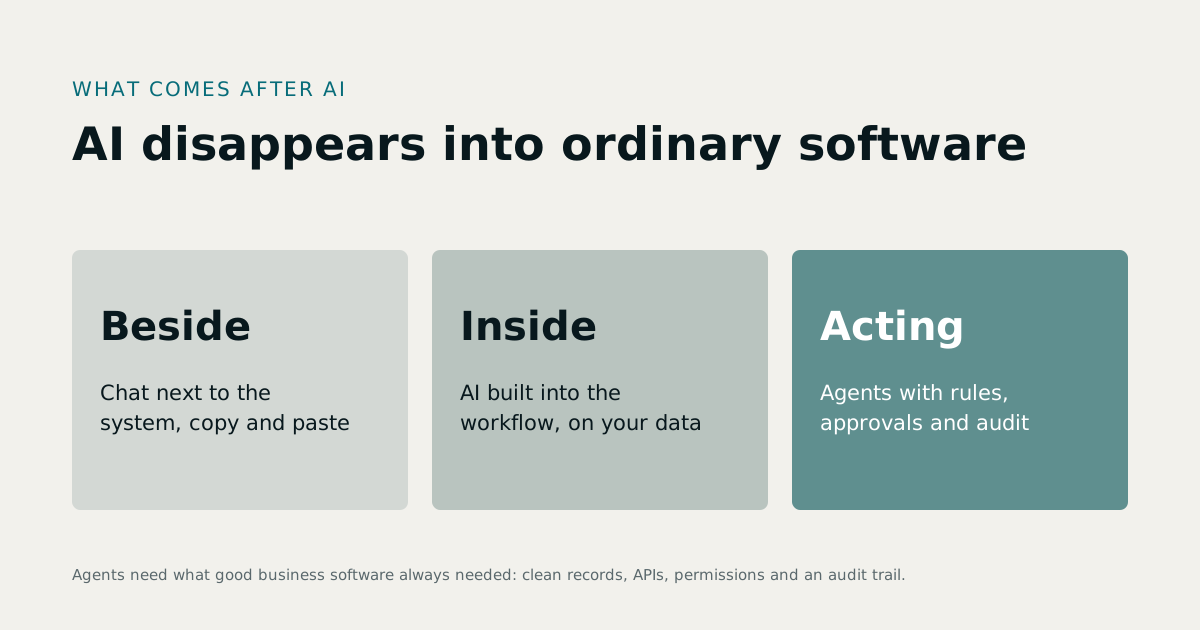
1Three stages of AI in business software
- Beside the system. Staff copy text into a chat assistant and paste the answer back. Useful, but the AI cannot see your records and cannot act on them.
- Inside the workflow. The AI is built into the software: it summarises a customer's history in the CRM, reads an invoice into the accounts, answers a buyer's question from the payment schedule. It works on your data, but a person still does the acting.
- Agents with guardrails. The AI takes actions itself: books an appointment, drafts and sends a reminder, prepares a purchase order, routes an approval. It does so within permissions, under rules, and with a log of everything it did.
Most businesses are moving from the first stage to the second. The third is where "what is after AI" is really heading, and it depends entirely on how well the underlying systems are built.
2Whats after AI: what agents need from your systems
An agent is only as good as the system it acts in. The requirements are the same ones good business software has always had:
- One record for each real thing. A customer, an item, an employee, a unit, each in one place. An agent cannot reconcile three spreadsheets any better than a person can.
- Documented APIs. Agents act through interfaces. If the only way to change a record is a screen, the agent will be fragile.
- Permissions. An agent should get the narrowest access its job needs, like any new employee.
- Approvals. Anything that moves money, changes a price, or alters a record other people rely on should need a person's sign-off.
- An audit trail. Every action, by a person or an agent, logged with who, what and when.
These are exactly the properties we build into our own products. In MatrixHR, whoever prepares a payroll run cannot approve it, a rule that applies just as well to an agent. In RE-ERP, payments go through a verification queue before they settle.
3Managing the risks
AI systems can be wrong with great confidence, can be manipulated by the text they read, and can leak data they were given. The NIST AI Risk Management Framework organises the work of managing these risks into four functions: govern, map, measure and manage. In practice, for a business system:
- Decide what the AI may do alone, and what needs approval.
- Limit what it can see, so one customer's data never reaches another.
- Treat everything it reads as untrusted input, including documents and emails.
- Log and review its actions, especially in the first months.
- Keep a person accountable for each automated process.
4Whats the next big thing, and why it matters less than you think
Predictions of the next big thing come and go; the Stanford AI Index tracks how quickly the field itself changes from year to year. For a business, chasing the label matters less than having systems ready for whatever arrives: clean data, clear processes and documented interfaces. A company with those can adopt the next tool in weeks. A company without them will spend the same weeks untangling spreadsheets.
5How to prepare, step by step
- List the processes that eat staff time: data entry, answering the same questions, chasing approvals, reconciling records.
- Put each process in one system, with one record per real thing. That alone often saves more than any AI.
- Add AI inside the workflow for reading, summarising and drafting, with people doing the acting.
- Allow narrow actions once the results are trusted, behind approvals and logs.
- Review regularly: what the AI did, what it got wrong, and what to change.
6Where we use AI today
Our RE-ERP product uses the OpenAI and Anthropic APIs for AI features, with usage limits per plan, and our Callboard product answers inbound calls with AI phone agents that qualify leads. In both, the AI works on the product's own records and within its permissions. When we build custom systems, we design for the same pattern from the start; our guide to custom software development cost explains how AI features are priced.
7What this means for the software you buy
When you choose business software in the next few years, AI features will be on every vendor's list. Ask questions that separate useful AI from decoration:
- What can the AI see? Only your records, within your users' permissions, or more?
- What can it do on its own? Read, suggest, draft, or act? Which actions need approval?
- Where is it logged? Can you see every action it took and on whose behalf?
- Which model does it use, and where is your data processed?
- What does it cost as usage grows, and can you set limits?
- What happens when it is wrong? Can a person correct it easily, and does the correction stick?
A vendor that can answer all six clearly has built AI into its product properly. One that cannot is selling a chat window.
8What this means for the software you build
If you are planning a custom system, design for AI from the start even if you do not add it on day one:
- Model your data cleanly, with one record per real thing and clear relationships.
- Expose actions through an API, so a future agent can call the same, permission-checked operations a person uses.
- Separate suggestions from decisions in your workflows, so an AI can suggest and a person can approve.
- Log everything that changes data, with who or what made the change.
Systems built this way can add AI features as small, safe increments. Systems built without them need a rebuild first.
9A realistic timeline
The change will not happen all at once. Reading and summarising features are already common. Drafting and suggesting are spreading fast. Acting on its own, within rules, will arrive process by process, starting with low-risk, high-volume tasks such as scheduling, reminders and data entry, and reaching money and decisions last. Plan your systems so each step is possible when you are ready for it, not before.
10A short glossary
- Assistant: AI that answers questions or drafts content when asked.
- Agent: AI that takes actions in a system, such as creating a record or sending a message, within limits.
- Grounding: giving the AI your own records or documents to work from, so its answers reflect your data.
- Guardrails: the permissions, rules and approvals that limit what an AI may do.
- Human in the loop: a person reviewing or approving an AI's action before it takes effect.
- Audit trail: a log of every action, by people and AI, with who, what and when.
11The short answer
What comes after AI is AI that is boring in the best sense: built into the software you already depend on, constrained by the same rules as your staff, and trusted because every action can be checked. The businesses that benefit first will be the ones whose systems are already in order. If yours are not, that is the place to start; see custom software development services.
Sources
- NIST, AI Risk Management Framework — last verified 23 October 2026
- Stanford HAI, AI Index — last verified 23 October 2026
Rates, thresholds and rules change. Confirm current figures with the issuing body or your advisor before relying on them.