
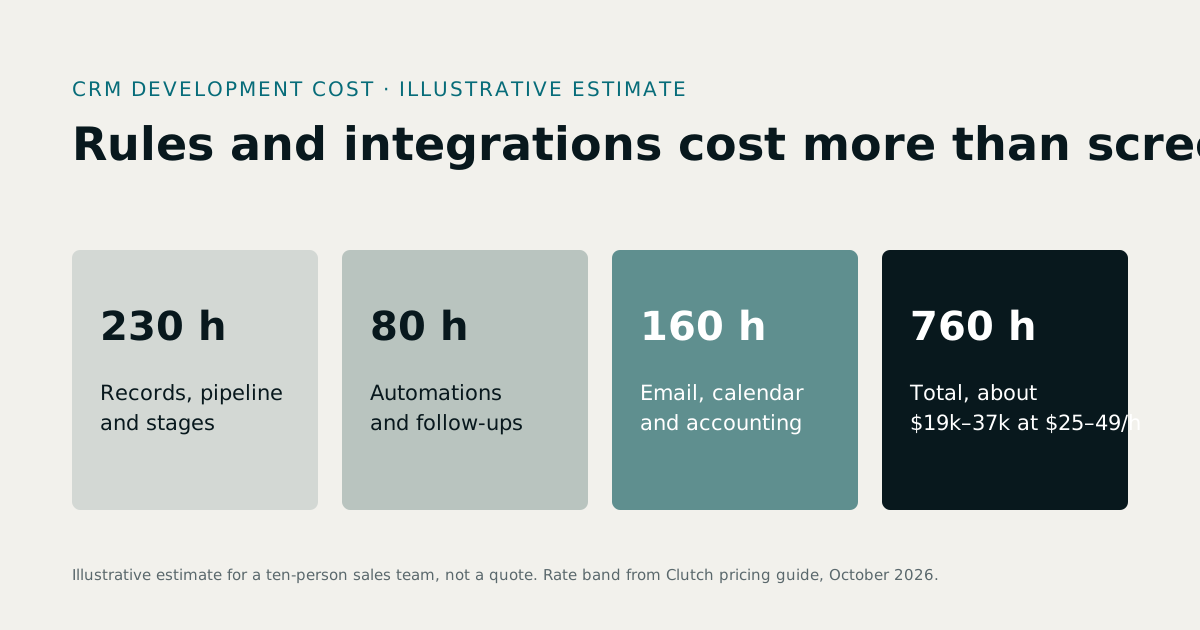
CRM development cost depends on how many kinds of record the CRM holds, how much of the follow-up it automates, and how many other systems it must talk to. Our illustrative estimate below, for a CRM with a sales pipeline, quotes, automated follow-ups and two integrations, comes to about 760 hours, or $19,000 to $37,000 at the $25 to $49 an hour that Clutch's October 2026 guide says most development companies charge. If you already know you want one built, see our CRM development services. It also covers the cost to build a CRM from scratch versus configuring one you already pay for.
1What you are paying for in a CRM
A CRM looks simple on screen: lists, a pipeline board, a timeline. The cost is underneath:
- The data model. Contacts, companies, deals, quotes, products, tasks, notes and the relationships between them.
- The rules. Stages and what each requires, who owns a lead, when a deal goes stale, what happens on win or loss.
- Automations. Follow-up tasks, reminders, assignment rules, emails triggered by events.
- Integrations. Email and calendar, website forms, accounting, phone systems and payment providers.
- Permissions. Salespeople see their own accounts, managers see the team, finance sees the money.
- Reports people trust, on the same data the team uses.
2A worked estimate for a custom CRM
An illustrative example, not a quote: a service company with ten salespeople wants leads from its website, a pipeline with five stages, quotes from a product list, automatic follow-up tasks, sync with its email and calendar, invoices pushed to its accounting software, and three years of spreadsheet data imported.
| Item | Hours (estimate) |
|---|---|
| Discovery and written specification | 50 |
| Contacts, companies, deals, notes and timeline | 160 |
| Pipeline board, stages and rules | 70 |
| Products and quotes with PDF output | 90 |
| Automations: tasks, reminders, assignment | 80 |
| Email and calendar integration | 80 |
| Accounting integration for invoices | 60 |
| Website form capture | 20 |
| Roles, permissions and audit log | 50 |
| Reports and dashboards | 50 |
| Data migration and checking | 50 |
| Total | 760 hours |
At $25 to $49 an hour that is $19,000 to $37,240; at the $50 to $99 typical of US firms, $38,000 to $75,240. Remove the two integrations and the automations and the same CRM drops by about 220 hours; add a customer portal and it grows by a similar amount.
3Custom CRM cost vs a subscription
Subscriptions are priced per user per month, so compare over the life of the system, not on the first invoice:
| Subscription CRM | Custom CRM | |
|---|---|---|
| Upfront cost | Low | The build |
| Ongoing cost | Per user, every month, rising with the team and the plan | Hosting, support and changes |
| Fit to your process | Configured; unusual steps often handled outside it | Built around it |
| Data ownership | Exportable, under the vendor's terms | Yours, in your database |
| Integrations | Marketplace apps, sometimes paid add-ons | Built for your systems |
As illustrative arithmetic only: twenty users at a hypothetical $60 per user per month is $14,400 a year, or $72,000 over five years, before add-ons. A $30,000 build plus $6,000 a year of hosting and support is $60,000 over the same period. The comparison flips with fewer users, a cheaper plan or a standard sales process. Do the sum with your own numbers, and count the spreadsheets you maintain beside the subscription as part of its cost.
4When a custom CRM is worth it
- Your pipeline or pricing is genuinely unusual, and the CRM you pay for still leaves the important part in spreadsheets.
- Sales, stock, billing and service must share one record, as in an ERP.
- You need a customer portal on the same data.
- You have many users and a long horizon, so per-user fees dominate.
When none of these apply, buy a subscription and configure it well. Our guide to custom software vs SaaS walks through the decision.
5Where CRM projects overrun
- Migration. Duplicate contacts, inconsistent company names and free-text fields take longer to clean than to import.
- Automations nobody wrote down. The "rules" live in a manager's head until the system has to follow them.
- Email integration edge cases: shared inboxes, forwarded threads, attachments.
- Reports added at the end. Design reports with the data model, not after it.
6How to keep the cost down
- Start with the pipeline, the timeline and follow-up tasks; add the rest when the team uses it daily.
- Use one integration at first, the one that removes the most retyping.
- Build on a clean API so later additions, like a portal or a mobile app, are cheap.
- Consider a CRM module inside a broader system if you also need stock or billing; see ERP software development.
7CRM features we have already built
Our own products include CRM pieces that run every day: lead pipelines and broker referrals in RE-ERP, inquiry-to-member conversion in FitZone Pro, and AI call answering that records the lead in Callboard. Starting from patterns that already work keeps a custom CRM's cost down.
8A phased CRM budget
You do not need the whole CRM on day one. A common sequence:
- Phase 1: the pipeline. Contacts, companies, deals, stages, notes and tasks. The team stops using spreadsheets for sales.
- Phase 2: quotes and follow-ups. Products, quotes, automated reminders and assignment rules.
- Phase 3: integrations. Email and calendar sync, website forms, accounting.
- Phase 4: portals and apps. A customer portal or a mobile app for staff on the road.
Each phase is useful on its own, and each one is scoped after the team has used the previous one, so the later phases are built on evidence rather than guesses.
9Questions to answer before you request quotes
- Who owns a lead, and what happens when two salespeople contact the same company?
- What makes a deal move from one stage to the next, and who decides?
- Which numbers matter to the sales manager every Monday?
- What happens on a win: an invoice, a project, an order, a welcome email?
- What happens on a loss: is the reason recorded, and is the lead nurtured?
- Who must not see what: prices, margins, other salespeople's accounts?
Teams that answer these before the project starts get quotes that are closer together and projects that finish closer to plan.
10Keeping a custom CRM healthy
A CRM is only useful if people keep it up to date. Three habits keep it that way: make the most common action, logging a call or moving a deal, take seconds rather than minutes; make the manager's weekly report come from the CRM, so people have a reason to keep it current; and remove fields nobody uses. Software can help with all three, but they start as decisions about how the team works.
11Signs you have outgrown your current CRM
- The important part of your sales process lives in a spreadsheet beside the CRM.
- Staff log the same information twice, once in the CRM and once somewhere else.
- The manager's weekly report is built by hand from exports.
- You pay for features nobody uses, and still lack the one you need.
- Every new rule needs a paid add-on or a workaround.
- Nobody trusts the numbers, so nobody keeps the data current.
Any two of these are worth a conversation; several suggest that a better-configured product, or a custom CRM, would pay for itself.
12What Treevoxa charges
We quote CRM work in US dollars and in writing, after mapping your pipeline with you. See CRM development services for how we scope a CRM, or our custom software development cost guide for software prices in general.
Sources
- Clutch, Software Development Company Pricing Guide (October 2026) — last verified 23 October 2026
Rates, thresholds and rules change. Confirm current figures with the issuing body or your advisor before relying on them.