
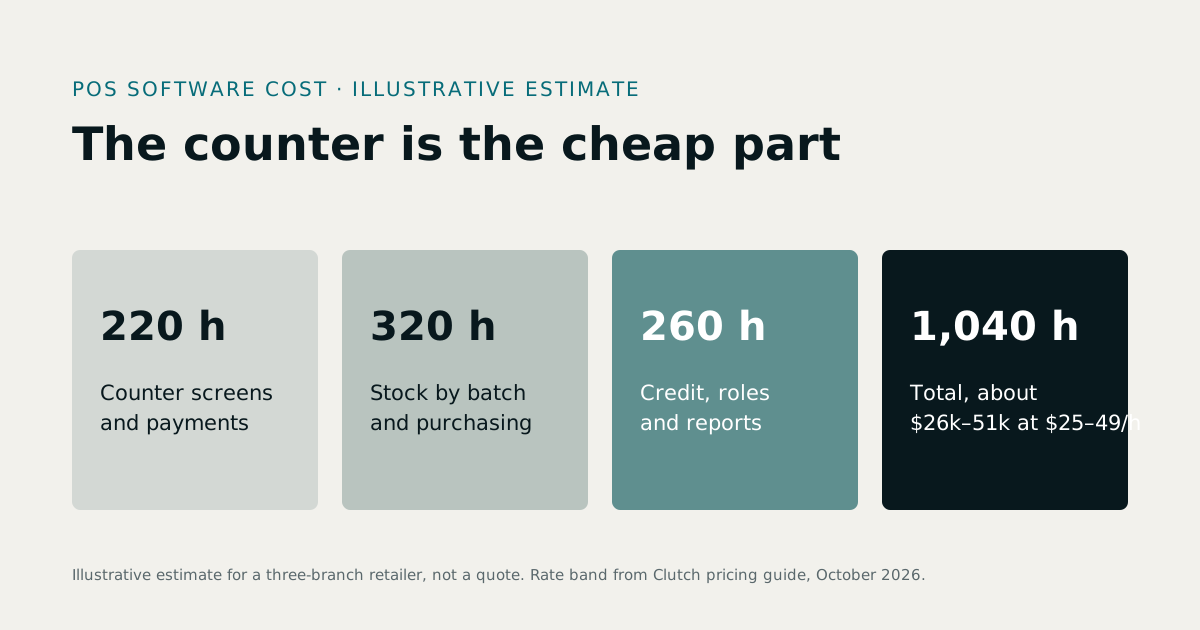
POS software development cost depends less on the checkout screen than on everything around it: the stock rules each sale must follow, whether the till must keep working offline, the hardware it drives, and the systems it must talk to. Our illustrative estimate below, for a multi-branch POS with stock, a back office and one integration, comes to about 1,040 hours, or $26,000 to $51,000 at the $25 to $49 an hour that Clutch's October 2026 guide says most development companies charge. To scope one, see POS software development.
1What a point of sale has to do
- Sell fast: search, barcodes, quick keys, discounts, split payments, returns and receipts.
- Move stock: every sale reduces stock, by batch and expiry where it matters, and feeds the reorder list.
- Handle money: cash drawers, card terminals, credit customers and end-of-day cash-up.
- Run the back office: products, prices, suppliers, purchasing, users and reports.
- Scale out: branches with their own stock, one login for the owner.
2A worked estimate for a custom POS system
An illustrative example, not a quote: a retailer with three branches wants a browser-based POS, batch-level stock, purchasing, credit customers, per-branch reports, and an integration with its accounting software.
| Item | Hours (estimate) |
|---|---|
| Discovery: a real day at the counter, written specification | 60 |
| Counter screens: search, basket, payments, returns, receipts | 220 |
| Stock by batch, transfers between branches, reorder list | 200 |
| Purchasing, suppliers and receiving | 120 |
| Credit customers and balances | 70 |
| Users, roles, branch switching and audit log | 80 |
| Reports and end-of-day cash-up | 110 |
| Receipt printer, scanner and cash drawer support | 40 |
| Accounting integration | 60 |
| Data migration, testing and pilot at one branch | 80 |
| Total | 1,040 hours |
At $25 to $49 an hour that is $26,000 to $50,960; at the $50 to $99 typical of US firms, $52,000 to $102,960. Add offline mode, an online store on the same stock, or a loyalty scheme, and each can add one to three hundred hours.
3What drives point of sale software development cost
- Stock rules. Selling by batch, expiry, serial number, weight or variant is more work than a simple quantity.
- Offline mode. If the till must sell through an internet outage, sales are queued on the device and synced later, with rules for conflicts.
- Hardware. Receipt printers, barcode scanners and cash drawers are usually simple from a browser; scales, customer displays and some card terminals are not.
- Payments. Integrate a payment provider's terminal or checkout so card data never touches your system; see the PCI DSS note below.
- Branches. Per-branch stock, transfers, prices and reports multiply the rules.
- The online store. Sharing stock between a store and the counter, in real time, is the hardest and most valuable piece.
4Card payments and PCI DSS
Any system that stores, processes or transmits card numbers falls under the Payment Card Industry Data Security Standard (PCI DSS). The cheapest way to stay out of most of its scope is not to handle card data at all: use the payment provider's terminal or hosted checkout, and let your POS record the result. We design every POS that way.
5Custom POS cost vs buying one
| Route | Cost shape | Best when |
|---|---|---|
| Subscribe to a POS | Monthly per register or location | Your counter works the way the product does |
| Buy a POS with its source code | One-time licence, plus changes | A working system covers most of your counter |
| Build a custom POS | A project fee, plus support | Unusual stock rules, many branches, or a store that must share stock |
Our own pharmacy POS, PharmaFlow, runs the counter, an online store and supplier ordering on one stock record, picking the earliest-expiring batch automatically. It is sold by subscription on the pricing page and with its full source code on our ERP software with source code page. Our guide to FEFO batch and expiry tracking explains the stock logic a pharmacy POS needs.
6How to cut the cost
- Pilot one branch before building every multi-branch feature.
- Skip offline mode unless outages really happen during trading hours; a mobile hotspot is often cheaper.
- Use standard hardware that works from the browser.
- Start from a working system where one fits.
7How to compare POS quotes
Ask each bidder: which stock rules are included; is offline mode included and how are conflicts handled; which hardware has been tested; how are card payments integrated; who owns the code; and can we see a POS you built that is in use today?
8Cost differences by trade
The same POS core costs different amounts in different trades, because the stock and pricing rules differ:
- Pharmacy: batches and expiry dates on every item, earliest-expiry-first selling, controlled items and supplier returns. Our guide to pharmacy expiry loss shows why the expiry rules matter.
- Grocery and convenience: large catalogues, weighed items, barcodes from many suppliers and fast checkout.
- Fashion: sizes and colours as variants, seasonal pricing and exchanges.
- Hospitality: tables, modifiers, kitchen tickets and split bills, which is a different product from a retail till.
- Gyms and studios: a small shop attached to memberships, as in FitZone Pro.
9Phasing a custom POS
- One counter, one branch: sales, stock, receipts and end-of-day cash-up. Prove it works at real speed.
- Back office: purchasing, suppliers, reports and user roles.
- More branches: per-branch stock, transfers and the owner's view across all of them.
- Online: a store on the same stock, delivery and order tracking.
Each phase can be piloted before the next is built, so the riskiest part, speed at a busy counter, is tested first.
10Questions to answer before you request quotes
- How many sales does your busiest counter handle in its busiest hour?
- How do you handle returns, exchanges and credit customers today?
- Which items are sold by batch, weight, serial number or variant?
- What hardware is at each counter, and does it need replacing?
- Which reports does the owner read every morning?
Clear answers here make quotes comparable and keep the project close to its estimate.
11A short glossary of POS terms
- SKU: a stock-keeping unit, one sellable item or variant with its own code.
- Batch: a quantity of an item received together, often with its own expiry date and cost.
- FEFO: first-expired, first-out; the batch closest to expiry is sold first.
- Z-report: the end-of-day report that closes the till and totals the day's sales by payment type.
- Cash-up: counting the drawer and reconciling it against the Z-report.
- Reorder level: the stock quantity at which an item is suggested for purchase.
- Payment terminal: the card device, run by a payment provider, that keeps card data out of your POS.
12Signs a POS quote is too low
- It does not mention returns, exchanges or credit customers.
- It assumes a simple quantity for items you sell by batch, weight or variant.
- It has no line for data migration or for a pilot at one counter.
- It is silent about hardware and card payments.
- It includes no reports beyond a daily total.
A low quote that leaves these out is not cheaper; it is incomplete.
13The bottom line
A custom POS pays off when your stock rules, branches or online store make every ready product a compromise. If one product fits your counter, buy it, and keep custom work for the integration or the one rule it cannot handle.
14What Treevoxa charges
We quote POS work in US dollars and in writing, after watching how your counter works. See POS software development for how we build, or our custom software development cost guide for software prices in general.
Sources
- Clutch, Software Development Company Pricing Guide (October 2026) — last verified 23 October 2026
- PCI Security Standards Council, PCI DSS — last verified 23 October 2026
Rates, thresholds and rules change. Confirm current figures with the issuing body or your advisor before relying on them.