
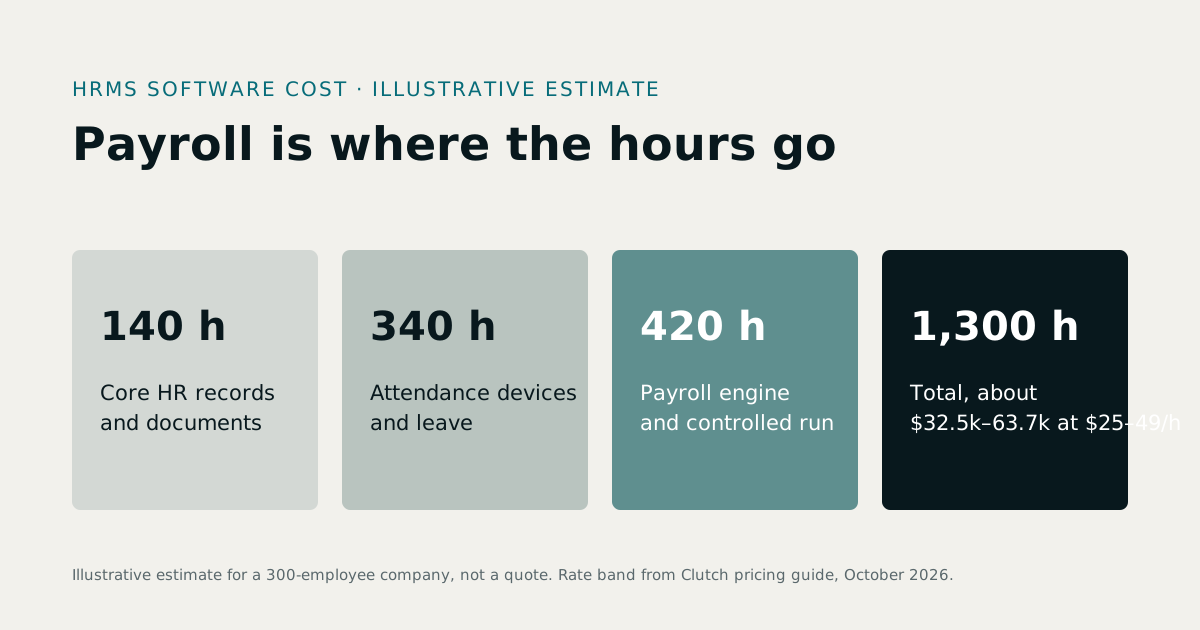
HRMS software development cost is driven by payroll more than anything else. Our illustrative estimate below, for core HR, attendance with biometric devices, leave, payroll with approvals and employee self-service, comes to about 1,300 hours, or $32,500 to $63,700 at the $25 to $49 an hour that Clutch's October 2026 guide says most development companies charge. Before you build, compare that with a subscription. To scope a custom HRMS, see HR software development services.
1The modules of an HRMS
- Core HR: employee records, documents, contracts, departments and reporting lines.
- Attendance: biometric terminals, browser and mobile clock-in, shifts, lateness and overtime.
- Leave: policies, balances, holidays and approvals.
- Payroll: earnings, deductions, taxes and contributions, payslips and bank files.
- Claims and loans, recovered through payroll.
- Recruitment, onboarding and reviews.
- Self-service for employees and managers, on the web and on a phone.
2A worked estimate for a custom HRMS
An illustrative example, not a quote: a company of 300 employees across two sites, with fingerprint terminals, three leave types, a monthly payroll with a second approver, and an export to its accounting software.
| Item | Hours (estimate) |
|---|---|
| Discovery: policies, pay components, approvals, written specification | 80 |
| Core HR records, documents and org structure | 140 |
| Attendance: terminal integration, shifts, lateness, overtime rules | 220 |
| Leave policies, balances and approvals | 120 |
| Payroll engine: earnings, deductions, taxes as dated rules | 280 |
| Payroll run: draft, review, second approver, lock, payslips, bank file | 140 |
| Claims and loans through payroll | 80 |
| Self-service web and mobile screens | 120 |
| Roles, privacy rules and audit log | 60 |
| Data migration and a parallel payroll run | 60 |
| Total | 1,300 hours |
At $25 to $49 an hour that is $32,500 to $63,700; at the $50 to $99 typical of US firms, $65,000 to $128,700. Payroll is 420 of the 1,300 hours, and it is the part where an error is most expensive after launch.
3What drives HR software development cost
- Pay rules. Each allowance, deduction, tax slab and contribution is a rule with an effective date. More rules, more testing.
- Attendance policies. Lateness, half days, overtime approval and night shifts that cross midnight each need clear rules before code.
- Devices. Connecting fingerprint or face terminals means an agent or a cloud push, plus handling devices that go offline.
- Approvals. Who approves leave, claims, loans and payroll, and what happens when they are away.
- Privacy. Managers should see attendance and leave for their team, never pay or bank details. Every screen and export must respect that.
- Countries. Each country's payroll is effectively its own module.
4Payroll software development cost: never just a calculation
A payroll run is a controlled process, not a formula. Approved attendance, leave, claims and loans flow into a draft that can be recalculated freely; a second person reviews exceptions; the run is locked; payslips and the bank file are produced; and the accounting journal must balance. Our guide to payroll approval controls explains each step. Building that properly, and running it in parallel with your old process for at least a month, is where most of the payroll hours go.
5Build vs buy
| Route | Cost shape | Best when |
|---|---|---|
| Subscribe to an HRMS | Monthly per company or per employee | Your policies fit after configuration |
| Buy an HRMS with source code | One-time licence, plus changes | You want to own and adapt a working system |
| Build a custom HRMS | A project fee, plus support | Your pay rules, approvals or integrations are unusual |
Our own MatrixHR is flat-rate from $25 a month for up to 25 employees, with payroll on the $69 plan; see the pricing page. It is also sold with its full source code on our ERP software with source code page, which is often the cheapest starting point for a custom HRMS.
6How to keep the cost down
- Write the policies down first. Most HR projects overrun because rules are discovered during testing.
- Launch attendance and leave first, then payroll once the inputs are trusted.
- Run payroll in parallel for at least one month and compare every payslip.
- Start from working code where a product is close.
7How to compare HRMS quotes
Ask each bidder: which pay components and rules are included; how tax and contribution changes are handled over time; which attendance devices have been integrated before; how privacy between managers and HR is enforced; whether a parallel payroll run is included; who owns the code; and can we see an HRMS you built that runs payroll today?
8Phasing an HRMS project
Payroll is the riskiest module, so many companies launch around it:
- Phase 1: core HR and self-service. Employee records, documents and a directory. Low risk, and it cleans up the data payroll will need.
- Phase 2: attendance and leave. Terminals, clock-in, leave policies and approvals. Inputs to payroll become trustworthy.
- Phase 3: payroll. Built and run in parallel with the old process for at least one month, then switched over.
- Phase 4: talent. Recruitment, onboarding, reviews and learning.
Each phase delivers value on its own, and payroll is built on inputs that have already been tested in daily use.
9Questions to answer before you request quotes
- What are your pay components, and how is each calculated?
- Which leave types exist, and how do balances accrue and carry over?
- How is lateness, a half day or overtime defined, and who approves overtime?
- Which devices do people clock in on, and where?
- Who approves leave, claims, loans and payroll, and who deputises?
- Who may see salaries and bank details, and who must not?
- Which reports and files must payroll produce each month?
Written answers to these questions are most of a good HRMS specification.
10Privacy and security in HR software
HR systems hold some of the most sensitive data a company has: pay, bank details, ID numbers, health and disciplinary records. A custom HRMS should enforce privacy on the server, not only in the interface: managers see their team's attendance and leave but never pay; exports respect the same rules; and every access to sensitive records is logged. Data protection law in your country may set further rules for retention and access, so confirm them with your adviser before launch.
11Signs you have outgrown spreadsheet HR
- Payroll depends on one person who understands the formulas.
- Attendance is exported from a terminal and retyped every month.
- Leave balances are disputed because nobody can show how they were calculated.
- Managers can see pay data they should not see.
- Nobody can say who changed a salary, or when.
- Month-end takes days, and corrections run into the next month.
When several of these are true, the cost of HR software, bought or built, is usually lower than the cost of the errors and the time.
12A short glossary
- HRIS: the core employee record system and its reports.
- HRMS: an HRIS plus the processes around it, such as attendance, leave and payroll.
- Pay component: one line on a payslip, such as basic pay, an allowance or a deduction.
- Payroll run: the monthly process of calculating, approving and paying salaries.
- Parallel run: running the new system beside the old one to compare results before switching.
13The bottom line
An HRMS is worth building when your pay rules, approvals or integrations do not fit any product, and when payroll errors already cost you real money and trust. Otherwise, buy, and spend the difference on getting your policies written down.
14What Treevoxa charges
We quote HR software in US dollars and in writing, after mapping your policies with you. See HR software development services for how we build, or our custom software development cost guide for software prices in general.
Sources
- Clutch, Software Development Company Pricing Guide (October 2026) — last verified 23 October 2026
Rates, thresholds and rules change. Confirm current figures with the issuing body or your advisor before relying on them.