
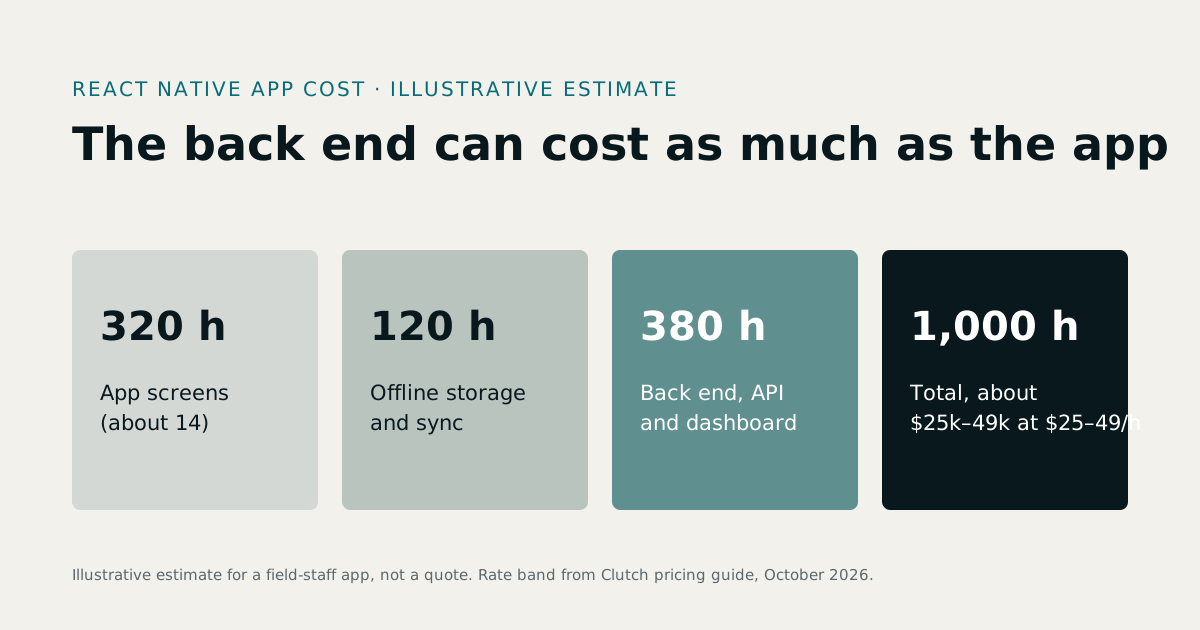
React Native app development cost for a small business depends on scope, not on the word 'app'. A single-purpose app, such as a staff check-in, sits in the $15,000 to $20,000 band where published 2026 estimates overlap. A customer app with accounts and card payments sits between $40,000 and $70,000, and a build with integrations and an admin panel sits between $150,000 and $250,000. This guide sets out three scope tiers, what a quote usually leaves out, when a mobile website does the job instead, and how to compare two written quotes before you sign. It is written for owners and operators of 10 to 200 person businesses in cities such as New York, Austin, Raleigh and Denver, in the Toronto area, and for founders building a first product. If you already know you need a build, React Native app development is the service this guide covers.
1How much does a React Native app cost a small business?
One React Native code base builds both the iPhone and Android versions of an app. That is the main reason the framework is popular for business tools. You still pay for the server the app talks to, which is covered later in this guide.
The budget question comes down to three things: how many screens you need, how many types of user will use them, and which other systems the app must connect to. Most small business app projects fall into one of three tiers.
| Tier | What it includes | What it usually leaves out | Band where published 2026 estimates overlap |
|---|---|---|---|
| 1. Single-purpose app | One job, such as a clinic booking app, a staff check-in or a site inspection form. Few screens, one or two user types. | Card payments, a full admin panel, system integrations and most of the back end unless the quote says otherwise | $15,000 to $20,000 |
| 2. App with accounts and payments | Sign-in, user profiles, order or booking history, card payments, push notifications and a simple admin view | Multi-role permissions, ERP or CRM links, offline working and a full web admin panel | $40,000 to $70,000 |
| 3. App with integrations and an admin panel | Several user roles, an ERP or CRM link, maps or scanning, offline working and a web admin panel for staff | Little is left out, but data-sync rules and testing across many devices can be priced as extras | $150,000 to $250,000 |
The bands come from the figures that 2026 guides publish for each tier. For tier 1, Deventity gives $3,500 to $20,000 and Fively gives $15,000 to $40,000. For tier 2, Fively gives $40,000 to $100,000, Codesclue gives $25,000 to $70,000 and Spaceotechnologies gives $35,000 to $80,000. For tier 3, Codesclue gives $70,000 to $250,000 and above, and Spaceotechnologies gives $150,000 to $300,000 and above. The guides do not group their figures by tier in the same way, so the matching above is ours.
Read the bands as market observations, not prices. The overlap is where the sources agree, which makes it a sensible test of whether a supplier's figure is in the right area. It is not a quote, and the guides that publish these numbers sell development services. Many do not say whether the back end is included. Ask every supplier that question directly.
The React Native app cost in your quote will depend mainly on the tier you pick. For a figure based on your own scope, run your feature list through the software cost calculator.
If you run a 40-person logistics firm in Denver or a clinic group in Raleigh, the tier that matters is the one your staff and customers use every day. A longer feature list does not make an app more useful if people only open it twice a week.
2Can a small business afford a React Native app in 2026?
Yes, if the first release does one job well. A single-purpose app sits in the $15,000 to $20,000 band, and the next tier up starts at $40,000. Small business app development is easier to fund in stages: build the one feature that saves the most time, watch how people use it, then add the next. Budget for the whole first year, not the build alone. The build, the backend, store fees, hosting and maintenance all count.
3What makes the price go up or down?
Five drivers move the mobile app development cost more than anything else.
| Driver | How it moves the budget | How to limit it |
|---|---|---|
| Screens and user roles | Each role adds screens, permission rules and test cases | Launch with one or two roles and add the rest in a second release |
| Integrations (payments, sign-in, maps, ERP or CRM) | Each one needs its own setup, a test environment and a plan for failure | Connect only the system that saves the most time. Move other data by scheduled export at first |
| Offline use | Data has to be stored on the phone and synced later, which adds rules and edge cases | Limit offline working to the one screen that needs it, such as a site form |
| Design depth | Custom animation and bespoke screens take more hours than a clean standard layout | Use a clear, standard design for the first release |
| Device testing | More phone models and older Android versions mean more test time | Agree a short device list in the written scope |
The quickest way to control cost is a first release that does one job well. MVP development works on this principle. Decide what must work on day one, ship it, and let real use decide what comes next. For a SaaS product, the MVP development cost for a SaaS startup guide sets out the figures.
Screens, roles and workflows
Count the roles before you count the screens. A booking app for one clinic has patients, receptionists and clinicians, and the flow is short. A field-service app with five roles (technician, supervisor, dispatcher, customer and administrator) needs a permission rule for almost every action.
Write down each role, what it can see and what it can change. If a supplier does not ask you these questions, they are not yet pricing your app.
Integrations and the backend
Payments, sign-in, maps, barcode scanning and links to an ERP or CRM each add time. Each one needs an account with a third party, a test setup and a plan for what happens when the link fails.
The phone app talks to a server, which holds the data, the rules and the admin tools. That server is the back end. If the app needs to pull orders from your accounting system, that work sits in the API development layer, not in the phone screens. Ask the supplier which integrations are in the quote and which need a separate estimate.
4Why do two quotes for the same app differ so much?
Two suppliers can quote the same app at very different totals, and both can be honest. The usual causes are these:
- Hourly rate against fixed price. An hourly quote leaves the risk with you. A fixed price moves it to the supplier, but only if the scope is written down.
- Team seniority. A senior team may need fewer hours for the same work but charge more per hour. Ask about the mix of senior and junior staff.
- Team location and time zone. Compare total cost, and also how easily you can reach the team during your working day.
- Scope gaps. One quote may include the back end. Another may cover only the phone screens.
- Items left out. Backend, design, store setup, testing and hosting are the usual gaps.
The published figures disagree for a simple reason. Each guide defines the app differently, dates quickly, and sells the services it prices. A guide that leaves out the back end will show a lower total than one that includes it. Always ask what a number covers.
Use this checklist to test any quote:
| Item | What the quote should state | Red flag |
|---|---|---|
| Scope | A list of screens, user roles and integrations | 'Full mobile app' with no list |
| Price basis | A fixed price, or an hourly rate with an estimate and a cap | Open-ended hours with no estimate |
| Backend | Server, database and admin panel as a separate line | Backend missing, or 'included' with no detail |
| Design | Number of screens and revision rounds | Design left out, or unlimited revisions |
| Testing | Devices, operating system versions and test rounds | No device list |
| Store setup | Who submits to the App Store and Google Play, and whose accounts are used | The supplier plans to use its own accounts |
| Hosting | Provider, monthly estimate and who holds the account | Hosting not mentioned |
| Launch date | A date tied to milestones and sign-off | 'Within a few months' |
5What does a React Native developer cost per hour?
Hourly figures for US and Canadian teams cluster around $60 to $160 an hour. Diligentic's 2026 guide gives $60 to $150 and above, and Fively's 2026 guide gives $90 to $160 and above. Some guides still publish $15 to $25 an hour. Treat those as outliers or out of date.
A low hourly rate does not mean a low total. A senior team may need fewer hours for the same work. Check current figures on software development rates before you compare suppliers, and then compare the total cost of the same written scope.
6Does React Native save money over separate iOS and Android apps?
Often it does, for a typical business app. One team builds one code base for iPhone and Android. You pay for one set of features, one set of tests and one team's time, not two. A native build usually means two skill sets, often two teams, and two rounds of testing for every change.
How much you save depends on how much device-specific work the app needs. Most staff apps, booking apps and order forms use common phone features and standard screens. For those, React Native is usually the efficient choice. We do not put a fixed percentage on the saving. The published percentages vary widely, and the real figure depends on your scope.
Native code is worth the extra cost in three cases:
- heavy graphics or animation, such as a detailed 3D product viewer or a game
- deep hardware access, such as specialist sensors or custom Bluetooth devices
- a feature that exists on one platform only and must behave exactly as that platform intends
Even then, React Native can call native code for one feature. You do not always have to choose all or nothing.
7How much does the backend add to the budget?
The backend is everything the phone app depends on: the server, the database, the rules that decide who sees what, the admin panel your staff use and the links to other systems. Customers rarely see it, but you pay for it every time the app does something useful.
Budventure's 2026 guide puts the backend at 20 to 40 per cent of the build. Firstbridge Consulting's 2026 guide puts it at 25 to 35 per cent. The spread is wide because the share moves with your scope. An app with a simple back end and no admin screens sits near the bottom of the range. An app with payments, several roles, reporting and an ERP link sits higher.
Do not accept a backend share as a fact. Ask for the backend as a separate line in every quote, with its own scope. That line lets you compare suppliers on the same terms.
8What does it cost to keep the app running each year?
Launch is not the end of the bill. Some costs are one-off, some recur every year, and some apply only when you sell through the store. The Apple and Google developer accounts are the first fixed costs: $99 USD a year for the Apple Developer Program and $25 USD once for Google Play registration.
| Cost | What it is | Figure and source |
|---|---|---|
| Apple Developer Program | Membership needed to publish on the App Store. A lapsed membership removes your app from the store. | $99 USD a year. Nonprofits, accredited schools and government bodies can apply for a fee waiver. Source: Apple Developer Program |
| Google Play registration | One-time developer registration for Google Play | $25 USD, one time. Identity verification is required. Source: Google Play Console |
| Apple store commission | A share of sales made through the App Store | 30 per cent standard, or 15 per cent under the Small Business Program. Generally applies to digital goods and in-app purchases, not physical goods. |
| Google Play service fee | A share of sales made through Google Play | 15 per cent on the first $1 million of a developer's annual revenue, 30 per cent above that. Subscriptions are 15 per cent. Source: Google Play service fees |
| Hosting | Server and database hosting for the back end, billed monthly or yearly | No single figure applies. Depends on provider, region and usage. See the worked example below. |
| Maintenance | Bug fixes, operating system updates, store resubmissions and small changes | Guides commonly suggest 15 to 20 per cent of build cost a year. Others range from 10 to 25 per cent. |
Figures in this table are as at the date this guide was written, in November 2026. Check them on the day you budget, because store fees and provider prices change.
Hosting worked example. Hosting varies too much for a single figure, so here is a calculation with the assumptions stated. Suppose your back end runs on two small cloud servers, one managed database and some file storage. Suppose your provider bills these hypothetical amounts: $50 a month per server, $75 a month for the database and $25 a month for storage. The total is $200 a month, or $2,400 a year. Replace those prices with your provider's real figures. The cost drivers are the number of users, the volume of data stored, how often the data is backed up, the region the servers sit in, and whether the app sends push notifications or email through a paid service.
Maintenance worked example. For a build costing $60,000, a 15 per cent maintenance rate comes to $9,000 a year. Ask the supplier what that figure covers, including operating system updates and store resubmissions.
Store fee worked example. Suppose your app takes $10,000 a year in in-app digital purchases. At Apple's standard 30 per cent, the fee is $3,000. Under the 15 per cent Small Business Program, it is $1,500. A booking app that takes no in-app payment may pay no commission at all.
Two things are easy to miss. Store fees depend on what you sell. And an operating system update from Apple or Google can force an update to your app even when nothing in your app has changed, so budget for that in maintenance.
9When is a mobile website enough instead of an app?
Many small businesses ask for an app when a mobile website would do the job. A mobile website or web app runs in a browser, needs no store approval, and one version works on every phone. The test is simple: list the things the app must do, and check which ones a browser cannot do.
| Need | Mobile website or web app | Native app |
|---|---|---|
| Bookings, quotes and order forms | Works well | Works, at higher cost |
| Staff check-in or timesheets | Works if staff have signal and log in | Works, and can run on a shared device |
| Push alerts when the app is closed | Limited | Yes |
| Offline working in the field | Limited | Yes, with planned sync |
| Camera, barcode or hardware access | Limited | Yes |
| Daily use from the home screen | Needs a bookmark or installation | Icon on the home screen |
| Store listing and discovery | None | Yes |
If most rows say 'works well', start with website development and test whether people use the mobile site. If your field staff need offline forms and push alerts, a native app is the right choice. The choice between a web app and a native app changes the budget more than the choice of framework does.
10Who should own the store accounts and the code?
Put the Apple and Google developer accounts in your company's name, with an owner's login. Do not let the supplier hold them. The accounts control your store listing, your review history and your ability to publish updates. If a supplier holds them and the relationship ends, you can lose your store presence and have to start again.
Apple asks organisations to enrol as a legal entity, so enrolment is a company decision, not a supplier one. See Apple's enrolment guidance.
Our position is that you own the code and the accounts. Before final payment, make sure you hold these:
| Asset | Who should hold it | What to check |
|---|---|---|
| Apple Developer account | You | Admin access and billing under your company |
| Google Play Console | You | Owner access, with the supplier invited as a user |
| Source code repository | You | Repository in your name, with full history |
| Hosting account | You | Billing in your name, with the supplier given access |
| API keys and third-party accounts | You | Payment, maps and sign-in keys stored in your password manager |
Ask for this handover in writing. It is much harder to fix after the supplier has gone.
11How do I compare two quotes before I sign?
Compare the total cost of the same written scope, not the headline price. Work through these steps with every supplier.
- Ask for a written scope, a fixed price and a launch date before work starts. A quote without these is an estimate, not a commitment.
- Read the exclusions first. A quote with no list of what is not included is incomplete.
- Check the change-request rules. Find out how a change is priced, who approves it and how long it takes.
- Confirm who holds the accounts and the code.
- Test the scope against your budget. Run the same feature list through the software cost calculator linked earlier, and compare the result with each quote.
Use this table when you read any offer, including ours:
| Term | What to ask for | Red flag |
|---|---|---|
| Exclusions | A written list of what is not included | No list, or 'everything else is extra' |
| Change requests | Rate, approval step and time to deliver each change | Changes billed with no estimate |
| Milestones and payments | Payments tied to agreed deliverables | Most of the fee paid up front |
| Post-launch fixes | The length of the bug-fix period after launch | Nothing said |
| Accounts and code | Both held by you | The supplier holds either one |
Our practice is to agree the scope, a fixed price and a launch date before work starts. One team covers software, design, cloud and marketing, so one group answers for the build. We have offices in Toronto, Thornhill, London and New York, and you own the code and the accounts.
12What to do next
Treat React Native app development cost for a small business as a scope question before it is a price question. Write down your roles and screens, check whether a mobile website would meet the need, and compare written quotes on the same scope. Then work through these steps:
- Write down your user roles, your three must-have screens and the systems the app must connect to.
- Decide whether a mobile website would meet the need before you commit to a native app.
- Run that scope through the software cost calculator and note where it sits against your budget.
- Ask at least two suppliers to quote against the same written scope. How to choose a custom software development company lists what else to check.
- Compare totals, including the backend, store fees, hosting and maintenance for the first year.
- Check the contract for the terms in the table above before you sign.