
Yes, in most cases you can add a mobile app to an existing ERP or web system without replacing it, provided its API covers the jobs your staff need on a phone. Treevoxa builds these apps with React Native app development. One React Native code base serves iOS and Android, with the same API behind both. This guide explains how to add a mobile app to an existing ERP or web system: which integration route fits, what the current system must provide, and what drives cost and timing.
The phone app and the desktop system read and write through the same backend. A stock adjustment made on a phone and one made at a desk land in the same database and pass the same checks. The questions are the same whether your head office is in Thornhill or Denver.
1Can you add a mobile app to an existing ERP or web system?
Usually, yes. The deciding question is not whether the system has an API, but whether that API covers the jobs your people need on a phone: checking stock, posting a receipt, approving a purchase, updating a job or recording a delivery. If it does, an ERP mobile app is mostly new screens over existing endpoints. If it does not, the gap is the first thing to fix.
The app holds no business rules of its own. It calls the same backend the office uses, so the desk and the phone follow the same rules.
Which endpoints and workflows must you map first?
Before anyone draws a screen, audit what you have. Look at the front end, the back end, the APIs, the database, how users log in, and what each role is allowed to do.
Then list the five to ten tasks staff need on a phone. For each task, find the endpoint that performs it. Every task without an endpoint is a gap, and gaps set both scope and cost.
Take a hypothetical receiving clerk at a distributor in Raleigh. The clerk needs to scan a purchase order, post the quantities received and flag a short delivery. If the API can read purchase orders but cannot post receipts, the app cannot do that job until the receipt endpoint exists. That endpoint goes into the scope at the start, so the price reflects it.
Which system should hold the record?
This is a business decision, and it comes before design. When the phone and the office both change the same record, one system must be the source of truth.
Ask three questions. Where is a stock count saved? Who can reverse an approval? Which edit wins when a customer note changes in two places?
In our projects, we usually recommend that the ERP holds stock, orders and approvals, while the app holds drafts until they are posted. Whatever you choose, write the answer down for each record type. Unwritten rules are the ones people argue about later.
2What if your system has no usable API?
Older ERPs, in-house web applications and packaged systems with thin APIs are common. There are four routes in, from a documented API to direct database access. Where the source is awkward, middleware or a custom connector sits between the app and the system and does the translating.
Screen-scraping, where software clicks through the existing screens, can work for a while. It breaks when the page layout changes. Treat it as a last resort.
A web product that renders its pages on the server, or whose API is tightly coupled to those pages, needs backend work before a mobile app is feasible. You cannot simply point the app at it. The logic has to be pulled out into a service the app can call first. Scope that groundwork before anyone quotes a launch date.
Take a hypothetical property maintenance company in Austin whose technicians update jobs in a web portal built around page templates. The portal works in a browser, but it has no endpoint a phone could use. The first project is not the app. It is the service layer the app would later call.
If you own a custom-built system, the cleanest answer is usually to add an API layer to it. For systems built to your requirements, see ERP software development.
Which integration route fits your system?
Effort and risk are relative. Your system and your workflows decide where each route sits. The simplest form of API integration is a documented API, and the other routes are fallbacks.
| Route | Effort | Risk | Best when |
|---|---|---|---|
| Documented API | Low | Low | The system has a current API that covers the workflows the app needs |
| Middleware or custom connector | Medium | Medium | The API is partial, or two or more systems must stay in step |
| File exchange (scheduled import and export) | Low | Medium | Data can wait minutes or hours, and nobody needs live updates |
| Direct database access | High | High | Rarely. Only when no API exists and the vendor's licence terms allow it |
Direct database access deserves the most caution. Stock limits, approval steps and required fields usually live in the application, not in the tables. Write straight to the tables and those checks are skipped. The errors often surface later as wrong stock figures, and nobody can trace which change caused them.
Why does a thin API layer often come first?
A thin API layer is a small service between the legacy system and the mobile app. The app talks only to that layer, and the layer talks to the legacy system, however awkward it is. In our projects, this layer usually comes first, before any screen is designed.
It also lets you replace the old system later. When the ERP is eventually swapped out, you rewire the thin layer, and the mobile app keeps calling the same endpoints. The app does not need rewriting. That is the main reason to build the layer.
The layer should expose only what the app needs, which keeps the scope small. Treevoxa builds these layers under API development.
3Should the mobile app write straight into the system?
Usually not. Writes should go through an API that enforces the business rules: stock cannot fall below a set limit, an approval needs the right role, and a job cannot close without a signature. If the app writes past that API, those checks are skipped too.
Reads can be more direct, but route them through the API as well, so permissions apply to every request. If customer records are part of the project, CRM development covers how the two systems connect. CRM integration with ERP sets out the methods and a worked flow.
4Should you build a native app, a wrapper or a progressive web app?
There are three realistic options. Pick by what your staff need, not by which one is quickest to start.
- Native app built with React Native. One code base serves iOS and Android. It has full access to the camera, barcode scanning, push notifications and local storage, so offline use is strong. Build effort is the highest of the three, but one shared code base keeps it well below two separate native builds. It gets a store listing.
- Web wrapper. The existing web app is packaged in a shell for the app stores. Build effort is low. Device access is limited to what the wrapper exposes, offline use depends on what was cached, and store approval is not guaranteed.
- Progressive web app (PWA). The app runs in the browser and can be added to the home screen. It reuses the web code, so build effort is low. Device access is narrower, and some browser features on iOS lag behind Android. There is no store listing. Offline use covers cached pages and queued actions.
For apps built to your brief, see mobile app development.
Why can app stores reject a thin wrapper?
Apple's App Review Guideline 4.2, on minimum functionality, can reject an app that is no more than a repackaged website. The point of the rule is value. The app should do something a browser tab cannot.
A good wrapper adds features that need a native app: offline use, device features such as the camera or barcode scanning, or push notifications. A wrapper that shows a login screen and nothing else is the kind that gets turned away. Apple's wording changes, so check the current guideline on developer.apple.com before you commit to a store launch.
Google Play has a separate rule. From 31 August 2026, new apps and app updates must target Android 16 (API level 36) or higher. That date has passed, so any plan that targets an older level needs changing before submission. Check Google's current wording on its Play Console help page.
When is a progressive web app enough?
A progressive web app is often the right answer for internal tools. It is the fastest route, and it avoids store review.
A progressive web app suits:
- Internal forms such as timesheets, inspections or order entry
- Shared devices on a warehouse floor, in a shop or on a site
- Staff who need no push notifications and no heavy camera use
Take a hypothetical contractor in Denver logging site inspections on shared tablets. That is a good PWA candidate.
Be aware of:
- Less control over device features, especially on iOS
- No store listing, so staff open a link or add it to the home screen
- Narrower offline support than a native app
5How much will it cost, and how long will it take?
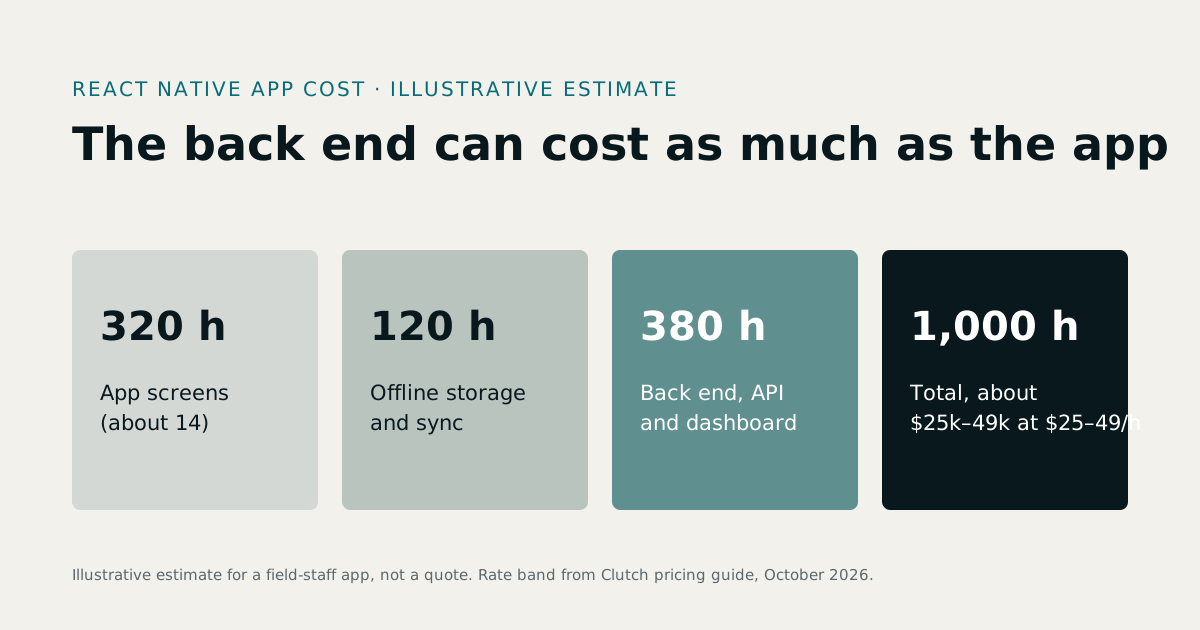
We do not quote a figure in this article. A number without a defined scope is a guess, and a guess is no use to a budget holder. What we can give you is what moves cost and time, and how to get a real number.
Start with the software development cost calculator for a first estimate. For rate context, see software development rates. ERP development cost explains what a custom ERP really costs.
Timing follows the same drivers as cost. A single read-only screen over existing endpoints takes far less time than a multi-role app with offline sync and three integrations. Your endpoint audit tells you where in that range you sit.
Treevoxa agrees a written scope, a fixed price and a launch date before work starts. You know what is being built, what it costs and when it ships before any code is written.
What drives the cost up or down?
When you turn a web app into a mobile app, the same six drivers apply. Check these first:
- API coverage. How many of the phone tasks already have endpoints?
- User roles. Each role changes what the screens show and what the API allows.
- Offline support. Sync is among the hardest parts to build and test.
- Data volume. Large catalogues or long histories need paging and careful caching.
- Integrations. Each other system the app reads from or writes to adds work.
- Design needs. A plain internal tool costs less than a branded, customer-facing app.
React Native helps on the build side. One code base serves both platforms, so you are not paying for two separate native apps.
If your web system is built in React, see React development. Validation rules, API client code and type definitions can often be shared with the React Native app. That removes a second round of the same work.
What should a first release cover?
Pick one module or task set for version one. Stock checks, job updates or delivery sign-off are good candidates: they are frequent, clearly defined and easy to measure.
Hold everything else for later phases. A first release that does three things well tells you more than a broad one that is half-finished.
Agree four things before work starts: the scope, the fixed price, the launch date and who owns what at handover. Treevoxa's position is that you own the code and the accounts, including the app store and cloud accounts.
6Should you build a custom app or use your ERP vendor's?
A custom-built system has no vendor SDK to extend, so the mobile architecture starts from the API. There is no ready-made mobile framework to lean on, which is why the endpoint audit comes first.
A packaged ERP may come with its own mobile app. That helps, but the vendor's app is limited to what the vendor has built, and changes depend on the vendor's roadmap. A custom app is limited to what you specify.
If your business runs Odoo, see Odoo development before you decide. The trade-offs depend on how far the Odoo system has already been customised. For the wider comparison, read custom ERP vs off-the-shelf ERP for small business.
7How do you handle logins, offline use and conflicting edits?
These three problems need a decision before design starts. Here is how we approach each.
Can users log in with their existing website accounts?
Both apps should use the same backend API and the same user accounts. One login means one set of permissions. Often yes, if the accounts and their permissions were designed for it. If customers and staff sit in two separate login systems, merging them is a design job to finish before the app is built.
A common pattern is OAuth 2.0 with refresh tokens. The app holds a short-lived access token and a longer-lived refresh token, so staff stay signed in without a password stored on the phone.
Three things need design:
- Where tokens sit on the device. Use the phone's secure storage, not a plain file.
- How to sign out a lost phone remotely.
- How role-based permissions carry across both apps, so a driver sees only their own deliveries on the web and on the phone.
How does offline sync handle conflicting edits?
Yes, a mobile app can work offline and sync changes later, but only for the tasks you choose. Start by deciding which tasks must work with no signal. A stock count in a steel-racked warehouse may need it. An approval may not. Design offline sync only for the tasks that need it, because sync is the hardest part to get right.
Then set conflict rules by record type:
- Low-risk fields, such as a customer's phone number, take the latest edit.
- Orders and stock need a version check. The server rejects an update if the record changed after the device last read it, and the user sees both versions.
Imagine a driver in Thornhill who marks a delivery complete at 2 pm while offline. At 2:10 pm, the office changes that order's delivery address. When the phone reconnects, the server sees that the order changed after the driver last read it.
The completion is not silently overwritten or dropped. The app holds it and flags the conflict. A dispatcher sees both changes and confirms the right one. Because the rule was agreed before build, the driver and the dispatcher both know what will happen.
8How do you roll it out without stopping the business?
Roll out in stages, not all at once.
- Start with one module. Use only the task set chosen for version one.
- Choose a pilot team. Pick a small group who use the process daily and will say plainly what breaks.
- Run old and new side by side for a period agreed in advance. Two weeks is an example. The client sets the period, and seasonal work may need longer.
- Keep a rollback plan. Keep the old form or process available, with a named person who can switch back within a day.
A staged rollout suits small and mid-sized firms. A failed pilot affects one team, not the whole operation, and you get real usage data before you fund the next phase.
9What should you check before you hire a partner?
Whoever builds the app will work with your ERP's API and your staff every day. Check these points before you sign.
| What to check | What good looks like |
|---|---|
| Written scope | A document listing the modules, screens, endpoints and user roles included, and what is excluded |
| Fixed price | One agreed figure for the scoped work, with the scope and price fixed in writing before work starts |
| Launch date | A date agreed before work starts, tied to the agreed scope |
| Code and account ownership | You own the source code, app store accounts and cloud accounts from handover |
| One team for software, design and cloud | One partner handles the API, the app, the design and the hosting, so nothing falls between suppliers |
| API documentation | Written endpoints, authentication rules and error codes, delivered with the project |
| Named technical lead | One engineer is accountable for the architecture and answers your questions |
For more on vetting suppliers, read how to choose a custom software development company. Treevoxa has offices in Toronto, Thornhill, London and New York. If you want to talk through your system, contact Treevoxa.
10Where should you start?
If you are working out how to add a mobile app to an existing ERP or web system, start with the endpoint audit. The task list, the endpoints behind it and the record-ownership decisions are inputs any partner will need, and you can write them yourself. Once they exist, you will know which integration route fits your system and whether adding a mobile app is a small change or a larger build.