
MatrixHR is attendance software for ZKTeco terminals that does not stop at attendance. Your ZKTeco terminals push punches straight into MatrixHR, where they sit next to browser clock-ins and feed attendance. Approved attendance and unpaid leave then flow into the monthly payroll run, which a second person must approve before payslips and the bank file are produced.
Most companies already have a ZKTeco machine on the wall. The problem is what happens after it: someone exports the punches, cleans them in Excel and types the result into payroll. Every copy is a chance for an error.
How ZKTeco punches reach MatrixHR
ZKTeco terminals push their punches to MatrixHR as they happen, so there is no export file and no USB stick. Device credentials are stored encrypted. Staff who work remotely, travel or sit in another office can clock in from a browser instead, and both sources land in the same attendance record for each employee.
Because the punches arrive by themselves, the attendance screen is current during the month, not only at month-end. HR can spot a missing punch on the day it happens, while people still remember why.
From attendance to the payroll run
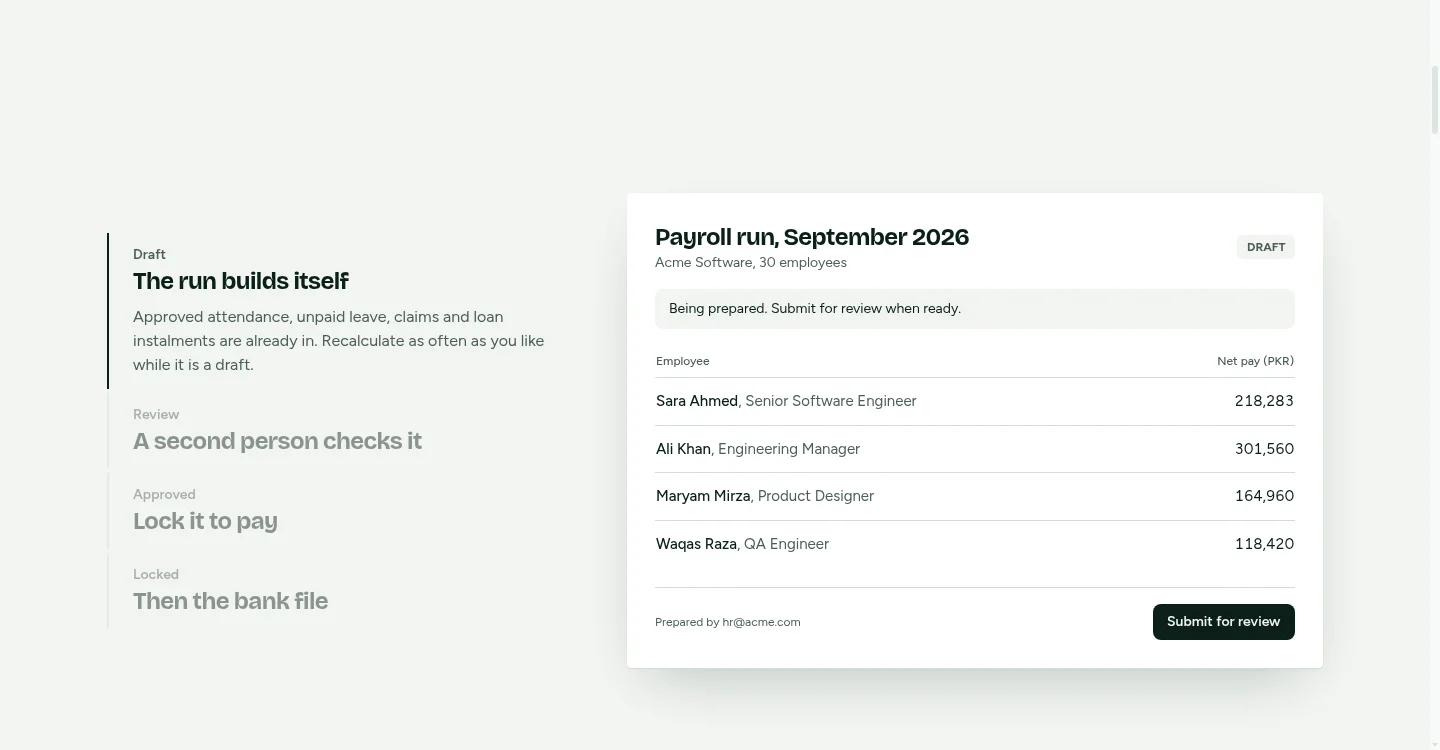
At month-end, nobody copies attendance into payroll. The run builds itself:
- Draft. Approved attendance, unpaid leave, expense claims and loan instalments are already in. Recalculate as often as you like.
- Review. A second person checks the numbers. MatrixHR will not let whoever prepared the run approve it.
- Approved. The run is locked, every payslip is generated as a PDF and archived.
- Paid. Export the bank file for Meezan, HBL or a generic format. Employees with an invalid IBAN are left out and listed, and the QuickBooks journal balances before you download it.
The reasoning behind the second approver is in our guide to payroll approval controls.
Leave, claims and loans in the same run
Attendance is only one input. In MatrixHR, leave is requested in the app and managers approve it from WhatsApp with a one-time code that expires within 24 hours. Expense claims are filed by category, approved and reimbursed in the next run, and loan instalments are recovered by payroll until the balance is zero. Each of these is a module that feeds the run, so a number is typed once.
Tax, EOBI and provident fund
Payroll runs include income tax, EOBI and provident fund. The slabs and rates live in a rule set that is versioned by effective date, so a new budget applies from the day it starts without rewriting past months. Check the current rates with your tax advisor before your first live run. To see what the 2026-27 slabs mean for one salary, try the salary calculator for Pakistan.
Before you connect: agree your attendance rules
The terminal records when someone punched. What that punch means for pay is a company policy, and it is worth writing down before you switch on any attendance software:
- What time counts as late, and how many late days become a deduction?
- When does a short day become a half day?
- How is overtime approved, and at what rate is it paid?
- How are night shifts that cross midnight handled?
- Who can correct a missed punch, and is the correction logged?
Agree these with management first, then check during your trial how each one maps to MatrixHR.
Which plan you need
Attendance with web clock-in and biometric terminals is part of the Starter plan, $25 a month for up to 25 employees. Payroll, payslips and bank files need the Growth plan, $69 a month for up to 100 employees. The Business plan, $149 a month, covers up to 300 employees and $0.50 for each one after that. Every plan starts with a 30-day free trial with 100 AI credits. Companies in Pakistan are billed in rupees and everyone else in US dollars, by bank transfer.
Setting up attendance software for ZKTeco
- Create your company and choose a subdomain. You start on the Growth plan for 30 days.
- Import your employee list from one file.
- Connect your ZKTeco terminals so punches start arriving.
- Run a draft payroll against last month's numbers and compare it with what you actually paid.
If you also run a gym, FitZone Pro uses ZKTeco machines at the door to check member fees. See ZKTeco gym software.