
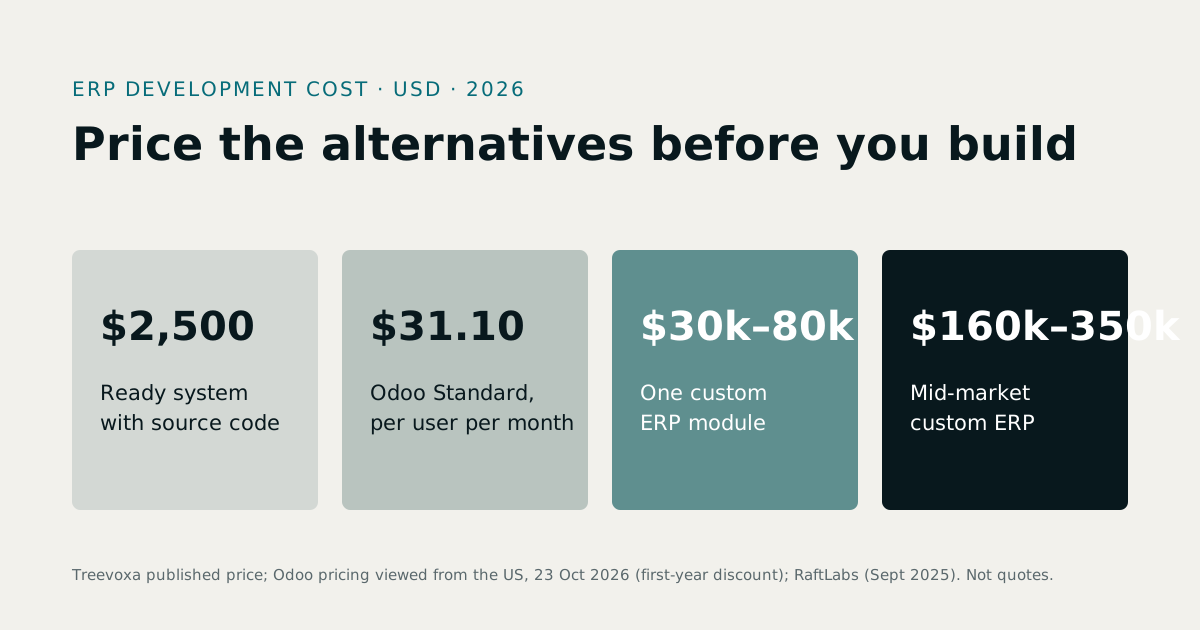
Custom ERP vs off-the-shelf ERP for small business: the short answer is to buy first if your processes are standard. Build only when the way you work is what makes you money and off-the-shelf software can't model it. If you do build, custom ERP development should start with one module, not the whole company.
This guide gives a verdict by headcount, a five-year cost table you can check against your own numbers, and the ownership and exit questions most comparisons skip. Prices are taken from the 2026 sources linked below, as listed on 26 October 2026. Vendors change prices often, so confirm before you sign.
1Custom ERP vs off-the-shelf ERP for a small business: which wins?
Off-the-shelf ERP is software a vendor has already built, sold as a packaged licence or a cloud subscription (SaaS). You configure it and adapt your processes to it. Custom ERP is software written for your business, so it follows your workflows, approval rules and reports.
| Off-the-shelf (packaged or SaaS) | Custom ERP | |
|---|---|---|
| Fit | Good for standard accounting, stock, sales | Exact, if the specification is right |
| Time to go live | Weeks to a few months | Months for a first module |
| Upfront cost | Low: subscription plus implementation | High: the build |
| Five-year cost | Grows with users and price rises | Front-loaded, then hosting and maintenance |
| Customisation limits | Set by the vendor; heavy changes get costly | Few limits, but every change is built and billed |
| Upgrades | Automatic in SaaS, but customisations can break | You decide when and what |
| Integrations | Ready connectors, sometimes paid extras | Built to order; any system with an API |
| Lock-in | To the vendor's price, roadmap and export tools | To the developer, unless you hold code and documentation |
| Support | Vendor or reseller | Developer or your own team |
Headcount changes the answer. One caution first: ERP users are not the same as staff. A 40-person factory may only have 12 people who log in. The bands below use staff numbers, and the checklist at the end uses users.
- Under 10 staff. Buy. A custom build rarely pays back at this size. A simple packaged system, or even disciplined spreadsheets, will do. The exception is a regulated or unusual process you can't run any other way.
- 10 to 49 staff. This is the contested zone. Buy if your processes are standard. If one or two workflows don't fit, look at the middle route (Odoo, ERPNext or a ready-made system with source code) before a blank-sheet build.
- 50+ staff. Custom becomes a serious option, but mainly on fit, not price. Spreadsheet workarounds start costing real hours, and you may want to own the system. As the cost table below shows, a cheaper packaged or open-source route can still beat a build on money alone. In practice you'd build the module that hurts and keep packaged software for the rest.
2How much does each cost over five years?
The upfront price is the wrong number to compare. Five-year cost is the right one, because subscriptions repeat and builds don't. Custom ERP cost is front-loaded, while off-the-shelf ERP cost keeps arriving every month.
Current public figures, as listed in 2026:
- Cloud ERP entry subscriptions commonly run $30 to $150 per user per month. Implementation for a small business is typically about 0.5x to 2x the first-year subscription (ERP Research).
- NetSuite is about $999 a month base plus about $99 per user (ERP Research). At 10 users that is roughly $1,989 a month. At 50 users it is roughly $5,949 a month.
- Odoo starts from $24.90 per user per month. ERPNext is free if you self-host, or about $50 per user per month hosted (ERP Research comparison).
- Enterprise-grade systems can exceed $300 to $400 per user (ERP Research).
You will see claims such as "$100k to $400k for custom against $1k to $100k packaged" (CCBD). That is an unsourced vendor claim with no visible method behind it, so we don't rely on it.
Here is a worked model in USD. These are planning assumptions, not quotes.
Assumptions
- Packaged cloud ERP: $60 per user per month, a 7% annual price rise, implementation equal to one year's subscription, plus a one-off allowance for training and integrations ($3,000, $6,000 and $10,000 at 10, 25 and 50 users).
- Middle route (Odoo): the $24.90 entry price per user per month with the same 7% rise, plus implementation and customisation by a partner ($10,000, $20,000 and $35,000). This assumes a vendor-hosted subscription and leaves out self-hosting costs. The entry tier may not include every app a real business needs, so treat this line as a floor.
- Custom build: build cost of $40,000, $70,000 and $110,000 for a first-phase scope of core modules. Hosting is $150, $300 and $500 a month. Maintenance and changes run at 20% of the build cost a year.
The 7% rise, the allowances, the partner fees and every custom figure are our own planning assumptions. None is a published price or a quote. For real build figures, see our development rates and product pricing.
| Route | 10 users | 25 users | 50 users |
|---|---|---|---|
| Packaged cloud ERP | about $52,000 | about $128,000 | about $253,000 |
| Odoo with a partner | about $27,000 | about $63,000 | about $121,000 |
| Custom build | about $89,000 | about $158,000 | about $250,000 |
Totals over five years, rounded.
What the table shows:
- At 10 users, custom costs the most, about $37,000 more than packaged. That is why we say buy first.
- At 25 users, custom is still dearer than packaged on paper, about $30,000 more, so the gap is somewhat narrower.
- At 50 users, per-user fees catch up and custom roughly matches packaged cloud ERP. It still costs about twice the Odoo line. At that size the case for custom rests on fit and ownership, not on cost.
- The middle route is cheapest throughout, if your needs sit inside what Odoo does without heavy bespoke work.
The table leaves out the cost of a poor fit. If staff spend a day a week on spreadsheet workarounds, that is a real cost no licence line shows.
For GBP, AED, AUD or SGD budgets, convert at the current rate. Exchange rates move, so treat any conversion as approximate. To model your own scope, use the software cost calculator. For a deeper breakdown, read ERP development cost in 2026 or browse all our guides.
What hidden costs catch small businesses out?
Off-the-shelf:
- Per-user ERP licences. Every new hire who needs access adds to the bill, and annual price rises compound. The table above assumes 7% a year. That is our assumption, so ask for the renewal cap in writing.
- Paid modules and connectors. The headline price often covers the core only.
- Implementation and data migration. Cleaning and loading old data takes longer than anyone budgets for.
- Paying twice. Customisations can break on upgrade, so you pay to build them and again to fix them (SitePoint).
- Training and your own time. Someone on your team will spend weeks on this.
Custom:
- Change requests. A spec is never perfect, and the first months of use will show gaps.
- Hosting and maintenance. Both continue after launch.
- Key-person dependence. If one developer holds all the knowledge, you carry that risk (BDC raises the same warning).
3How long does each route take to implement?
ERP implementation time is shorter for packaged software. Off-the-shelf systems typically go live in weeks to a few months. A custom build takes months for a first module.
Staff training time and how quickly your own people make decisions stretch either route. If speed matters most, buy. If you build, a single first module gets you into real use sooner than a whole-company project.
4When is off-the-shelf ERP enough?
More often than agencies selling custom work admit. If most of these are true, buy:
| Condition | Why it points to buying |
|---|---|
| Accounting, stock and sales follow standard patterns | Packaged systems already do this well |
| Up to about 25 ERP users | In the cost table, custom is dearer than packaged at 10 and 25 users |
| No unusual approval or costing rules | Nothing to customise |
| You need to go live within weeks | A build can't match that speed |
| You're leaving spreadsheets or basic accounting software | Any structured system is a big gain |
| No one on your team can own a software project | Vendor support is the safer fit |
If you're moving off spreadsheets, you may only need packaged software, not a full ERP. For the wider build-or-buy test, software consulting can pressure-test your requirements before you spend anything. Our guide on custom software vs SaaS covers the same choice beyond ERP.
5When does off-the-shelf ERP stop working?
It stops working when the cost of bending packaged software to your process exceeds the cost of fitting software to it. This is a trade-off, not an impossibility. Odoo and ERPNext both handle lots and expiry dates, and Odoo offers FEFO removal strategies and FIFO costing. The trouble starts when your rules are stricter than the standard modules, and the configuration work gets heavy.
Typical triggers:
- Batch and expiry rules. A pharmacy must sell the earliest-expiring batch first. Standard modules can track batches and expiry. Strict local rules and a fast pharmacy counter flow usually need heavy configuration or custom work. See PharmaFlow pharmacy POS for how a purpose-built system handles it.
- Batch costing in a factory. If each production batch has its own cost and stock must be consumed oldest-first, batch-level costing tied to production orders takes real setup in a general ERP. See Batchbook manufacturing ERP.
- Instalment schedules. A property developer selling units on payment plans needs schedules, penalties, reminders and collections tied to each unit. Standard sales and invoicing modules can be stretched to do this, but rarely cleanly. See RE-ERP.
- Biometric attendance feeding fees or payroll. Turnstile and fingerprint events need to flow into membership status or pay. Packaged systems often need an expensive bridge. See ZKTeco gym software and ZKTeco attendance to payroll.
- Approvals that don't match the vendor's workflow. If sign-off depends on amount, branch and role in ways the system can't express, people work around it.
- Repeated spreadsheet workarounds. If staff export data every week to fix what the ERP can't do, the software has stopped fitting.
- Per-user fees that outgrow a build. In the cost table, this crossover with packaged cloud ERP arrives around 50 users. It does not arrive against Odoo.
One trigger is a prompt to look at the middle route. Several at once is a sign to build, or to start from a ready-made system.
6Is Odoo or ERPNext a middle route?
Yes, and for many small businesses it is the best one. Both have wide module coverage and much lower licence costs than commercial SaaS.
The main differences are price and support model:
- Odoo starts from $24.90 per user per month and has a large partner network. Typical total costs run from about $10,000 to $80,000, according to ERP Research. The entry price may not cover every app or hosting option you need.
- ERPNext is free to self-host, or about $50 per user per month hosted. Typical total costs run from $0 to $30,000, on the same source.
The licence is cheap, but the work isn't free. Customisation, hosting, upgrades and a partner who understands your business all cost money. Heavy customisation of either system brings back the upgrade problem, because your changes must be re-tested against each new release.
Odoo and ERPNext fit when you need standard modules plus modest tailoring. They get expensive when your core process, such as strict batch costing or instalment collections, needs deep changes to modules built for something more general. For a closer comparison, see custom ERP vs Odoo vs ERPNext. If you choose Odoo, Odoo development covers the tailoring.
What about a ready-made system with source code?
This is the third route that comparison pages usually skip. You start from a system already running real businesses, receive the full source code, and change only what differs for you.
The trade-offs are plain:
- Less blank-sheet freedom. The core data model is already decided.
- Much faster and cheaper than building from zero, because the hard, tested parts exist.
- You own the code. There is no per-user licence and no vendor who can raise the price.
It suits businesses whose industry is well served, such as pharmacy, manufacturing, gyms, HR or real estate, but whose details differ a little. See ready-made software with source code and our ready-made systems.
7Who owns the code and the data?
Ownership is where small businesses get hurt, in both directions.
Packaged ERP: you rent access. Data export quality varies, the vendor can raise prices, and a product can be retired. Check what you can take out before you put data in.
Custom ERP: you own only what the contract says you own. Get it in writing.
| Check | Packaged / SaaS | Custom build |
|---|---|---|
| Who owns the software | Vendor | You, if the contract says so |
| Source code delivered | No | Yes, in a repository in your name |
| Data export | Ask for a test export before signing | Full database access and a documented schema |
| Deployment documented | Not applicable | Yes, so another developer can host it |
| Price-change protection | Check the term and renewal clause | Not applicable |
| Exit plan | Notice period and export format | Handover period and documentation |
| Third-party licences | Included | Listed, with who pays |
What if my developer disappears? If you hold the source code, the deployment notes and the database, any competent developer can take over. It may cost a few weeks of onboarding, but it isn't a rebuild. If you hold none of those, you're locked in as tightly as with the worst SaaS vendor. Ask for the repository in your name from the first week, not at the end.
8How do you cut the risk of a custom build?
Most failed builds fail because the buyer committed to a large, vague scope before seeing anything work. Reduce the risk in these ways:
- See a working demo before you commit. A developer who has built something similar can show it.
- Build one module first. Pick sales, inventory or HR, whichever hurts most. Use it for a few weeks before you fund the next.
- Write the specification down. Include the odd cases, such as returns, part payments and expired stock.
- Use fixed phases with acceptance tests. Each phase ends with checks you wrote, not a verbal "it's done".
- Ask for weekly releases. You see progress, and problems surface early. Our guide to software development methodologies covers delivery methods in more detail.
- Put an exit clause in the contract. It should cover handover of code, documentation and data at any phase.
If you aren't sure how to scope it, software consulting can produce the specification before you commit to a build.
9Can you start with off-the-shelf ERP and move to custom later?
Yes, and it's often the safest way. Buy or build the one module that hurts most, connect it to the rest by API, and add modules as headcount and complexity grow.
The risk is a rebuild later. Avoid it by doing three things from day one:
- Keep your data clean. Consistent product codes, customer records and units will outlive any software choice.
- Insist on open APIs. Whatever you buy or build should let other systems read and write data. API development is how modules are joined later.
- Own your data model. Know what your records look like and be able to export them in full.
A first module, such as a web application for stock or sales, is a sound use of MVP development. It gives you a small, working piece to judge in real use before you fund the rest.
Moving from packaged to custom later is realistic if you've kept the data clean, and so is moving the other way. Neither is a trap if the exports work.
10Which should you choose? A decision checklist
Score each line 0, 1 or 2, then add up.
| Question | 0 | 1 | 2 |
|---|---|---|---|
| How standard are your processes? | Fully standard | A few exceptions | Core process is unusual |
| ERP users now and in two years? | Under 10 | 10 to 49 | 50 or more |
| Industry rules (batches, expiry, instalments, biometric)? | None | One or two | Central to the business |
| Integrations needed? | None or common ones | A few | Many, or with devices and custom systems |
| Budget for year one? | Tight | Moderate | Can fund a first module |
| Time to go live? | Within weeks | A few months | Can wait for the right fit |
| Comfortable owning code and a developer relationship? | No | With support | Yes |
0 to 4: buy off-the-shelf. Choose packaged or SaaS ERP and spend your effort on clean data and good implementation.
5 to 9: take the middle route. Look at Odoo, ERPNext or a ready-made system with source code. Customise only what truly differs.
10 to 14: build, but in stages. Start with one module, see a working demo first, and keep the code and data in your name.
A score near a boundary means one assumption is deciding the result. Test that one, usually the number of users or how unusual your core process really is, before you spend.
11The bottom line on custom ERP vs off-the-shelf ERP
For most small businesses, off-the-shelf ERP is the right first step, and Odoo or ERPNext is the usual middle ground. Custom ERP earns its place when your core process is unusual, your user count is high enough for per-user fees to bite, and you are ready to own the code. Whichever route you pick, start with the module that hurts most and keep your data and exports in your own hands.