
Choosing between React Native vs Flutter for a small business app? Either framework will do the job for most small business apps. React Native is usually the safer pick because it is easier to maintain, hire for and hand over. Treevoxa usually recommends it, and our React Native app development team will also tell you when Flutter is the better tool. This guide names those cases so you can judge the advice for yourself.
Updated October 2026
1React Native vs Flutter for a small business app: which wins?
For a booking, ordering, loyalty or staff app, both frameworks are mature and both will ship a good result. The decision rarely turns on technology. It turns on who will maintain the app in three years and how easily you can find someone to do it.
Both are tools for cross-platform app development. That means one code base produces both the iPhone app and the Android app. You pay for one build instead of two, and a new feature arrives on both phones together. So no, you do not need two separate apps for iOS and Android.
| Factor | React Native | Flutter | Our view |
|---|---|---|---|
| Cost to build | Similar | Similar | The framework is not the main cost driver |
| Speed to first release | Fast | Fast | A tie for typical business apps |
| Look and feel | Uses the phone's own components | Draws its own, identical on every phone | Flutter wins on custom, brand-led design |
| Hiring and handover | Wide pool (JavaScript/TypeScript) | Narrower pool (Dart) | React Native is safer |
| Long-term risk | Low | Low | Both are backed by large companies and widely used |
If you are unsure, start with React Native.
2What is the real difference between the two?
React Native uses JavaScript and TypeScript, the same languages behind most websites. You write the app logic in those languages, and the screen is built from the phone's real buttons, lists and text fields. An iPhone user sees an iPhone-style control and an Android user sees an Android one.
Flutter uses Dart, a language created by Google. It does not use the phone's own controls. It draws every button, list and animation itself with its own rendering engine (Impeller, in current releases). The app looks identical on every device, which is a real advantage if you care about that.
Neither is better in the abstract. React Native borrows the phone's look and a widely known language. Flutter gives you control of every pixel and asks you to use its language.
Version numbers move quickly. Check reactnative.dev and docs.flutter.dev for the current releases when you brief a developer, and ask your agency which versions it plans to build on.
3Is Flutter faster than React Native?
On animation-heavy screens, Flutter can feel smoother. It controls every frame itself, so complex transitions, custom charts and game-like interfaces are its home ground.
For the screens most small businesses need, users will not notice a difference. Think of forms, lists, bookings, orders, dashboards and profile pages. That is the honest summary of Flutter vs React Native performance for business apps.
What about the "bridge bugs" argument?
Some older comparisons still say React Native is slower or buggier because of its "bridge". The bridge was the old way React Native's JavaScript talked to the phone's native code. It passed messages back and forth asynchronously, and under heavy load it could become a bottleneck.
That argument is out of date. React Native's New Architecture replaced the old bridge with a more direct connection between JavaScript and native code, and the Hermes JavaScript engine runs the code. Recent releases use this by default, but confirm the details for the version you will build on at reactnative.dev. Any claim that React Native is costlier to maintain because of bridge bugs describes the framework as it used to be.
Why would my app be slow, then?
In our experience, a slow business app is rarely slow because of the framework. The usual causes are:
- A slow API that takes two seconds to answer a simple request.
- Huge, uncompressed images, especially product photos and logos.
- Loading all the data at once instead of a page at a time.
- Cheap hosting for the backend.
Fix those first. Changing framework will not fix any of them.
4Which costs less to build and run?
They cost about the same to build. Any agency that tells you one framework halves your bill is selling something. Almost everything else on the list below moves the price more.
Here is what drives small business mobile app cost:
| Cost driver | Why it matters |
|---|---|
| Number of screens | Each screen needs design, build and testing. Ten screens and forty screens are different projects. |
| Backend and API | The app needs somewhere to store and fetch data. See the next section. |
| Admin panel | Your team needs to manage members, orders or staff without calling a developer. |
| Integrations | Payments, WhatsApp, email, SMS, accounting software, biometric devices. Each one takes time. |
| Design | A clean standard interface costs less than a fully custom one. |
| App store fees | Apple charges an annual developer programme fee and Google charges a one-off registration fee. Check the current amounts on Apple's and Google's official pages before you pay. |
| Testing | Both platforms, several screen sizes, several OS versions. |
| Maintenance | Apple and Google release new OS versions every year and raise their requirements for new submissions. Apps need updates to keep working and stay listed. |
Budget for a modest yearly maintenance amount as well as the launch.
For numbers, use our own pages. Our software development rates page explains how we price, and the software cost calculator gives you a rough figure from your own feature list. For a worked estimate, read our React Native app development cost guide.
5How much of the cost is the backend?
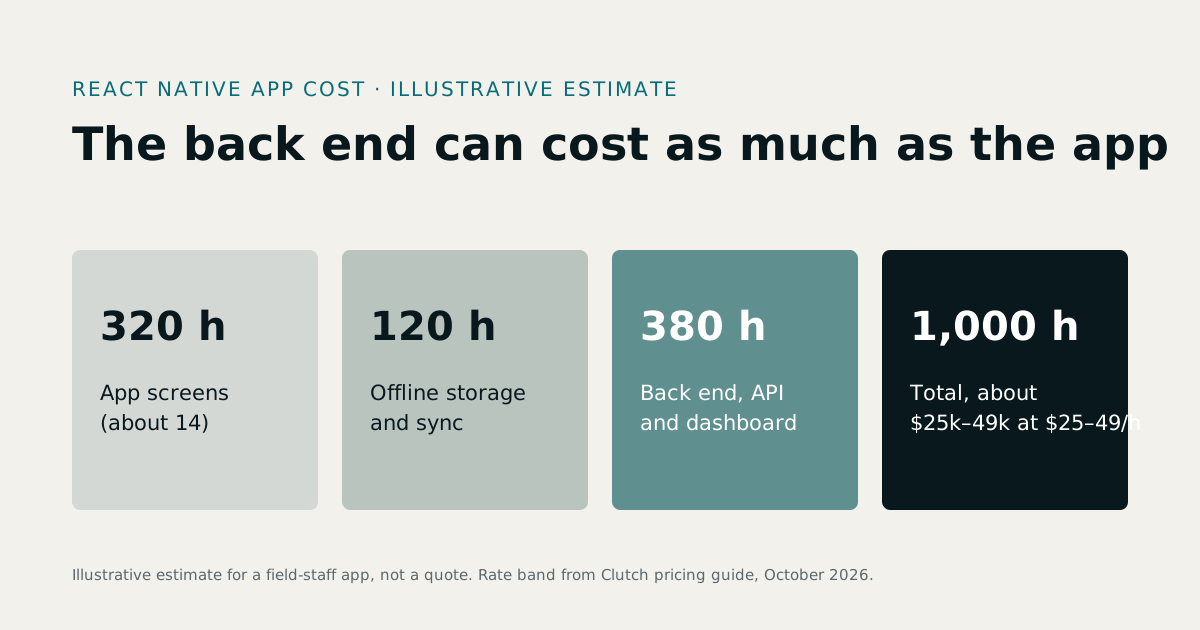
Often a large share, and sometimes as much as the app itself. This is the part most comparison articles skip.
The app on the phone is only what you see. Behind it sits a second piece of software that does the real work:
- An API that the app calls to read and save data.
- A database that stores members, orders, bookings or attendance records.
- User logins, password resets and permissions.
- An admin panel where your staff manage everything.
- Push notifications and any scheduled messages.
If you already run a system, such as a gym management package or a pharmacy POS, the app may only need to connect to it. The same goes for an existing website or API: the app can talk to it, provided it exposes the data the app needs. If you have no system, the backend is a project of its own.
That is why the backend must be planned first. It decides what the app can show, how fast it loads and how easy it is to change later. It is also the part that survives a change of framework.
Treevoxa builds both sides, so you get one team and one plan. Our API development work covers the backend, and the app is built to match it.
6Which is easier to hire for and hand over?
This is the risk that matters most to a small firm with no in-house developers. What if your developer leaves, your agency closes, or you simply want someone else to take over?
React Native has the advantage. JavaScript and TypeScript are among the most widely used languages in software, and the skills overlap with website and web app work. A developer who builds your website can often read and fix the app.
Dart developers exist, and many are excellent. In many markets the pool is narrower, so replacing one takes longer and can cost more.
We do not quote market-share figures. The numbers you see online disagree because each source measures something different, and many do not say what. If you want a usage figure you can trust, use the annual Stack Overflow Developer Survey and read how it defines "used" before you quote it.
How do you protect yourself if your developer leaves?
Whatever you choose, these rules matter more than the framework:
- Own the source code. It should sit in a repository in your company's name, not on a developer's personal account.
- Own your store accounts. Register the Apple and Google developer accounts yourself and add the agency as a team member, not the other way round.
- Get documentation. A short written guide on how to build, release and update the app.
- Keep the backend separate and documented. That makes any future developer's job much easier.
If you would rather buy a finished product than build from scratch, see our page on ready-made software with source code. If you want an ongoing team rather than a one-off project, look at our hire developers page.
7Which fits your app? Four worked examples
The real decision points are offline use and device access: camera, QR scanning, biometrics, location and notifications. Both frameworks handle all of them. What differs is how much custom design you need and who will maintain the result.
| App type | Key needs | Pick | Reason |
|---|---|---|---|
| Gym member app | QR check-in, class bookings, dues and payments, notifications | React Native | Standard screens and forms, easy to extend |
| Pharmacy order and refill app | Product search, repeat orders, order tracking, optional prescription upload | React Native | Camera and forms, tied to a stock system |
| Staff attendance and leave app | Clock in/out, location check, leave requests, payslips | React Native | Simple screens, connects to an HR system |
| Field-sales order app | Offline order capture, product catalogue, sync when back online | Either | Offline design matters more than the framework |
Gym member app
Members want to check in, book a class and see what they owe. These are standard screens, and the heavy lifting happens in the backend. Our FitZone Pro gym management software already handles members, billing and access, so an app on top mostly needs to talk to it. React Native is the sensible pick.
Pharmacy order and refill app
Customers search for products, reorder regular items and track an order. If you add prescription photo upload, the camera is the only unusual feature, and both frameworks handle it. The harder part is connecting to stock and orders, which is where a system like PharmaFlow comes in. React Native again.
Prescription handling and personal health data carry local regulatory and privacy requirements in the UK, the US, the UAE and elsewhere. Settle those rules with your developer and, where needed, a legal adviser before you design that feature.
Staff attendance and leave app
Staff clock in, request leave and read payslips. The app is thin and the HR system does the work. A system such as MatrixHR already holds the records, so the app is mostly a window onto it. This is the clearest React Native case: simple screens, maintained by someone who probably also looks after your web side.
Field-sales order app with offline mode
Salespeople in areas with poor signal need to take orders and sync later. Both frameworks can store data on the phone and send it up when a connection returns. What decides success is how the app stores orders locally, handles conflicts when two people change the same record, and syncs safely. Plan that with your developer before choosing a tool. If your team already uses React or JavaScript, React Native wins on handover. If not, it is a tie.
8When is Flutter the better choice for a small business app?
Flutter is the right call in a few real situations:
- Animation-heavy or brand-led interfaces. If the look of the app is the product, with custom transitions, bespoke charts or a strongly branded design, Flutter's control over every pixel helps.
- A pixel-identical look on both platforms. Flutter does this by design. React Native deliberately follows each platform's own style.
- A team already working in Dart. If your developer or agency is strong in Flutter and you are happy with them, there is no reason to change.
- One code base across many surfaces. Flutter also targets web and desktop, which suits a product that wants the same interface on phone, tablet and desktop.
Treevoxa builds Flutter too, so this advice is not one-sided. If your brief fits the list above, our Flutter app development team will say so and build it in Flutter.
9Can you switch frameworks later?
Yes, but it means rebuilding the app layer, not a quick conversion. The screens, the on-phone logic and the framework-specific code would all be rewritten. Nobody can convert a React Native app into Flutter automatically and have it come out well.
The backend and API stay. That is why API-first design protects you. If the app talks to a clean, documented API, you can replace the app without touching your data, your admin panel or your business rules. Only the visible layer changes, so the choice is less permanent than it feels, provided the backend is built properly.
10Do you need a native app at all?
Sometimes neither framework is the right answer. An app earns its place when you need the camera, push notifications, offline use, biometrics or a spot on the customer's home screen. For many small businesses, none of those is essential.
A responsive web app, or a progressive web app (PWA), can cover a lot:
- A product catalogue or price list.
- A booking or enquiry form.
- A customer portal showing orders or invoices.
- A staff dashboard used on a desk or tablet.
These run in the phone's browser, need no app store, carry no store fees and update the moment you change them. Our web application development team builds them, and they often cost less than a mobile app.
If your goal is simply to show offers to customers, a WhatsApp offers page gives them a branded page they open from a message, with nothing to install.
If you do need a native app, the first release can be small. Launch with the two or three features that matter most, learn from real users, then add more. That is the idea behind MVP development, and on a small budget it is usually the wisest route.
11How do you decide? A checklist
Answer each question honestly, then count the ticks in each column.
| Question | If yes, lean towards |
|---|---|
| Does your business already have a website or web team using React or JavaScript? | React Native |
| Do you want the easiest possible handover to a new developer? | React Native |
| Do you expect to hire or replace developers in the next few years? | React Native |
| Do you want to reuse TypeScript logic, such as API calls and data types, in a React web app? | React Native |
| Is your budget tight and your first release small? | Either |
| Do you need heavy custom animation or a highly branded interface? | Flutter |
| Must the app look pixel-identical on iPhone and Android? | Flutter |
| Is your existing developer or agency strong in Dart and Flutter? | Flutter |
| Do you want one interface across phone, tablet and desktop? | Flutter |
| Does the app need to work offline? | Either (plan sync first) |
The web row needs a caveat. React Native shares logic with a React website, not the screens themselves. Flutter can run on the web, but it shares the interface by drawing it itself, which suits app-like products better than content sites.
Most small businesses tick mostly the first group and none of the Flutter rows. If that is you, the default stands. In the React Native vs Flutter for a small business app choice, if unsure, start with React Native.
Before you commit, it helps to have someone independent review the brief. Our software consulting and mobile app development pages describe what that review and the build involve.