
Getting ZKTeco attendance data to payroll software works as a chain. The device records punches, they reach your system by file, database read or push, rules turn them into paid hours, and someone approves the run before money moves. MatrixHR covers most of that chain. Its attendance and payroll modules work from the same employee record, so punches, leave, approvals, payslips and the bank file sit in one place. You can build the same chain from separate parts, but you then own the joins between them.
This guide walks through each link from punch to bank file, based on what we have seen building and running MatrixHR. Each connection method has its own failure points, and we say where.
1How does ZKTeco attendance data to payroll software work?
The chain has six steps:
- Device. An employee punches with a fingerprint, face or card. The device stores a log of user ID, date and time.
- ZKTeco software or direct push. Either ZKTeco's own software collects the logs, or the device pushes them straight to your HR system. Product names include BioTime, ZKBio Time, ZKTime.Net and ZKBio Time Cloud, depending on your licence.
- Import or sync. The punches arrive in the payroll system as a file, a database read or a live feed.
- Rules. Shift, grace, rounding, overtime and leave rules turn raw punches into paid hours.
- Approval. Exceptions are fixed, leave is approved, and a second person signs off the run.
- Pay. Payslips, a bank file and an accounting journal come out.
Many pages we have seen stop at step 3 and call the export "payroll-ready". The real work is in steps 4 and 5. A clean export of wrong punches is still wrong pay.
ZKTeco renames and re-versions its software from time to time. Check the current product name on your licence or on ZKTeco's own pages rather than trusting an older blog post, including this one.
2Does ZKTeco software do payroll on its own?
No. ZKTeco's software records and totals attendance: who punched, when, how late, how many hours. That is a timesheet, not payroll.
It does not do tax, social insurance or pension deductions, loans and advances, payslips, bank files or payroll approvals. Some of its reports can be formatted for payroll, but that is still an export you carry somewhere else.
The dividing line is simple. If the output is "hours per employee", you are in attendance reporting. If the output is "net pay per employee, approved, with a file for the bank", you are in payroll.
3Which connection method should you use?
There are four realistic routes for ZKTeco payroll integration. Pick by how many sites you have, how much payroll you run each month and how much control you need over who changed what.
- CSV by hand. Use the ZKTeco CSV export from your ZKTeco software, tidy it in Excel, then import or retype it into payroll. You can export ZKTeco attendance to Excel in a few clicks, but clear unmatched IDs and duplicates first or you carry the errors into pay.
- SQL bridge. A script or tool reads the ZKTeco database directly. In some versions, punches sit in tables with names like CheckInOut and UserInfo. Table names and layouts vary by version, so test against your own install.
- Cloud or ADMS push into an HR system. Devices send punches to a server over the internet as they happen.
- All-in-one HR and payroll. Attendance, leave, payroll and approvals live in one system fed by the devices.
Comparing the four ways to connect
| Method | Effort to set up | Error risk | Audit trail | Best fit |
|---|---|---|---|---|
| CSV by hand | Low to start, high every month | High: retyping, wrong date formats, stale files | Weak: files and spreadsheet edits | Under about 20 staff, one site, simple pay |
| SQL bridge | Medium: someone must write and maintain it | Medium: can break when software versions change; duplicates if re-run | Depends on what you build | In-house IT, or an existing payroll you must keep |
| Cloud or ADMS push | Medium: device settings, network, server | Medium: offline devices, firewalls, unsupported models | Good if the HR system logs edits | Several branches, devices you can't reach from the office |
| All-in-one HR and payroll | Medium: employee data, rules and devices set up once | Lower: one system, one employee record | Strong if edits, approvals and runs are logged | Teams that want fewer moving parts |
No option is zero-effort. CSV fails at the human step. The SQL bridge fails when the person who wrote it leaves. Push fails when a device loses its connection. An all-in-one system fails when your rules don't fit its settings. Choose the failure you can best manage.
How does ADMS push differ from pulling punches over the LAN?
With a pull, your software connects to the device on your local network and downloads the log. It suits a single site where the server can reach every device.
With ZKTeco ADMS push, the device is set to call a server address and send punches as they happen. It suits several branches, or devices on networks you can't reach from head office. That also answers the multi-branch question: push, or a central system that collects from each site, is how most multi-device setups work.
Three things go wrong with push:
- Not every model or firmware supports it. Check your exact model and firmware against ZKTeco's documentation before you plan around it.
- Firewalls and network changes. A router swap at one branch can silently stop that site reporting.
- Devices go offline. Most devices keep punches in memory and send them when the connection returns, but memory is finite and clocks keep drifting. We cover this below.
Pull has its own problem: downloading the same log twice. If your import can't recognise a punch it has already seen, you get duplicates and double overtime.
4How do you map device user IDs to employees?
ZKTeco device user ID mapping is the most common reason someone's pay comes out short. A device only knows "user 214". Payroll knows "Amira Hassan, employee E-0087". If nothing links them, the punches go nowhere.
Rules that work:
- One device ID per person, kept on the employee record. Don't reuse a number for a different employee.
- Handle leavers and rehires deliberately. A returning employee should get a new or clearly reactivated ID. Don't let old punches attach to the new contract by accident.
- No shared or temporary cards. If a card is lent to a cover worker, you have lost the audit trail.
- Flag, don't drop. Any punch with an unrecognised ID should land in a "needs attention" list. A silent drop is how people go unpaid for a month.
Before each pay run, the unmatched-punch count should be zero, or every item should have an owner.
5How do raw punches become paid hours?
The device gives you timestamps. Paid hours come from rules applied to them. This is the overtime and lateness calculation:
- Shift. The expected start, end and break for that person on that day.
- Grace period. How late still counts as "on time".
- Rounding. Whether 08:58 counts as 09:00, and how part-hours are treated.
- Late arrival and early leave. Whether they are deducted, and from which minute.
- Absence. No punches and no approved leave.
- Overtime. Time beyond the shift, usually paid only if approved.
- Unpaid time. Breaks, unpaid leave, suspensions.
Overtime rates are not universal. They come from law and from the contract. Never copy a multiplier from a blog post, ours included. Check the rules for where your staff work:
- UK: Working Time Regulations, National Minimum Wage rules and the employment contract.
- US: the federal Fair Labor Standards Act plus state rules, and whether the role is exempt or non-exempt.
- UAE: the Labour Law and Ministry of Human Resources and Emiratisation guidance.
- Australia: the National Employment Standards and the relevant modern award or agreement, via the Fair Work Ombudsman.
- Singapore: the Employment Act and Ministry of Manpower guidance.
Ask an adviser or the relevant authority, then set the result as a rule in the system.
A worked example: one week of punches to pay
These figures are illustrative. The rules used:
- Shift 09:00 to 18:00 with a one-hour unpaid lunch, so 8 paid hours.
- A 15-minute grace period. If an arrival is later than the grace, the full lateness is deducted, not just the minutes beyond it.
- Overtime counts only when a manager approves it.
- The overtime rate is applied afterwards, under your policy and local law.
| Day | Punches | What happened | Rule used | Worked regular hours | Other |
|---|---|---|---|---|---|
| Mon | In 08:56, out 18:02 | On time | Within grace; no approved overtime, so early and late minutes are not paid | 8h 00m | |
| Tue | In 09:25, out 18:00 | Late arrival | 25 minutes is over the 15-minute grace, so the full 25 minutes is deducted | 7h 35m | |
| Wed | In 09:00, no out-punch | Missing punch | Held in the exception queue; manager sets out time 18:00 with a reason | 8h 00m after fix | |
| Thu | In 08:58, out 20:00 | Overtime | Two hours past shift end, approved by manager | 8h 00m | 2h 00m overtime |
| Fri | No punches | Approved annual leave | Approved leave feeds the same calculation | 0h 00m | 8h 00m paid leave |
Weekly totals: 31h 35m worked regular hours, 8h 00m paid leave (39h 35m regular pay in total) and 2h 00m overtime, paid at whatever rate your rules set.
Look at Wednesday. Until a manager fixes it, the system should hold the day, not guess it. The fix carries a reason, and the log keeps both the original punches and the correction.
6What happens with missing punches, night shifts and clock drift?
These are the failure modes we see most. For each, the control follows the same idea: surface the problem, make a named person fix it with a reason, and log it.
| Failure mode | What goes wrong | Control |
|---|---|---|
| Forgotten out-punch | Day shows one punch, or a 24-hour shift | Exception queue; manager confirms the time and records why |
| Shift crossing midnight | In at 22:00, out at 06:00 next day, split across two dates | Assign punches to the shift's start date, not the calendar date |
| Rotating rosters | Day, evening and night shifts vary by week, so "late" is judged against the wrong shift | A roster per employee per date, matched before lateness is calculated |
| Duplicate downloads | Same punch imported twice, overtime doubled | Reject a punch with the same user, device and timestamp |
| ID mismatch | Punches belong to no one | Unmatched-punch list that must be cleared before the run |
| Clock drift | Device time is minutes or hours off, so people look late or early | Regular clock check against a known time; correct the device and flag affected punches |
| Time-zone mismatch | Server and device disagree, so every punch shifts by an hour or more | One time zone per site; test with a live punch after any change |
| Device offline for days | Punches missing, then arriving late in a batch | Last-sync date per device, checked before cut-off; reconnect and re-pull so nothing is lost |
One more point on offline devices. When a device has been disconnected for several days, don't assume a gap in punches means absence. Check the last-sync date per device first. Then look at how the late batch lands: its timestamps are real, but its arrival date isn't.
7How do leave and corrections get approved, including on WhatsApp?
Leave must feed the same calculation as punches. If leave lives in a separate spreadsheet, someone will pay for a day off or deduct a day of approved leave. Both mistakes are easy.
The harder part is speed. Managers are often on the floor or on site, not at a desk. In MatrixHR, a manager can approve leave requests and punch corrections from WhatsApp. They receive the request, reply to approve or reject, and the decision is logged against the request with who decided and when. Check the current approval options with us before you plan around them.
This matters for two reasons. Corrections get done before cut-off, not after the pay run is already in trouble. And "my manager said it was fine" becomes a record rather than a memory.
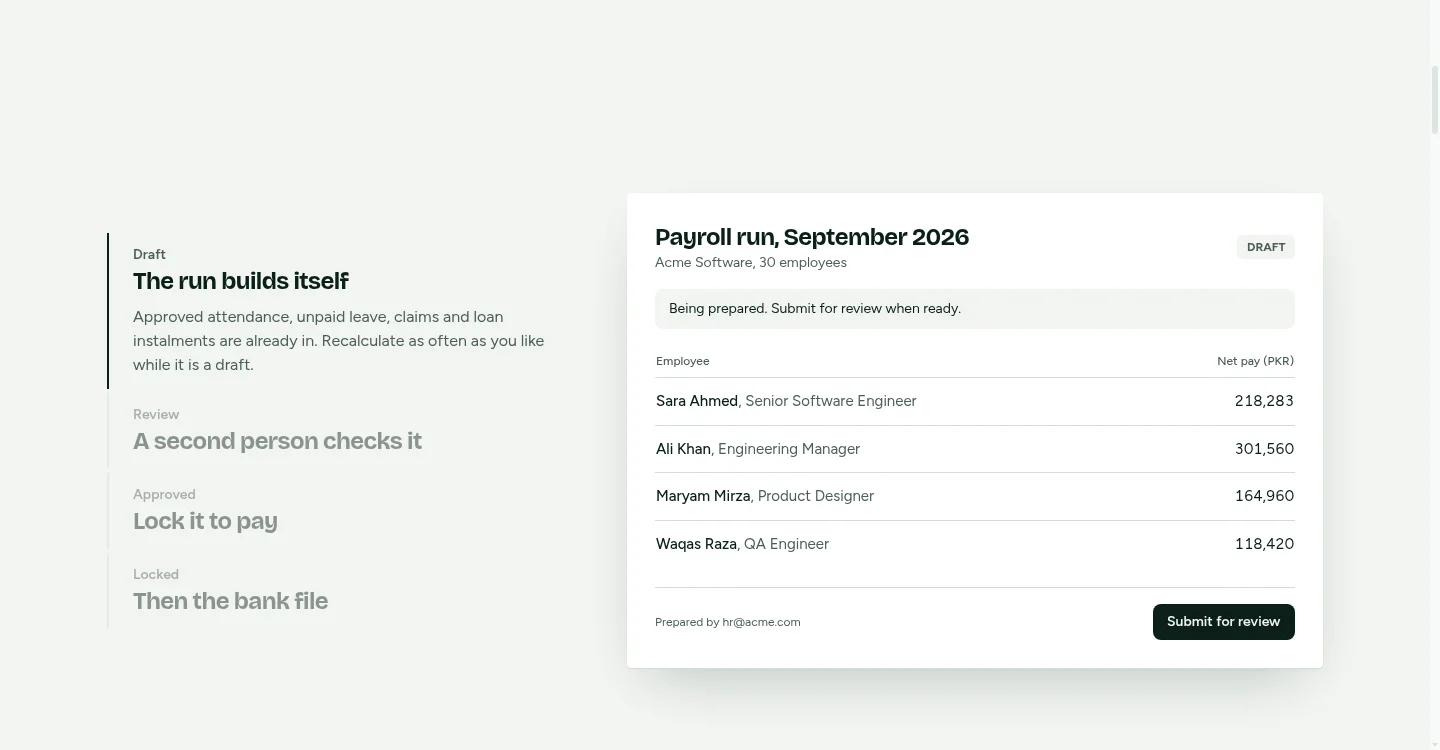
8Why should a second person approve the payroll run?
Whoever prepares the payroll should never be the one who approves it. Most attendance-to-payroll write-ups skip this control, and it is where the real money risk sits. Our guide to payroll approval controls goes deeper.
The risks are plain:
- Ghost employees. Someone adds a person who doesn't work there.
- Edited hours. Hours or overtime nudged up for a friend, or for oneself.
- Changed bank details. An account number swapped just before the file is produced.
A second approver who sees the totals, the exceptions and any bank detail changes since last month catches most of this. They don't need to re-check every line. They need to see what changed.
In a small business the second approver may be the owner. That is fine. The rule is about roles, not size.
9What comes out after the calculation?
Once the run is approved, three outputs matter:
- Payslips. One per employee, showing hours, additions, deductions and net pay.
- A bank file. The payment instruction your bank accepts, so you don't key each transfer by hand. Formats differ by bank and country, so confirm yours before your first live run.
- An accounting journal. The payroll cost posted to your books so finance isn't re-entering totals. MatrixHR produces a QuickBooks journal. If you use Xero, Sage or another tool, ask whether a journal for it is supported, or whether you would import a generic file.
Some countries add their own filing rules. In the UAE, for example, payments may go through the Wage Protection System using an SIF file. Check whether it applies to your business, and what the current file rules are, with the Ministry of Human Resources and Emiratisation or your bank.
10What does the full flow look like in MatrixHR?
Here is the chain as MatrixHR runs it:
- ZKTeco punches arrive from your devices. See ZKTeco attendance to payroll in MatrixHR for the connection options.
- Punches are matched to employees. Unmatched IDs and missing punches go to an exception list.
- Managers approve leave and corrections, including by WhatsApp.
- Rules turn punches and leave into paid hours.
- One person prepares the payroll run. A second person approves it.
- Payslips, the bank file and the QuickBooks journal are produced from the approved run.
The same device-to-system logic applies outside payroll. A gym uses it to tell who is on the door and who is on the books, which is how our ZKTeco gym software works.
11Pre-payroll cut-off checklist
Run through this before anyone prepares the payroll run:
| Check | Done when |
|---|---|
| All devices synced | Every device shows a last-sync date inside the pay period |
| No unmapped IDs | Unmatched-punch list is empty or each item has an owner |
| No duplicates | Same user, device and time appears once |
| Missing punches resolved | Every exception fixed with a reason, or held with a note |
| Leave approved | No pending requests inside the period |
| Overtime reviewed | Each overtime entry approved by a manager |
| Run prepared | Preparer has produced the run and signed off their part |
| Second approver signs | Someone other than the preparer has approved it |
| Files exported | Payslips, bank file and journal generated from the approved run |
A simple monthly close timeline for a month-end payday:
| Day | Task |
|---|---|
| Last working day minus 3 | Check device syncs and clocks; clear unmapped IDs |
| Minus 2 | Managers clear missing punches and approve overtime and leave |
| Minus 1 | Preparer builds the run; second approver reviews changes |
| Cut-off day | Approval, then export of payslips, bank file and journal |
| Pay day | Bank file submitted; payslips released |
Adjust the days to your own payday, but keep the order.
12Should you buy an all-in-one system or build a bridge?
It depends on how unusual your pay rules are and what you must keep.
A bridge or custom build suits you if you have an existing payroll you must keep, very unusual rules (complex allowances, union agreements, piece rates) or in-house IT who will maintain it. You get exactly what you ask for, and you own every join. If you are weighing that route, our software development rates page and the software cost calculator give a starting point on cost, and our HR software development team can build one where a bridge is the right answer. You can also browse our other guides on custom builds versus ready-made systems.
An all-in-one system suits you if your rules are fairly standard and you want fewer moving parts: one employee record, one audit trail, one place where punches, leave and pay meet. You accept its settings in exchange for not maintaining the glue.
Whichever route you take, the controls matter more than the tool: mapped IDs, an exception queue, logged corrections and a second approver. Get those right and ZKTeco attendance data to payroll software becomes something the pay run can trust, not a monthly scramble.