
A custom ERP demo before you commit is often possible, provided the build starts from working modules rather than a blank page. You then watch a running system handle your own purchase, stock or dispatch scenario before you pay for the full build. This guide explains how that works in custom ERP development, what the demo should show, and what to agree in writing before you sign.
Most advice online assumes you are buying a finished product such as Odoo, NetSuite or Dynamics. Custom ERP is harder, because nothing exists to demo until someone builds it. So this guide spends less time on vendor tricks and more on how to get something real in front of you early.
1Can you get a custom ERP demo before you commit?
Often, with a condition. If a vendor starts from a blank page, all they can show you is slides and screenshots. If they start from modules that already exist (inventory, purchasing, costing, approvals), they can configure those around your scenarios and let you use them.
That does not mean every custom build comes with a free working demo. What can be shown before payment depends on the project, and it should be agreed at scoping, not assumed. What you should expect is a clear answer to one question: what will I be able to use, on my own scenarios, before the main build is paid for?
It still takes effort from your side. A useful demo needs a real process, some real data and a few real users. The rest of this guide covers how to supply those.
2Why do most ERP demos mislead buyers?
The usual fear is that the system looks good in the sales call and then does not fit daily work. Standard demos share a few habits that make that fear reasonable:
- Clean data. Ten tidy products, three well-behaved suppliers, no duplicates and no missing fields.
- The happy path. Every order is complete, every approval is granted, every delivery arrives in full.
- Rehearsed clicks. The presenter knows where every button is. Your storekeeper will not.
- One expert. Only the person who built the demo can drive it.
None of this means the vendor is dishonest. A demo built to impress is simply not a demo built to test.
A trustworthy vendor does the opposite. They ask for your script, they ask for a slice of your data, and they let your people click. If a vendor refuses your script or your data, treat it as a red flag. It usually means the product cannot do what you asked.
3Demo, prototype, PoC or pilot: what is the difference?
These four words get used loosely. Here is how we use them. Similar distinctions appear in Flectic's ERP proof of concept guide.
| Type | What it tests | Your data? | Who uses it | When it fits |
|---|---|---|---|---|
| Vendor demo | Whether the product exists and looks sensible | No, the vendor's sample data | The vendor drives, you watch | Early shortlisting |
| Prototype | How the system will feel for each role (screens, flow, wording) | Sometimes, mock-ups of your data | Your users click through, nothing is live | Checking usability before building |
| Proof of concept (PoC) | Whether one risky thing is feasible on your scenarios | Yes, a slice of it | A small group from your team | Unusual rules, heavy integrations, device links |
| Pilot (conference room pilot) | Whether the whole process works end to end before go-live | Yes, close to full | Your real users, run as if live | Final check before switching over |
An ERP proof of concept answers one narrow question: can this be done here? A pilot answers a broader one: will this work when we run the business on it? Mixing them up is how buyers either spend too much too early or find problems too late.
4How can a custom ERP demo exist before the build?
By not starting from zero. Most manufacturing, distribution and property businesses need the same core building blocks: items and stock, suppliers and purchasing, approvals, costing, reports. The differences sit in the rules and the edges.
Batchbook, our manufacturing ERP is the working system we draw on for manufacturing builds. For property developers, RE-ERP plays the same role. Starting from a product like these means the common modules are already built, so a demo can be configured around your scenarios rather than drawn from scratch. Which modules are reusable for your project, and how much can be shown before payment, is something to settle in the first scoping conversation. You can contact us to ask about your own case.
Be clear about the split, because it decides how much of the demo is real. Every build divides into three layers:
- Reused as is. Core modules that fit your business without change, such as basic stock movements or purchase approvals.
- Configured. Things that exist but need setting up for you: item categories, approval limits, units of measure, roles, report layouts.
- Custom-built. What your business does differently: a pricing rule, a specific costing method, a link to a machine, a document format your customers require.
Ask any vendor to mark each item in the demo with one of those three labels. The first two are quick to show. The third is where the risk and cost sit, so question it hardest. A demo can show layer three only as a prototype or PoC, never as finished work.
If your needs are close to a standard system, the shorter route may suit you better: ready-made software with full source code, which you can inspect before deciding whether to adapt it. For the wider choice, see custom software vs SaaS.
5What should a custom ERP demo show?
Use this as your ERP demo checklist. If a demo skips an item, ask for it.
- Your real process, end to end. Not 'inventory' as a module, but your actual path from request to receipt to payment, or from order to dispatch.
- Roles and approvals. The same transaction seen by a storekeeper, a manager and finance. Show what each person can and cannot do.
- Reports your finance team actually reads. Stock valuation, supplier ageing, margin by product. If the reports need an export to a spreadsheet, note it.
- Integrations. Anything the ERP must talk to: accounting software, e-commerce, attendance or access devices, a bank file, email. Show it working, not described. For gate or vehicle control, for example, ask to see a QR code gate pass scanned and logged. Custom links are usually built as an API.
- An audit trail. Who changed what, and when. Ask them to edit a record and show you the history.
- An exception path. A short delivery, a rejected approval, a failed integration. This is where weak systems show themselves.
- Speed and effort. How many clicks and screens a routine task takes. A system that is correct but slow will be bypassed within a month.
6What does a good demo script look like?
Write the script before you meet anyone, and give every vendor the same one. Otherwise you are comparing demos, not systems. Below is a worked purchase-to-pay example for a small factory. Replace the items and values with your own.
| Step | Who acts | What you should see |
|---|---|---|
| 1. Raise a request for raw material | Storekeeper | Request saved with item, quantity and needed-by date |
| 2. Approve the request | Operations manager | Routed to the right approver by value; approval logged with name and time |
| 3. Create and send the purchase order | Purchasing | PO at the agreed supplier price, with tax and terms |
| 4. Receive goods against the PO | Storekeeper | Stock rises in the right location, with batch or lot recorded |
| 5. Match the supplier invoice | Finance | Invoice checked against PO and receipt before it can be paid |
| 6. Update cost and stock value | Finance | Cost reflects the delivered price; stock valuation report changes accordingly |
| Exception A: supplier delivers 80 of 100 | Storekeeper | Partial receipt accepted; PO stays open for the balance of 20 |
| Exception B: manager rejects a high-value request | Operations manager | Request returns to the requester with a reason; no PO can be raised |
| Exception C: invoice price differs from the PO | Finance | Mismatch flagged and held for approval; not paid automatically |
| Exception D: the accounting export fails | Finance | Error is visible, and retrying does not create a duplicate entry |
Step 6 is where many demos go vague. If costing matters to you, ask the vendor to show the cost of one finished item before and after the delivery in step 4, and to explain which costing method is being used and why. Our guide to product costing for factories shows what to look for.
Do not accept 'we will show that later' for the exception rows. They are the point of the script.
7How do you test a demo with your own data?
A demo on the vendor's data proves little. A demo on yours proves a lot, and it does not need to be large.
- Pick a clean slice. One product line, one site, one month. Small enough to prepare in days, real enough to expose problems.
- Export the basics. Items, suppliers, customers if relevant, opening stock and units of measure. Expect to find duplicates and gaps. Finding them now is useful.
- Prepare about ten real transactions. Include two awkward ones: a part delivery, a returned item, a price that changed mid-order. Use real cases from last quarter.
- Agree who sees the data and how it is protected. Settle where it is stored, who at the vendor can access it, and that it is deleted if you walk away. Data protection rules differ across the US, UK, UAE, Australia and Singapore, and depend on what data you hold. Ask your regulator or legal counsel what applies to you. If the demo can run on anonymised or trimmed data, do that. Put the data location and the governing law in the contract, and have a lawyer review it.
Some off-the-shelf products offer free trials for exactly this purpose. A custom build has no standing trial, so the equivalent is the agreed-scope demo described here.
Who should be in the room?
Not only the sponsor. Bring one real user from each department: finance, stores, sales or purchasing, and at least one sceptic. The sceptic is the person most likely to notice a problem that would otherwise surface after go-live.
Give each person one task to try themselves, on the screen, without the presenter driving. Ask them to score it separately, before they hear anyone else's opinion.
How do you score what you saw?
Keep it simple. Weight each scenario by how often the task happens in a normal week, so a daily task counts for more than a quarterly one.
This is an example only, not a real result:
| Scenario | How often | Result | Effort to fix |
|---|---|---|---|
| Raise and approve a purchase request | Daily | Passed | None |
| Receive a part delivery | Weekly | Passed with a workaround | Low |
| Match a supplier invoice | Daily | Passed | None |
| Stock valuation report | Monthly | Failed | Medium |
| Accounting export | Daily | Passed with a workaround | Low |
Five or six rows are enough. The 'effort to fix' column matters most, because it turns a complaint into something you can price.
8Do you need a proof of concept or a scripted demo?
It depends on where the risk is.
A scripted demo is enough when your flows are standard and the build sits on proven modules. Purchasing, stock, approvals and basic costing fall in this group. If the demo passes on your data, a PoC adds cost without adding much confidence.
A PoC is worth it when one piece could sink the project:
- An unusual pricing, costing or commission rule that no standard module covers.
- A heavy integration, such as a legacy system with a poor interface.
- Machine or device links: scales, scanners, attendance readers, gate hardware.
- High volumes, where speed under load is a real question.
A PoC is overkill for a simple build with no unusual rules. Spending weeks proving something nobody doubts delays the project and can cost more than the risk it removes.
A good test: what is the one thing that, if it fails, makes this project pointless? If you can name it, test that one thing. If you can't, a scripted demo is probably enough.
9What should you agree before you commit?
Write these down before any large payment.
- What is paid before and after the demo. Some work, such as the scripted demo on your slice, may be paid for separately. Be clear whether that fee counts towards the main build.
- What you can walk away from. If the demo fails your scorecard, what do you owe, and what do you keep?
- Fixed scope for phase one. A defined list of modules and scenarios, not 'the ERP'.
- Change control. How new requests are priced and approved, and who signs.
- Timeline. Milestones, and what 'done' means for each, tied to your script.
Then agree what you own. Buyers often skip this part.
| What | What to agree |
|---|---|
| Source code | You receive the full code for what is built for you, not only access to a running system |
| Database and data export | You can export all your data, in a usable format, at any time |
| Hosting accounts | Cloud and domain accounts are in your name, with the vendor given access, not the other way round |
| Documentation | Setup, deployment and user documentation are handed over |
| Third-party licences | Paid components and open-source libraries are listed, with their licence terms, who pays and who holds each licence. These terms can limit what you may do with the code |
| IP in custom parts | Who owns the custom work, and whether the vendor may reuse it for others |
Contracts differ by country, so have a lawyer review ownership, governing law and data location before you sign.
For the wider decision, read the comparison of custom ERP vs Odoo vs ERPNext. Ownership is often the deciding difference between those routes.
10What does it cost beyond the demo?
We won't quote figures here, because the real number depends on your scope. The main cost drivers are:
- Scope. How many modules and how many distinct processes.
- Custom versus configured. Layer three in the earlier split is the expensive one.
- Data migration. Cleaning and loading years of item, supplier and stock records takes more effort than most buyers expect.
- Integrations. Each connection to another system adds build and testing time.
- Training. Real users need hands-on time, not a one-hour session.
- Support. Fixes and small changes after go-live.
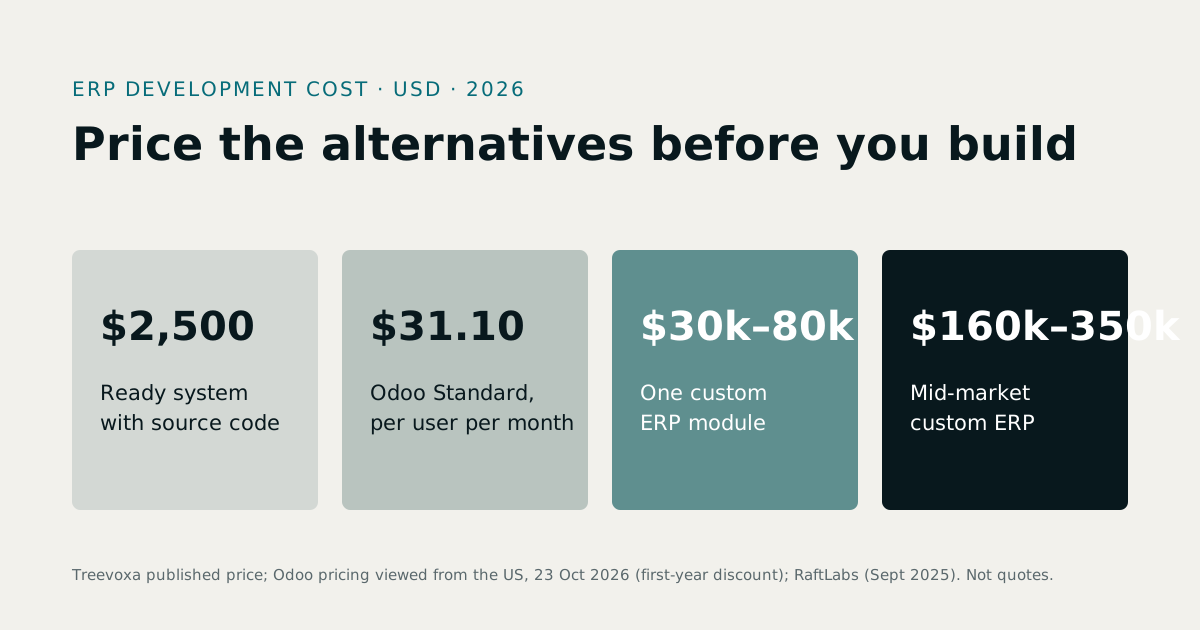
Buyers often price only the licence or the headline build quote and underestimate implementation. For numbers, read ERP development cost in 2026, then use our development rates and the software development cost calculator.
11What if the demo reveals gaps?
It will, and that is a good outcome. A demo that finds no gaps was either too easy or too polished.
Sort every gap into one of three groups:
- Must-have before go-live. The business cannot run without it. It goes into phase one.
- Can wait for phase two. Useful, but the business can work around it for now.
- Drop. Nice to have, rarely needed, or solved better some other way.
Each gap should then get a price and a date. If a vendor can't tell you how long a fix will take, they haven't understood it yet.
Don't try to close every gap before you sign. That is how a project stalls before it starts. Phased delivery lets you go live on the core and improve from there, with each phase tied to the scenarios in your script.
12Checklist: your custom ERP demo before you commit
A custom ERP demo before you commit should leave you with evidence, not a feeling. Run through this list before you say yes.
- You gave every vendor the same written script, including exception cases.
- The demo ran on a slice of your own data, not sample data.
- Real users from each department tried tasks themselves and scored them.
- Every feature is marked as reused, configured or custom-built.
- Gaps are sorted into must-have, phase two and drop, each with a price and date.
- You know what is paid before and after the demo, and what you can walk away from.
- Source code, data export, hosting accounts, third-party licences and custom IP are agreed in writing and reviewed by a lawyer.
- You considered whether a PoC is needed for the one riskiest piece, and skipped it if there isn't one.