
Here is when to build a custom CRM: when your pipeline, quotes and follow-ups don't fit a standard tool, or when the CRM must run as one system with your ERP, accounting, POS or attendance data. Otherwise, buy. Most small teams should start with an off-the-shelf CRM, even though we offer custom CRM development.
This article gives you a test you can score in an afternoon, a worked five-year cost comparison, and the options between buying and building.
1When to build a custom CRM, and when to buy one
Buy if your sales process looks like most sales processes: lead, call, proposal, close, renew. A standard CRM handles that well, and you can be live in weeks.
Build if the thing you sell, or the way you sell it, doesn't fit. Typical cases are quotes with real rules behind them (stock, production capacity, instalment schedules, credit limits), roles that must see different data, or a CRM that has to read and write to other systems rather than sit beside them.
Two terms get mixed up:
- A customisable CRM is a standard product you configure with custom fields, stages and automations. You rent it, and the vendor owns the code.
- A custom CRM is software written for your process. You decide the data model, screens and integrations, and you can own the source code.
Plenty of businesses want the second and only need the first. The scoring test below separates the two. For the wider question of owning versus renting, see custom software vs SaaS.
2What are the signs you have outgrown your CRM?
One annoyance isn't a sign. A pattern is. Look for these, and put a number on each.
- Duplicate data entry. Someone retypes won deals into accounting or the ERP. Measure the hours a week, and how many errors reach an invoice.
- Quotes made outside the CRM. Reps build quotes in Excel or Word because the CRM can't apply your pricing rules. Count this week's quotes that never touched the CRM.
- Follow-ups tracked in a spreadsheet. If the real follow-up list lives in a sheet, the CRM is a filing cabinet. Count missed or late follow-ups in a month.
- Paid add-ons to fake one workflow. Three marketplace apps and a connector to approximate one stage is a warning. Add up the monthly cost and who fixes them when they break.
- Reports nobody trusts. If the sales manager rebuilds the forecast by hand every Friday, that is hours a week plus decisions made on a number nobody believes.
- Staff avoiding the tool. If reps update the CRM only before the Monday meeting, the data is stale by Tuesday. Check the share of open deals touched in the last 14 days.
- Integrations that keep breaking. A sync that fails silently every few weeks costs more than the hours to fix it, because nobody knows what is missing.
Other firms publish similar lists, including Hypha's seven signs your company has outgrown its CRM and Vivato's ten signs. What matters is attaching a number, such as hours a week or misses a month, to each one.
3When is a spreadsheet no longer enough?
A spreadsheet works longer than people expect, then fails quickly. These are rules of thumb from projects we have seen, not hard limits:
- Several people editing the same sheet. Once more than two or three people edit it, overwrites and "which version is right?" start.
- Thousands of rows across several tabs. Lookups slow down and nobody dares touch the formulas.
- Missed follow-ups. If a lead went cold because nobody noticed a date, you need reminders and ownership.
- No audit trail. You can't answer who changed a price or deleted a contact.
- No permissions. Everyone sees every customer, including commission data and margins.
The next step from a spreadsheet is almost always a standard CRM, not a custom one. A free or low-cost plan fixes most of these problems in a week. Building straight from a spreadsheet usually means you haven't yet learned what your process needs, so you would be paying to guess. The cost sections below show when owning starts to pay.
4A scored test: build, buy or extend?
Score each row 0, 1 or 2. A 2 should mean "this costs us money every week", not "it would be nice".
| Criterion | 0 | 1 | 2 |
|---|---|---|---|
| Unusual pipeline stages | Standard lead-to-close | A few extra stages | Stages depend on other systems (stock, production, approvals) |
| Quote complexity | Simple price list | Discounts and bundles | Rules, schedules or calculations a standard tool can't hold |
| Number of workarounds | 0–1 | 2–3 | 4 or more |
| Hours a week lost to workarounds | Under 5 | 5–15 | Over 15 across the team |
| Systems that must connect | None, or one via a ready connector | Two, partly covered | Three or more, or two-way sync with ERP, accounting, POS or attendance |
| Role-based access or compliance | Basic roles are fine | Some field-level rules | Strict rules, audit trail, or data that must stay in a region |
| Seat count | Under 10 | 10–40 | Over 40 and growing |
| Wish to own the system | Don't care | Would be nice | Strategic: no vendor lock-in |
| Clarity of requirements | Vague | Mostly written down | Documented and agreed by the people who use it |
| In-house owner for the project | Nobody | Part-time | A named owner with time to give |
Score bands
| Total | What it suggests |
|---|---|
| 0–6 | Buy a standard CRM and configure it |
| 7–12 | Extend or integrate: configure a standard CRM, add API links, or use an ERP module |
| 13–20 | Build, in a narrow first release |
Two warnings on scoring. First, if "clarity of requirements" or "in-house owner" scored 0, don't build yet, however high the total. In our experience those two rows predict failure better than any other. Second, ask the people who use the system to score, not only the person who signs off the budget. Managers tend to underestimate workarounds because they don't live in them.
5When should you not build a custom CRM?
Don't build if any of these is true:
- Your sales process is standard. Custom screens for a normal pipeline buy you nothing.
- The team is small. In our experience, under about 10 people, licences are cheap enough that a build rarely pays for itself.
- You need it live in weeks. A custom system takes months. A standard CRM takes days.
- You can't yet describe the process. If two managers describe the pipeline differently, fix that first.
- Nobody will own adoption. Software doesn't get used because it exists. Someone has to train, chase and measure.
- There's no budget for upkeep. This one is often missed.
A built CRM is not a one-off purchase. It needs hosting, security updates, backups, fixes when a connected system changes its API, and a developer you can reach when something breaks. Budget for it from day one.
6What are the middle options between buying and building?
The choice isn't buy or build. Most businesses scoring 7–12 belong in the middle.
| Option | Best for | Typical limits | Lock-in | Upfront effort |
|---|---|---|---|---|
| Configure a standard CRM | Standard process with a few quirks | Quote rules, cross-system logic, field-level rules | High: data and workflows sit with the vendor | Days to weeks |
| Extend it through its API | Good CRM, missing links to your other systems | API call limits, vendor changes, fragile syncs | Medium to high | Weeks to a few months |
| Low-code or no-code build | Internal tool, small team, fast test of a process | Performance and complexity ceilings, platform pricing | Medium to high: you can't take the app with you | Weeks |
| ERP CRM module | Sales, stock, production and accounting in one database | Often weaker sales usability | Depends on the ERP | Weeks to months |
| Fully custom | Unusual process, deep integration, long-term ownership | Cost, time, upkeep | Low if you hold the source code | Months |
Extending through the API is underused. If your CRM is fine except that won deals don't reach accounting, you don't need a new CRM. You need a well-built connector. That is API development, and it costs a fraction of a rebuild.
An ERP module makes sense when sales is tied to inventory, production or finance. Our custom ERP vs Odoo vs ERPNext comparison covers where those platforms stop fitting. If you are weighing a broader system, look at ERP software development.
Low-code and no-code tools are a reasonable way to test a process before committing. They suit a simple tool with few users. They struggle with heavy integration, strict permissions or large data volumes. AI-assisted coding can lower the cost of a first version, but not the cost of testing, security, migration and upkeep.
7When does a CRM need to connect to your other systems?
A CRM that sits beside your other software forces people to copy data between them. A CRM wired into those systems removes that work.
The usual chain is pipeline, then quote, then invoice, then accounting. If won quotes have to be retyped into your books, that link is the first thing to fix. Here are four examples of where the connection matters.
- Gym. A lead books a tour, signs up and becomes a member. If the CRM sees membership and access-control data, the front desk knows who is a lead, who has lapsed and who is paying. Follow-ups can trigger off real behaviour, such as no visits in three weeks.
- Factory. A quote has to become a production order. If the CRM can read stock and capacity, a rep can quote a real delivery date. If not, sales promises dates that production then has to rescue.
- Pharmacy supplier. Reps sell to pharmacies on credit limits, batch availability and negotiated prices. A CRM that sees stock and account balances stops reps taking orders from customers over their limit or for items that aren't there.
- Property developer. A lead becomes a buyer, then an instalment plan with a payment schedule. The CRM must hand over cleanly to collections, or sales and finance keep separate records of what is owed.
Attendance data matters less often, but it appears. A field sales team with commission tied to site visits or hours worked needs the CRM and payroll to agree on what happened. Reconciling it by hand each month is where disputes start.
If your scored table shows three or more systems that must connect, weigh an ERP module or a custom build.
8What does a custom CRM cost, and does it beat per-seat pricing?
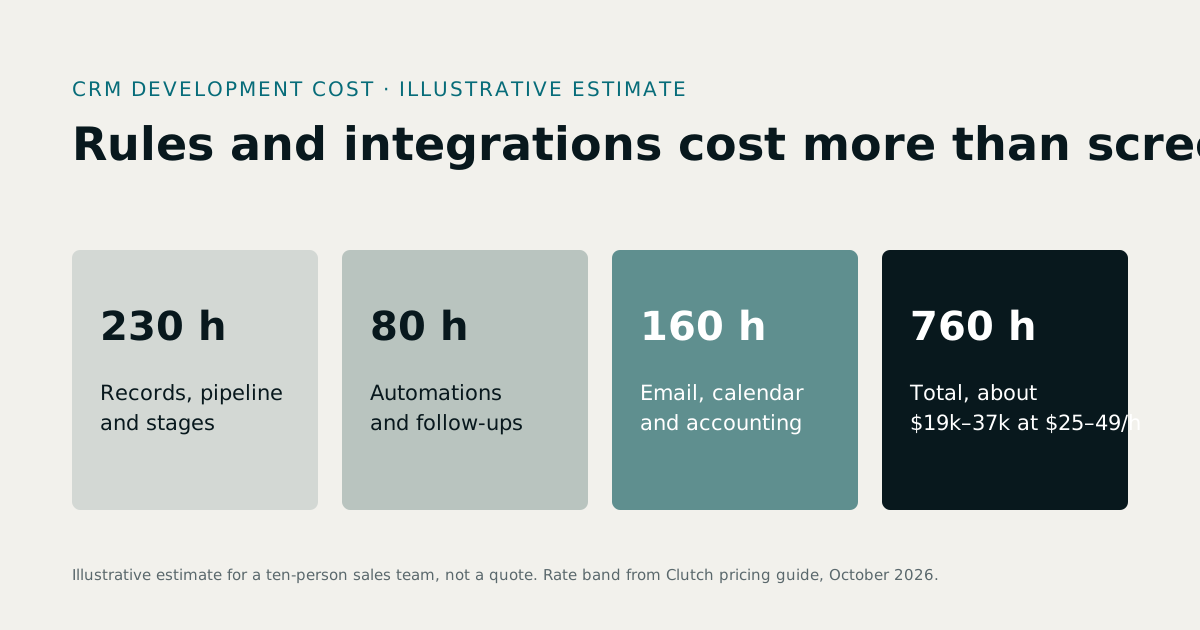
First, a caution on published ranges. Tadabase puts full-code custom CRMs at $50K–$200K+, with 10–20% annual maintenance. SumatoSoft quotes $100K–$300K+, with 15–25% maintenance. Both are vendor estimates, and the second is aimed at enterprises. A focused CRM for a growing business usually sits at the lower end, but get a quote rather than relying on a range. For a fuller custom CRM cost breakdown, see our guide to CRM development cost.
The table below is a worked example, not a quote. The assumptions are ours and illustrative, in US dollars.
Assumptions
- Custom build: $60,000 for a focused first release (pipeline, quotes, follow-ups, one or two integrations).
- Annual upkeep: 15% of the build cost, which is $9,000 a year, covering hosting, fixes and small changes. That is $45,000 over five years.
- Subscription A: $45 per user per month, a mid-tier plan. Subscription B: $100 per user per month, for a higher tier plus add-ons.
- Five-year view, with no price rises, no discounts, and no admin or training costs on either side.
Check seat prices on each vendor's own pricing page before you use them. Third-party roundups, such as this one, report entry plans from around $25 per user per month, but vendors change plans often.
| Users | 5-year licences at $45 | 5-year licences at $100 | Custom build plus 5 years' upkeep |
|---|---|---|---|
| 10 | $27,000 | $60,000 | $105,000 |
| 25 | $67,500 | $150,000 | $105,000 |
| 60 | $162,000 | $360,000 | $105,000 |
What the table says:
- At 10 users, buy. Even at $100 a seat, five years of licences cost about $45,000 less than the build.
- At 25 users, it depends on the tier. At $45 a seat, buying is still cheaper. At $100 with add-ons, building wins.
- At 60 users, building is cheaper on both. The saving is about $57,000 against the lower tier and about $255,000 against the higher.
Break-even is about 39 users at $45 a seat and about 18 at $100 a seat. Move any assumption and those numbers move, so redo the sum with your own.
Money isn't the whole answer. The table ignores the cost of workarounds, which can exceed licences. Five people losing 5 hours a week each is 25 hours a week, about 1,200 hours a year. It also ignores the cost of failure, which for a custom project is real.
The figures are in US dollars, so convert at the current rate for pounds, dirhams, Australian dollars or Singapore dollars. For a number on your own scope, use the software development cost calculator and compare software development rates by region.
9How long does a custom CRM take to build?
For a focused scope, our experience is a first usable release in three to four months. Tadabase and SumatoSoft both give three to six months or more for a first version. Treat these as typical ranges, not promises.
| Phase | Typical duration | What happens |
|---|---|---|
| Discovery | 2–4 weeks | Map the pipeline, quotes and follow-ups; agree scope and success measures |
| First release (MVP) | 10–16 weeks | Core pipeline, quoting, reminders, permissions, first integration |
| Rollout and data migration | 3–6 weeks | Clean and import data, train users, run old and new side by side |
| Iteration | Ongoing, monthly | Add integrations and reports based on real use |
Plan on four to five months before the team relies on it daily.
What pushes it out:
- Messy data. Duplicate contacts and inconsistent fields take longer to fix than to code around.
- Scope added mid-build. Every "while we're at it" adds weeks.
- Slow decisions. If nobody can approve a screen within a few days, the schedule slips by the same amount.
- Third-party systems. An undocumented or unreliable API on the other side can take longer than the CRM itself.
Keeping the first release narrow is the best way to hold the timeline. That is the logic behind MVP development: ship the part that hurts most, then learn.
10Why do custom CRM projects fail, and how do you avoid it?
Five causes come up repeatedly. Each has a fix.
| Cause | What it looks like | Fix |
|---|---|---|
| Low adoption | Reps keep their own sheets | Involve two or three reps in design; retire the old sheet on a fixed date |
| Messy data migration | Duplicates and gaps on day one | Clean data before import; migrate a sample first |
| Undefined success | Nobody can say if it worked | Agree one or two measures up front, such as follow-up misses or hours saved |
| Scope creep | The list grows, the date doesn't | Keep a "later" list; every addition replaces something |
| No owner | Decisions stall | Name one person with time and authority |
Build the first release around the three things that hurt: pipeline, quotes and follow-ups. Leave marketing automation, dashboards and AI features for later. A narrow release that people use beats a broad one they ignore.
Agree the success measure before you start. For example: "Missed follow-ups fall from around 30 a month to under 5, and quotes are produced inside the CRM." If you can't write that sentence, you aren't ready. Integrations, performance and security carry their own risks, which a good partner will raise during discovery.
11What does owning your CRM change?
Subscriptions carry lock-in that doesn't show on the price list. Check these before you sign, and again every year:
- Export limits. Can you get all your data out, including notes, attachments and history, in a usable form?
- Price rises. Seat prices can rise at renewal, and moving tier to get one feature can add a large amount to the bill.
- API call limits. Heavy integrations can hit caps that force a higher plan.
- Exit cost. Leaving means migrating data, retraining staff and rebuilding automations.
Owning the system changes that. Your data sits in a database you control, and you can change hosts or developers. If you hold the source code, no vendor can retire the product from under you. That is the idea behind ready-made software with source code as well as bespoke builds. The trade-off is that you carry the maintenance, which is why the upkeep line in the cost table matters.
A CRM holds personal data, so check your obligations before launch. That means your local data protection law: UK GDPR and the ICO's guidance, the EU GDPR, state privacy laws in the US, and the equivalent laws in the UAE, Australia and Singapore. Law changes, so confirm what applies now. This is not legal advice. Ask a qualified adviser, and tell your developer early, because retention rules, consent records and deletion requests are easier to design in than to add later.
12What should you do next?
Four steps, in order:
- Score the table. Do it with the people who use the CRM or spreadsheet daily. Write down the total and the two rows that scored highest.
- List your workarounds and the hours they cost. Use hours a week, then multiply by 48 for a yearly figure. That is the cost of staying as you are.
- Price both paths. Get real seat prices from vendor pricing pages and a real quote for a focused build, then rerun the five-year table with your numbers. An independent scoping session through software consulting is one way to test the build quote.
- Set a 12-month review. If you buy now, note the trigger for revisiting: a seat count, a score of 13 or more, or a third integration.
If your score is under 13, buy now, keep the data clean and revisit in a year. That is the practical answer on when to build a custom CRM: when your score, the hours lost to workarounds and the number of systems that must connect all show that a standard tool has stopped fitting.