
Custom ERP development in Toronto works best when you start from a system that already runs real businesses, add your own workflows, and see a working demo before you sign. That is how our custom ERP development service works. You end up with one system for orders, inventory, purchasing, finance, HR and reporting, built around how you trade.
Treevoxa delivers remotely and has no Toronto office. Later sections cover how that works with Eastern hours, and where it is a real trade-off.
1What does custom ERP development in Toronto involve?
Custom ERP means one system, shaped to your workflows, that replaces the patchwork of spreadsheets, accounting software, email approvals and re-keyed data.
A typical build covers some mix of these:
- Sales orders, quotes and invoicing
- Inventory across one or more locations
- Purchasing and supplier approvals
- Finance, costing and reporting
- HR, attendance and payroll
- Role-based access and dashboards
The usual route is to write all of it from scratch. That is slow and expensive, and you find the bugs on your own time.
Our approach is to start from systems already in daily use: RE-ERP for property, Batchbook for manufacturing and MatrixHR for HR and payroll. Where a part of one fits your business, we reuse it, change the rules to match how you work, and build what is missing. You see a working demo before you commit.
These are systems running real businesses, but they are not Toronto case studies. If Canadian references matter to you, ask for them and judge the answer.
2Is a custom ERP right for your Toronto business?
Not always. Custom ERP is the wrong choice more often than suppliers admit.
| Question | Points to custom ERP | Points away from it |
|---|---|---|
| Can standard software model your processes? | No: pricing, production or approvals are unusual | Yes: normal invoicing and stock |
| How many systems re-key the same data? | Three or more | One or two |
| How are approvals handled? | Email chains and chat messages | Already handled in your accounting tool |
| How many people will use it? | About ten or more, across roles | Fewer than about ten |
| Who owns the process? | A named person with authority to decide | Nobody has the time or mandate |
| What is your main pain? | Operations, not just bookkeeping | Bookkeeping and tax filing |
If most of your answers sit in the right-hand column, buy something off the shelf. A small team with standard accounting needs is usually better served by a good packaged product. The wider decision is covered in our guide to custom software vs SaaS, and it depends on the same questions. You can browse all our guides too.
The process owner row matters most. If your business cannot agree how it works, software will only make that disagreement permanent.
3Custom ERP vs Odoo, ERPNext, NetSuite or Acumatica?
Each route suits a different kind of business. Licence terms change, so check them with each vendor before you decide.
| Custom ERP | Odoo | ERPNext | NetSuite / Acumatica | |
|---|---|---|---|---|
| Licence model | One-off build; you own the code | Open-source community edition plus paid editions, usually priced per user | Open source; paid hosting and support available | Subscription, usually by user and module |
| Fit | Built around your workflows | Broad module library, good for standard processes | Solid for manufacturing, distribution and services | Mature mid-market and enterprise suites |
| Customisation effort | Highest upfront, lowest ongoing adaptation | Moderate to high once you leave standard flows | Moderate; needs developers who know the framework | Often partner-led work within the vendor's platform |
| Ownership | You hold the source code | Open-source parts; paid editions are licensed | Open source | Vendor-owned platform |
| Running cost | Hosting and support | Per-user fees tend to grow with headcount | Hosting and support | Subscriptions tend to grow with users and modules |
| Vendor lock-in | Low if you hold the code and documentation | Moderate | Low to moderate | Higher |
Odoo and ERPNext win when your processes are fairly standard and you want to be live quickly at lower cost. Odoo in particular has a large module library. If that describes you, use one of them. We also offer Odoo development for that reason.
Custom wins when the way you quote, produce, approve or cost work is your edge, and forcing it into a standard template would weaken it. NetSuite and Acumatica suit larger organisations that want a vendor-backed platform and accept subscription pricing.
For a fuller side-by-side, read custom ERP vs Odoo vs ERPNext.
4How much does custom ERP cost in Toronto in CAD?
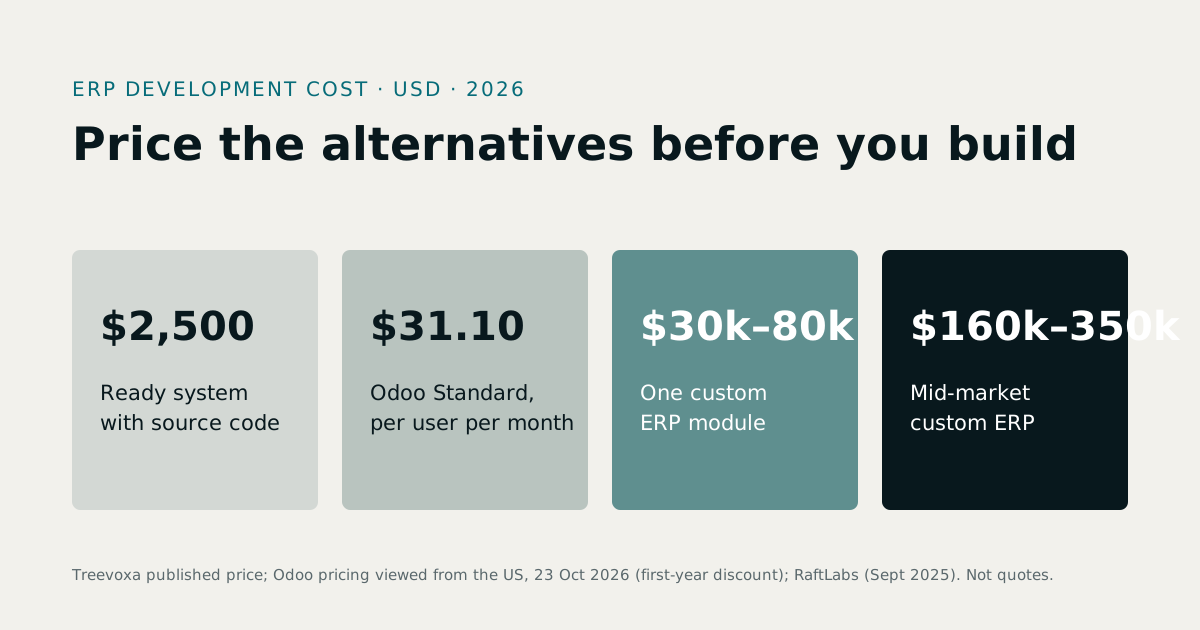
Budget somewhere between CAD 15,000 and CAD 300,000 or more, depending on scope. The gap is wide because a single-module start and a multi-branch rollout are different projects.
These are indicative planning ranges, not a price list or a quote. A real figure only comes after scoping your workflows, users and data. We have not converted from any exchange rate. If a supplier quotes in USD, convert at the rate on the day you budget.
| Scope | What it usually covers | Indicative build cost (CAD) |
|---|---|---|
| Single-module start | One area, such as inventory and purchasing, with reports | 15,000 – 40,000 |
| Multi-module | Sales, inventory, purchasing, finance, approvals, dashboards | 40,000 – 120,000 |
| Full multi-branch | Several locations, HR and payroll, integrations, migration | 120,000 – 300,000+ |
Hourly rates alone tell you little, because a cheap hour spent rebuilding what already exists costs more than a dearer hour spent adapting it. Our software development rates page explains how we think about rates.
A worked example
Take a distributor with 25 users, three modules, one warehouse and a QuickBooks migration. All figures are assumptions for illustration.
| Item | Estimate (CAD) |
|---|---|
| Build, three modules plus migration | 75,000 |
| Hosting per year (assumed) | 3,600 |
| Support per year (15%, the middle of a 10–20% range) | 11,250 |
| Yearly running cost after launch | 14,850 |
Over five years that is about CAD 149,000 in total (75,000 plus five years at 14,850). To compare fairly, get a per-user subscription quote for 25 users and do the same five-year sum. Custom costs more upfront and usually less to keep. Whether that pays off depends on your headcount and how long you stay on the system.
What drives the price up or down?
- Modules. Each module adds screens, rules and reports.
- Users and roles. More roles mean more permissions to build and test.
- Branches. Stock transfers and branch reporting add complexity.
- Integrations. Each connection to a payment tool, courier or accounting package is its own piece of work.
- Data migration. Messy history costs more to clean than tidy history.
- Reports. A fixed set is cheap. Any report, any way is not.
- Reuse. Starting from a proven base cuts cost and risk, because the dull but dangerous parts (stock movements, approvals, audit logs) already work.
To size your own project, try the software cost calculator. For a deeper look at what a custom ERP really costs and how to read a quote, see our ERP development cost guide. It comes down to the drivers above.
5How long does it take to build a custom ERP?
The first module should be live in weeks, not quarters. The whole system takes longer, and that is fine.
These are planning estimates. Discovery confirms the real plan.
| Phase | Typical duration | What happens |
|---|---|---|
| Discovery and demo | 1–2 weeks | Map workflows, show a working demo, agree scope |
| First module live | 4–8 weeks | Build and release the module that hurts most |
| Further modules | 4–8 weeks each | Add one at a time, with feedback between |
| Data migration and parallel run | 2–4 weeks | Trial imports, then run old and new side by side |
| Training and go-live | 1–2 weeks | Staff training, cutover, close monitoring |
First module first limits risk. You learn whether the supplier delivers, and whether your team will use the system, before most of the money is spent. The business also gets value early.
Big-bang projects that promise everything in twelve months tend to arrive late and over budget. The software development methodologies behind phased delivery are not complicated: short cycles, working software at the end of each, and scope changes agreed as you go.
6Can you see a demo before you commit?
You should see working software with real screens and realistic data, not a mock-up. That is only possible if the supplier has something running.
Our examples:
- RE-ERP shows how property businesses handle units, contracts, payments and reporting.
- Batchbook shows stock, production batches and costing for manufacturers.
- MatrixHR shows attendance, leave and payroll.
Whoever you speak to, ask them to:
- Show a live system, not slides.
- Walk through one of your real scenarios, such as a partial delivery or a returned item.
- Show what happens when someone edits or deletes a record.
- Show the reports a finance person would ask for.
- Explain how permissions work for different roles.
If the answer is we will build a prototype after you sign, you are buying on trust.
7Which ERP modules should you build first?
Start with the area costing you the most time or money. For most businesses that is stock or cash.
| Module | Pain it solves | Suggested order |
|---|---|---|
| Inventory | Stock-outs, wrong counts, no location visibility | 1 |
| Purchasing | Late orders, no approval trail, supplier price drift | 2 |
| Sales and invoicing | Re-keyed orders, slow invoicing | 2 or 3 |
| Finance and costing | Unknown margins, month-end scramble | 3 |
| HR and payroll | Manual attendance, payroll errors | 4 |
| Approvals | Email chains, unclear sign-off | Alongside each module |
| Dashboards | Reports built by hand in spreadsheets | Last, once data is clean |
Dashboards come last on purpose. A dashboard on dirty data only shows the mess faster.
Manufacturers should treat product costing for factories as an early module, because margins depend on it. For the money side, see accounting and costing software. For people, see HR software development.
8Will a custom ERP meet CRA record-keeping rules?
It can support compliance, but it does not replace your accountant. The ERP's job is to keep complete, readable records you can produce on request. Treat CRA record-keeping rules as a design requirement from day one.
The Canada Revenue Agency says electronic records must be kept in an electronically readable format for six years after the end of the tax year they relate to, even if you also keep a hard copy. See the CRA's electronic records page for the wording. Some situations can extend that period, such as audits, objections and late filings, as Toimi notes. Confirm the exact rules for your case on canada.ca or with your accountant.
Here is what to build in:
| Requirement | What the ERP should do |
|---|---|
| Records stay readable | Store data in open, exportable formats, not a format only the vendor can open |
| Six-year retention | Keep financial records for at least the required period, with retention set as a rule you can configure |
| Longer holds | Let you flag records to keep during audits, objections or late filings |
| Audit trail | Log who changed what and when, on every transaction |
| No silent deletes | Reverse or cancel financial transactions with a reason; never quietly erase them |
| Exports | Produce full data and report exports on demand |
| Backups | Run automated, tested backups stored separately |
| Access logs | Record who viewed or exported sensitive data |
Keeping everything forever is not the goal. Canadian privacy law, including PIPEDA, expects organisations not to hold personal information longer than they need it. A good design keeps financial records for the required period, then supports secure disposal or anonymisation of personal data once that period and any holds end. Ask your accountant what they need to see, and take legal advice on privacy and retention before you sign off the design.
9How does an ERP handle GST/HST, PST and QST?
Through tax codes that sit in the data rather than in the code.
Canadian sales tax is not one rate. Some provinces, Ontario among them, use HST, a combined federal and provincial tax. Others charge GST plus a separate provincial tax such as PST or QST. Rates differ by province and change from time to time. Check current rates on canada.ca rather than trusting any blog post, including this one.
A sound design for GST/HST, PST and QST has:
- Tax codes per line item, because one invoice can mix taxable, zero-rated and exempt goods.
- Rate tables held as data, so a good design lets you change tax codes and rates without a software release.
- Province-aware rules, based on where goods are delivered or services supplied.
- Tax reports that tie back to invoices, so your accountant can prepare returns without rebuilding the numbers.
Two optional extras. If you serve Quebec customers, bilingual screens and documents may be a requirement. Decide early, because retrofitting is harder. For payroll, the ERP should apply Canadian deductions using the rules your accountant or payroll provider gives you, and be updated when those rules change.
10How do you move data from QuickBooks, Sage or spreadsheets?
Carefully, in stages. ERP data migration is where more projects go wrong than anywhere else.
- Audit. List every source: accounting package, spreadsheets, email attachments, paper.
- Clean. Merge duplicate customers and suppliers, fix product codes, retire dead records.
- Map. Decide which old field goes to which new field, and write it down.
- Trial import. Load a copy and check totals against your existing reports.
- Parallel run. Run old and new side by side, usually across a month-end.
- Cutover. Freeze the old system, load final balances, go live.
The usual risks are duplicate customers, mismatched product codes and opening balances that do not agree. Agree opening balances with your accountant at a clean date, ideally a period end. Keep the old system readable, which also helps with the six-year record rule above.
Moving from spreadsheets follows the same steps, but the cleaning takes longer because nothing enforced consistency.
11Can an offshore team build your ERP and work Toronto hours?
Yes, with honest limits. Remote delivery relies on communication rather than visits, so agree the ground rules in writing. This applies to any remote supplier, us included. Our page on offshore software development covers the model in general.
- Overlap hours. Agree a fixed window of shared hours with Eastern time for calls and decisions, and ask what it is.
- Demo cadence. Agree how often you see working software. Regular demos catch misunderstandings early.
- Invoicing currency. CAD or USD, agreed in the contract.
- Contract terms. Scope, milestones, code ownership and support terms are written down before work begins.
The trade-off is no on-site visits by default. If you need someone in your boardroom every week, hire locally and accept the premium. If you are weighing this up, our guide on how to hire offshore developers as a Canadian business comes down to the same list: overlap, contract clarity, and who answers the phone.
12Who owns the code, and what does support cost?
You should own the source code. That is what removes vendor lock-in.
Make sure the contract says so, and that handover includes:
- The full source code and database structure
- Documentation for setup, deployment and backups
- Access to hosting and repositories under your accounts
Hosting is your choice. Ask whether your cloud provider can place data in a Canadian region if data-residency matters to you, and confirm where data physically sits and who can access it.
Annual support often runs at roughly 10–20% of build cost. That is an estimate, and it depends on how much change you expect. It should cover fixes, security updates, small changes and monitoring. If you change supplier, a well-documented codebase means the next team can pick it up. Our page on ready-made software with source code explains how ownership works.
13How to choose a Toronto ERP supplier: a shortlist checklist
Put these questions to every supplier, us included.
| Question | A good answer |
|---|---|
| Can I see a working demo? | Yes, live, using realistic scenarios |
| Can I speak to named references? | Yes, and they will take the call |
| Is the first phase fixed scope? | Yes, with clear deliverables and a stated price basis |
| Who owns the code? | You, in writing |
| What is the data migration plan? | Staged, with a parallel run |
| Are records CRA-ready? | Audit trail, no silent deletes, exports, configurable retention |
| What are the support terms? | A written percentage, response times and exit terms |
| Who is the day-to-day contact? | A named person, with agreed overlap hours |
If a supplier dodges two or more of these, move on. If you want a neutral view before you shortlist, software consulting can pressure-test scope and quotes. Whichever route you take for custom ERP development in Toronto, the four things to hold on to are a working demo, code you own, a staged build and records your accountant is happy with.