
If you run a Canadian business that sells through quotes, CRM development in Canada means building a customer system around your real pipeline, quotes and follow-ups. It connects to your accounting, email and phone tools. It is the right answer for some firms and a waste of money for others, and this guide helps you tell which you are.
Treevoxa has no Canadian office. We build remotely, with offshore pricing, full source-code ownership and working hours that overlap with Canadian business time. The rest of this guide covers what is specific to Canada: CASL, PIPEDA, Quebec Law 25, data residency and bilingual use. Nothing here is legal advice, so check your own situation with a Canadian privacy lawyer. For a USD view of the same question, see our CRM development cost guide.
1What is CRM development in Canada, and who needs it?
Results for "CRM development Canada" are mostly agency pages with the country name dropped into a generic template. The Canadian specifics matter more than where the developer sits. They include consent rules for messages, privacy law that follows your customers' province, and a French-speaking market next door.
A custom CRM suits you if:
- Your sales run on quotes, and the quotes live in spreadsheets or Word files.
- Your pipeline does not look like the standard "lead, opportunity, closed" model.
- Your team uses five or six tools and re-types the same details between them.
- You pay for seats you barely use, or for add-ons that cover gaps.
If none of that sounds familiar, the next section matters more.
2Should you build a custom CRM or buy one?
Do not build a custom CRM if you have fewer than about five users, a standard sales process and no integrations to speak of. HubSpot, Zoho, Salesforce or Dynamics 365 will serve you well, and you can be live in days. Spending tens of thousands of dollars to rebuild what a standard plan already does is poor value. Our guide to custom software vs SaaS covers the wider choice.
Custom starts to pay when you see these signs:
- Quotes outside the CRM. Sales build quotes elsewhere and someone updates the deal by hand.
- Workarounds. Custom fields, spreadsheets and automation tools hold the process together.
- Growing per-seat fees. Every new hire adds a monthly cost, and the useful features sit in higher tiers.
- Process as your advantage. The way you qualify, price or follow up is what you sell, and the tool fights it.
| Subscription CRM | Customised platform | Custom build | |
|---|---|---|---|
| Setup cost | Low | Medium (consultant fees) | Highest |
| Running cost | Per seat, rising with headcount | Per seat plus consultant retainers | Hosting, support and changes |
| Fit to your process | Generic | Good, within platform limits | Exact |
| Ownership | None; you rent | None; you rent | You own code and data |
| Time to first use | Days | Weeks | Weeks to months |
If you are on the fence, a short software consulting engagement can test the case before you commit to a build. We would rather tell you to buy than build the wrong thing.
3How much does CRM development cost in Canadian dollars?
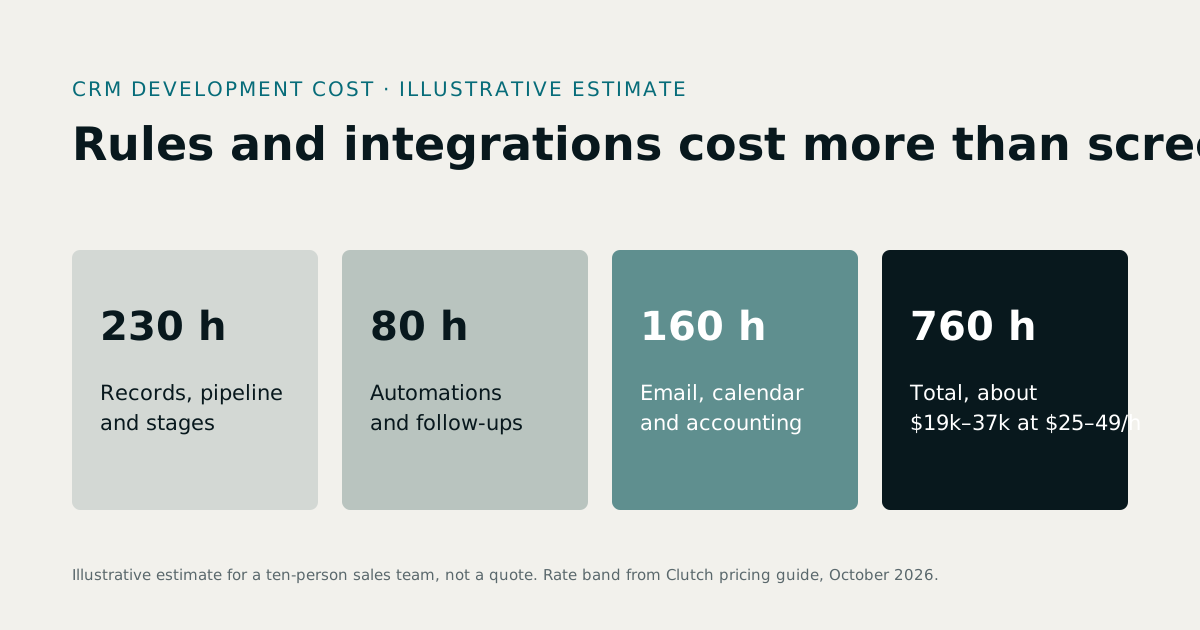
Published ranges for custom CRM builds vary by several times between vendor blogs, for example Apptunix and Devtechnosys. They rarely say what is included, and almost none use Canadian dollars. So the table below is our own planning range, built from our development rates. It assumes a remote team on offshore rates. It is an estimate, not a quote.
| Scope | What is included | Planning range (USD) | Planning range (CAD) |
|---|---|---|---|
| Simple pipeline | Contacts, deals, stages, tasks, basic reports; about 5 to 10 users | 8,000 to 18,000 | 11,000 to 25,000 |
| Mid-size | Pipeline plus quote builder, follow-up reminders, accounting sync, email integration, bilingual screens; about 10 to 50 users | 18,000 to 45,000 | 25,000 to 62,000 |
| Complex, multi-team | Several teams or pipelines, approvals, role-based access, data migration, custom reporting, several integrations; about 50 to 200 users | 45,000 to 100,000 | 62,000 to 138,000 |
Exchange rate: we converted at a planning rate of USD 1 = CAD 1.38 for 26 October 2026. We have not pulled a live rate, so check the Bank of Canada rate on the day you set your budget.
Hourly rates differ between Canadian agencies and offshore teams. For a build measured in hundreds of hours, that gap accounts for most of the price difference. Get at least two quotes with the same scope written down. To run your own numbers, use our software cost calculator.
What does a worked cost example look like?
Take a 15-user services firm. It wants a pipeline, a quote builder that produces PDFs, follow-up reminders and a sync with its accounting software. That is a mid-size build. Every figure below is a planning assumption, not a quote.
Assumptions:
- Custom build: CAD 38,000.
- Hosting and support: CAD 6,000 a year.
- Ongoing changes: CAD 4,000 a year for new fields, reports and small features. Custom software keeps needing developer time as your business changes.
- Subscription alternative: a mid-tier plan at CAD 90 per user per month (CAD 16,200 a year). Add CAD 2,000 a year for quoting and accounting connectors, and CAD 4,000 one-off setup. Check current vendor pricing, as plans change.
- Flat headcount and no price rises. Data migration and training are left out because they cost similar amounts either way.
| End of year | Custom build (cumulative) | Subscription (cumulative) |
|---|---|---|
| 1 | CAD 48,000 | CAD 22,200 |
| 2 | CAD 58,000 | CAD 40,400 |
| 3 | CAD 68,000 | CAD 58,600 |
| 4 | CAD 78,000 | CAD 76,800 |
| 5 | CAD 88,000 | CAD 95,000 |
On these numbers, custom costs more for four years and only moves ahead during year five, by about CAD 7,000. The case for custom here is fit and ownership, not a quick cash saving.
Headcount changes the picture. At 30 users the same subscription costs nearly double each year (about CAD 34,400), while the custom system's running costs barely move. If your needs fit a standard plan with no add-ons, the subscription may never lose.
4What must a CRM do for CASL compliance?
Canada's Anti-Spam Legislation (CASL) is an opt-in regime. You need consent before sending a commercial electronic message, and that covers email, SMS and messages on chat platforms. The regulator for these rules is the CRTC. Your CRM is where consent is either recorded properly or lost, so compliance starts with how the system is designed.
| CRM feature | Why CASL needs it |
|---|---|
| Consent type field (express or implied) | You must know which basis you rely on for each contact |
| Consent record: date, source and the exact wording shown | You carry the burden of proving consent |
| Expiry date on implied consent | Implied consent lapses, and sending after expiry is a breach |
| Withdrawal flag on express consent | Express consent lasts until the person withdraws it |
| One-click unsubscribe in every message | The mechanism must be simple and work reliably |
| Unsubscribes processed immediately, blocking later sends | The law sets a deadline; building for instant removes the risk |
| Sender identification and contact details in each message | Required content of every message |
| Channel-aware sending rules | Texts and WhatsApp-style messages count too |
We have deliberately left out the exact implied-consent periods, the unsubscribe deadline and the penalty maximums. These are set in the Act and its regulations, and you should read them from the CRTC's own guidance, not from a blog post. Treat the penalties as large enough to matter to a mid-size firm. The Fasken overview is a reasonable starting point. Build expiry periods as settings, not hard-coded values, so a rule change does not mean a rewrite.
5What do PIPEDA and Quebec Law 25 require of a CRM?
PIPEDA is the federal private-sector privacy law. Quebec Law 25 is Quebec's stricter regime. Law 25 can reach businesses outside Quebec that hold Quebec residents' personal information, so a Toronto company with Montreal customers should not assume it is exempt. The Gamtech Law 25 guide explains this for owners. Neither law is a software spec, but each turns into features.
| Obligation | CRM feature |
|---|---|
| Accountability (PIPEDA) and a named privacy lead (Law 25) | Admin role for the privacy officer, plus an audit log of who viewed or changed personal data |
| Collection limited to a stated purpose | Configurable fields, with the purpose recorded per contact |
| Access requests | Search by person and export everything held in one file |
| Portability (Law 25) | Export in a structured, commonly used format |
| Deletion and retention limits | Delete or anonymise on request, with automatic retention rules |
| Safeguards | Role-based access, encryption, two-factor sign-in |
| Breach records and reporting | Incident log, and the ability to list affected contacts fast |
| Assessment before personal information leaves Quebec (Law 25) | Documented data map: where each field is stored and who processes it |
The details change over time. Breach-record retention and reporting thresholds are set out by the Office of the Privacy Commissioner of Canada. The phase-in dates and penalties for Law 25 are published by Quebec's Commission d'accès à l'information. Read both before you finalise your requirements, and ask your lawyer to confirm how Law 25 applies to your customer base. The Mapledeploy note on transfers outside Quebec is a useful second read.
6Does CRM data have to be stored in Canada?
Generally, no. Guides from Maximizer and Traztech both state that no general Canadian privacy statute requires personal data to be stored in Canada. Some public-sector rules, sector regulations or customer contracts do, so check yours.
What the law does expect is accountability. Under PIPEDA you stay responsible for data your providers handle, and Law 25 asks you to assess transfers outside Quebec yourself.
Residency and sovereignty are different things:
- Residency is where the servers sit.
- Sovereignty is whose laws can reach the data. A Canadian data centre run by a US-incorporated provider may still be exposed to US legal process. Upper Harbour makes this argument in the context of Law 25.
Practical options:
- Host in a Canadian cloud region.
- Keep encryption keys under your control, not the provider's.
- Choose providers with care, and check where they are incorporated.
- Write down your transfer assessment, including who on the development side can reach production data.
Also ask who manages what. If you rent raw servers, you patch and secure them. If you use a fully managed service, the provider does. The split affects your risk and your support costs, and our guide to IaaS, PaaS and SaaS explains it.
7Can a CRM work in English and French?
Yes, and the cost is modest if you plan it from the start. A bilingual CRM needs:
- Screens and labels in both languages, with a language switch per user.
- A language preference stored on each contact.
- Bilingual templates for quotes, emails and PDFs, chosen automatically from that preference.
- French-language privacy notices and consent wording for Quebec contacts. Consent collected in a language the person cannot read is weak consent.
This adds scope. Our planning assumption is roughly 10% to 15% more effort on screens and templates, plus a translation budget. Retrofitting later costs more, because every hard-coded label and template has to be found and rewritten. If you sell into Quebec at all, decide this in discovery.
8What should a custom CRM connect to?
A CRM only pays off when it shares data with the tools around it. The work behind those connections is API development, and it is where much of the budget goes.
| Integration | What it saves | Planning effort |
|---|---|---|
| Quote builder with PDF and status tracking | Re-typing quotes; losing track of which are open | 2 to 4 weeks |
| Follow-up reminders and tasks | Deals going quiet because nobody remembered | 1 to 2 weeks |
| Accounting sync (customers, invoices) | Double entry; mismatched records | 2 to 4 weeks |
| Email and calendar | Copying messages into the CRM by hand | 1 to 3 weeks |
| Phone and WhatsApp links | Switching apps to call or message a contact | Under 1 week |
| Website forms | Leads emailed to someone's inbox | Under 1 week |
These effort figures are our planning estimates for a single integration on a small team. Accounting sync is the one that overruns most, because it exposes messy customer data.
9How long does a CRM build take?
| Scope | Planning timeline |
|---|---|
| Simple pipeline | 6 to 10 weeks |
| Mid-size | 12 to 20 weeks |
| Complex, multi-team | 5 to 9 months |
These are our planning estimates. The phases are the same at every size: discovery, pipeline and data model, build, data migration, training, go-live. What slows projects is rarely code. It is data clean-up, a sales process nobody has written down, and too many approvers.
Launch the pipeline and quotes first, then add integrations in later releases. That is the logic of MVP development: get the core in front of the team, and let real use decide what comes next. Ask your partner to work in short cycles with a working demo at the end of each one, so you see progress instead of status reports.
10Who owns the code and the data?
With a subscription, you own neither the software nor, in practice, easy access to your data. Export limits, API caps and plan changes are the vendor's decision. Leaving means paying for a migration.
With a custom build, get these in writing:
- Source-code ownership assigned to your company on payment.
- Hosting accounts in your name, so you hold the keys and the invoices.
- Documentation good enough for another developer to take over.
- Exit terms: what happens if you stop working with the developer, including handover time.
Ownership is the main reason to build rather than rent, and it is why we hand over full source code. If you would rather start from a working system than a blank page, see ready-made software with source code.
11Can an offshore team build a CRM for a Canadian business?
Yes. A team that has never been in your city can deliver, but ask for proof. This checklist works for any remote partner:
| Ask for | Why it matters |
|---|---|
| A paid, fixed-scope discovery phase | Tests the working relationship before you commit the full budget |
| A working demo, not slides | Shows what they have shipped |
| A named lead engineer | Someone accountable, not a rotating cast |
| Written ownership terms | Code, data and hosting accounts are yours |
| A compliance plan covering CASL, PIPEDA and Law 25 | Shows they have thought about Canadian rules |
| References you can phone | Checks claims against real clients |
| Stated meeting overlap | Eastern, Central and Pacific time each need agreed hours |
The trade-off is plain. A local agency gives you in-person workshops and shared business hours, and you pay for that. An offshore team costs less and can give you the same code ownership, but you rely on video calls and clear written specs. That works if the overlap hours are real and requirements are written down. For more, see our pages on offshore software development and hiring developers, and our guide to hiring offshore developers for Canadian businesses.
12Is CRM development in Canada worth it?
For a small team with a standard sales process, no: buy HubSpot, Zoho, Salesforce or Dynamics 365 and move on. For a firm whose quotes, pipeline and follow-ups do not fit those tools, CRM development in Canada can pay back over a few years and leaves you owning the code and the data. Our CRM development services page explains how we scope and build one.
Whichever way you go, settle CASL consent records, PIPEDA and Law 25 controls, hosting and French-language needs before you sign. They are far cheaper to design in than to bolt on.