
The best ERP software for small manufacturers in Canada, for most shops of 5 to 50 people, is a packaged system such as Microsoft Business Central or MRPeasy. Odoo or ERPNext suit shops that want more flexibility and have a partner to set them up. Custom ERP software development makes sense when your process is unusual, or when per-user fees keep climbing as you hire. Which is right depends on headcount, how standard your process is, and who will support the system once the consultants leave.
Most “best ERP” lists are written by Canadian Microsoft or ERP resellers. That doesn't make them wrong, but it shapes the shortlist. This guide covers all three routes and says which shop each one fits. Prices and timelines below are as of October 2026, and prices date quickly.
1When does a small manufacturer need an ERP?
Most shops start looking at 10 to 25 staff. Gestisoft, a Canadian Microsoft reseller, puts the trigger at about that size, or when bills of materials get too complex to track by hand (Gestisoft's small-manufacturer guide). That matches what we see, though a reseller has its own reasons to say it.
Your shop probably needs one if several of these are true:
- You have stock-outs on some materials and over-ordering on others, and nobody trusts the stock count.
- Quotes are based on gut feel or last year's material prices, not the real cost of the job.
- Your bills of materials live in spreadsheets, and different people hold different versions.
- QuickBooks can't track batches, work orders or what was consumed on which job.
- A customer or regulator asks which lot went where, and the answer takes a day of digging.
- Sales, purchasing and the floor all keep their own lists, and re-keying causes errors.
There is another side. A shop under about 10 people often does fine with QuickBooks plus a stock app, or a light packaged tool. An ERP adds discipline: someone has to enter receipts, issue materials and close production orders. If nobody on your team will do that, a bigger system won't fix the problem.
2Which ERP modules matter first?
Don't buy everything at once. The shops that struggle are the ones that switch on twelve modules in month one. Start with the three that fix the most money, then add the rest in phases.
| Module | What it fixes | When to add it |
|---|---|---|
| Inventory with lot and batch tracking | Wrong stock counts, recalls you can't trace | First |
| Bill of materials (BOM) and recipes | Inconsistent builds, quotes with no real cost behind them | First |
| Costing | Pricing below true cost, margin surprises | First |
| Purchasing | Late orders, over-ordering, no supplier history | First or second |
| Production orders and scheduling | Unclear priorities, missed delivery dates | Second |
| Sales orders and invoicing | Re-keying, slow invoicing | Second |
| Quality checks | Rework, customer returns, missing inspection records | Second, or first if you are regulated |
| Finance and reporting | Month-end by spreadsheet | Later, or keep your accounting package and integrate |
Costing deserves a closer look because it is where small shops lose the most. If you use FIFO or average costing, the system has to carry material cost through to finished goods correctly. Our guide to product costing for factories explains how materials, overhead and FIFO batches fit together. If your rules are unusual, that is a job for accounting and costing software development rather than a workaround in a spreadsheet.
Also decide whether you are a discrete manufacturer (counting parts and assemblies) or a process or batch manufacturer (mixing, blending, yield and recipes). Many packaged tools lean one way. A food or chemical shop should test recipe and yield handling before anything else.
3What does ERP cost for a small Canadian manufacturer?
ERP cost has four parts, and vendors tend to quote only the first:
- Licence or subscription. Usually per user per month for cloud products.
- Implementation. Setup, data migration, training and testing. In the table below it is a large share of the three-year total.
- Customisation. Anything the product doesn't do out of the box: your document layouts, a special costing rule, an integration.
- Support and hosting. Ongoing fixes, upgrades, user changes and backups.
Reseller-reported Canadian figures give a rough range. Gestisoft says typical small-business cloud ERP runs about CAD 70 to 200 per user per month. Its articles put Business Central Essentials at roughly CAD 110 per user per month. Gestisoft's manufacturing picks list the Premium tier, which it ties to core manufacturing users, at roughly CAD 150. Dynamics Square lists Team Members licences at roughly CAD 11.
These are reseller-reported, rounded figures. We have not checked them against Microsoft's own price list, and tiers get renamed. Confirm with the vendor's current page, and ask a partner which tier your manufacturing users actually need. For MRPeasy, Capterra Canada lists it as suited to companies up to 200 employees, but check its current plans directly too.
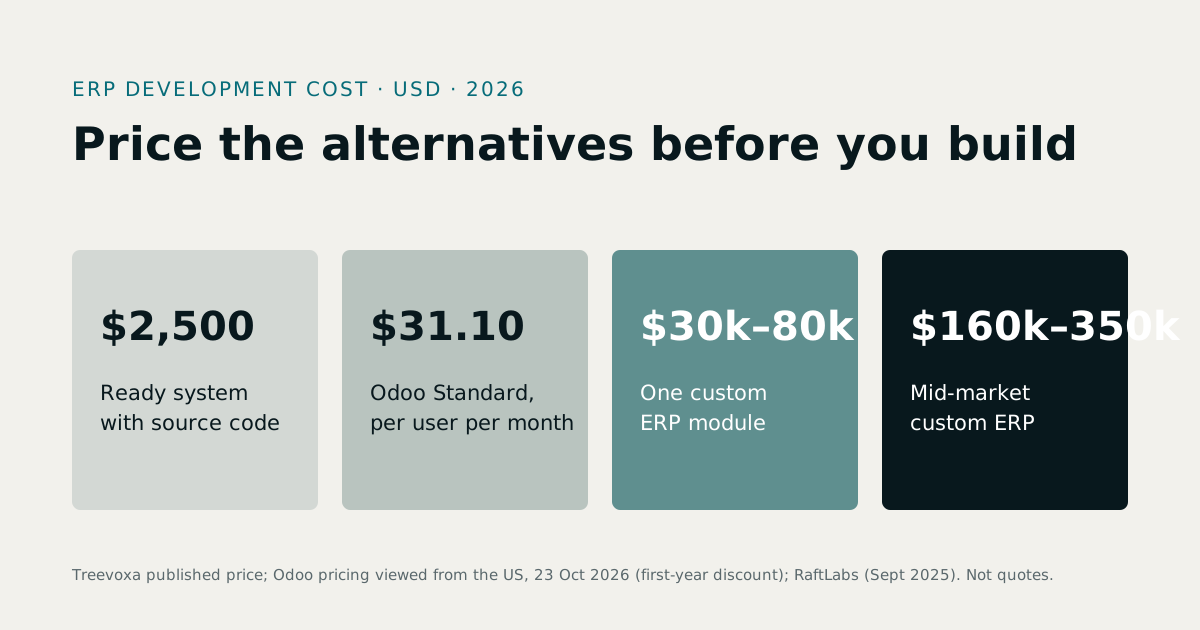
For a first estimate of a custom or adapted system, our software development cost calculator gives a range in minutes, and our software development rates page explains how we price. For a wider view of custom pricing, see our guide to ERP development cost.
What does a 15-user shop pay over three years?
This is a planning comparison, not a quote. Every figure is an estimate in Canadian dollars, and you should replace our assumptions with yours.
Assumptions (ours, not vendor quotes):
- 15 named users over 36 months.
- Packaged cloud ERP at a blended CAD 130 per user per month, inside the reseller-reported range above.
- Odoo or ERPNext at CAD 45 per user per month for hosted licences and hosting, with a partner doing setup.
- Custom build adapted from an existing working ERP rather than written from a blank page: about CAD 20,000 for implementation and data migration, CAD 60,000 to adapt it to your process, and CAD 15,000 a year for hosting, support and small changes.
| Cost line (CAD, estimate) | Packaged cloud ERP | Odoo or ERPNext with a partner | Custom build |
|---|---|---|---|
| Licence or subscription | 70,200 | 24,300 | 0 |
| Implementation | 45,000 | 35,000 | 20,000 |
| Customisation or build | 10,000 | 15,000 | 60,000 |
| Hosting and support | 15,000 | 18,000 | 45,000 |
| Total over 36 months | 140,200 | 92,300 | 125,000 |
The working behind it:
| Measure (CAD, estimate) | Packaged | Odoo or ERPNext | Custom |
|---|---|---|---|
| Licence | 15 × 130 × 36 = 70,200 | 15 × 45 × 36 = 24,300 | 0 |
| Upfront (implementation plus customisation or build) | 55,000 | 50,000 | 80,000 |
| Running cost per year (licence plus hosting and support) | 28,400 | 14,100 | 15,000 |
What the numbers say:
- Odoo or ERPNext is the cheapest route here, about CAD 47,900 below packaged and CAD 32,700 below custom. Custom never catches it under these assumptions. It starts CAD 30,000 higher and runs about CAD 900 a year dearer.
- Custom overtakes packaged after about 22 months. It starts CAD 25,000 higher (80,000 against 55,000) but costs CAD 13,400 less a year to run (28,400 against 15,000). The gap closes in 25,000 ÷ 13,400 ≈ 1.9 years. By month 36, custom is CAD 15,200, about 11%, cheaper. That is a real saving, but on cost alone it is not decisive at 15 users, and a custom project carries more delivery risk.
- Headcount moves the packaged line most. Ten more users add 10 × 130 × 36 = CAD 46,800 to the packaged licence (CAD 16,200 on the Odoo line). That excludes extra support and training, and a custom system's hosting and support would also rise somewhat. At eight users the packaged licence falls to CAD 37,440 and its total to about CAD 107,440, below custom's CAD 125,000, assuming the other lines stay the same.
4Which ERP software for small manufacturers in Canada fits you?
For a deeper side-by-side, read custom ERP vs Odoo vs ERPNext. The short version:
| If this sounds like you | Route |
|---|---|
| Your process is fairly standard, you have under about 15 users, and you want a local reseller who answers the phone in English and French | Packaged ERP (Business Central, MRPeasy) |
| You want broad features, a large module library and lower licence costs, and a partner can configure it | Odoo or ERPNext |
| You have in-house technical skill and want to self-host to avoid per-user fees | ERPNext, or Odoo Community |
| Your process is unusual, or your quoting, costing or traceability rules don't fit standard modules | Custom build |
| You expect to grow headcount quickly and per-user fees would bite | Custom, or Odoo or ERPNext self-hosted |
| You want to own the source code and not depend on a vendor's roadmap | Custom, or ready-made software with source code |
A packaged product is often the better buy. A small team with a standard process gets a faster start, a support desk and upgrades handled for it. A local reseller with French-speaking staff is worth real money in Quebec. Don't build something you can buy. Our guide to custom software vs SaaS covers the wider trade-off.
Odoo is a strong middle path. Its manufacturing app covers bills of materials, work orders and lot tracking, and its module library is large. The limits show up later. Heavy customisation makes upgrades harder, enterprise licences are per user, and you should check that its Canadian tax and reporting setup fits your province. If you go this way, Odoo development support can cover configuration.
Custom wins in narrower cases: an unusual process, recurring workarounds, or fees that keep climbing. The main risk is the project itself, which is why seeing a working system early matters (more on that below).
5Is cloud or on-premise ERP better for a small shop?
For most small shops cloud is simpler: no server to maintain and no backups to forget. On-premise or self-hosted makes sense if you want control over your data or your site connectivity is poor, but then someone owns security, backups and upgrades. If the terms are new, our explainer on cloud service models covers IaaS, PaaS and SaaS.
6What do Canadian tax and language rules change?
Whatever you pick, the system has to cope with how business works in Canada. Ask questions rather than assuming.
Canada has a federal GST, a combined HST in some provinces, a separate provincial PST in others (British Columbia, Saskatchewan and Manitoba each run their own), and QST in Quebec. The ERP must apply the right tax by ship-to and ship-from location, handle exempt and zero-rated items, and produce reports you can file from. Manufacturing inputs and equipment are often treated differently from ordinary purchases, and the treatment varies by province.
We are deliberately not quoting rates. They change, so check them with the Canada Revenue Agency and, for QST, Revenu Québec, and have your accountant confirm how they apply to your sales.
Language matters too, especially in Quebec. French-language rules, which were tightened by Bill 96, can affect customer-facing material. Have a Quebec adviser or the Office québécois de la langue française confirm what applies to your invoices, packing slips, labels and contracts. A good ERP lets you hold French and English versions of product names, document templates and customer-facing text, and print in the customer's language.
If you trade with the US, add CAD and USD invoicing, exchange-rate handling and gains or losses on payment. Customs paperwork and CUSMA origin documents are usually handled alongside the ERP, often with a customs broker, but the ERP should hold the data they need: country of origin, tariff codes and weights.
Ask every vendor:
- Can you show GST, HST, PST and QST applied correctly on a sample order across two provinces?
- Can a customer's invoice, quote and packing slip print in French or English by customer?
- Can I invoice in USD and see CAD margin on the same job?
- Where do I store tariff codes and country of origin for each product?
- Who maintains tax tables when rates change, and how fast?
- Is there a Canadian customer I can speak to?
7What shop-floor features should you ask to see?
Demos tend to show dashboards. Ask to see what happens at the bench, the dock and the stores shelf.
- Lot and batch traceability. Pick a finished lot and ask the vendor to trace it back to supplier lots, then forward to every customer shipment. If a recall happens, this is the report you need within hours.
- Barcode or QR scanning. Receiving, issuing materials and moving stock should work from a phone or handheld, not just a desktop.
- Work orders. Can the floor see what to build, issue materials against it and close it with actual quantities?
- Scrap and yield. Is waste recorded, and does it flow into cost?
- Gate passes. Goods leaving the site should be authorised and recorded, not waved through on a handwritten slip.
Batchbook, our manufacturing ERP software, is a working example of how these pieces fit together. Its QR code gate pass ties a physical release of goods to a scannable record, so the person at the gate can check what is leaving against what was authorised. It is a small feature, but it closes a gap many shops live with for years.
8How long does an ERP project take?
Gestisoft's guide cites 3 to 6 months for small manufacturers working with a certified partner. Treat that as a typical ERP implementation timeline for a packaged system, not a guarantee. Timelines grow when data is messy or decisions drag.
| Phase | Packaged ERP | Odoo or ERPNext | Custom (adapted system) |
|---|---|---|---|
| Scoping and choosing | 2–6 weeks | 2–4 weeks | 2–3 weeks, ending in a working demo |
| Configuration or build | 6–12 weeks | 4–10 weeks | 6–10 weeks for phase one |
| Data cleanup and migration | 2–6 weeks | 2–6 weeks | 2–6 weeks |
| Training and parallel running | 2–4 weeks | 2–4 weeks | 2–4 weeks |
| Typical total | 3–6 months | 2–5 months | 3–5 months, phased |
Apart from the packaged total, which echoes Gestisoft, these ranges are our estimates, not vendor promises. For a custom build the phasing matters: inventory, BOM and costing go live first, and the rest follows.
The steps that hurt most when skipped are the same on every route:
- Clean your item list, supplier list and BOMs before loading anything.
- Run the old and new systems in parallel for a few weeks so you can compare stock and invoices.
- Train the people who will use it daily, not just the manager who bought it.
9How do you see a working ERP before you commit?
The usual complaint about ERP projects is paying for months of setup before seeing anything that resembles your shop. With a packaged project, you may wait the full 3 to 6 months to learn how it feels.
Our approach is to start from a system that already exists. Our custom ERP work begins with Batchbook rather than a blank page, so there is something working to look at early. Before you commit, we can set up a demo loaded with sample data you give us: your items, a few BOMs, some suppliers. You then judge it against your own numbers, not a generic demo company.
Hold any vendor to the same standard. Ask them to demonstrate:
- Your real BOM, with a sub-assembly, costed correctly.
- A purchase order received into stock, with a lot number.
- A production order that consumes materials and produces finished goods with scrap.
- A sales order shipped and invoiced with the right Canadian tax.
- A trace from a finished lot back to supplier lots.
- A French-language invoice, if you need one.
If you want to own the code rather than rent a platform, see ready-made software with source code. If support will come from a remote team, ask about response times and handover, and read how offshore software development works in practice. Our guide to hiring offshore developers for Canadian businesses covers the Canadian side.
10How to choose: a short decision checklist
- Do you have fewer than 10 staff and a standard process? If yes, start with QuickBooks plus a stock app, or a light packaged tool.
- Do you need a local reseller with French-speaking support? If yes, lean packaged.
- Is your process mostly standard, with 10 to 30 users? If yes, shortlist Business Central, MRPeasy and Odoo or ERPNext, and run the three-year table with your own numbers.
- Can you hire or name someone to manage configuration and upgrades? If no, avoid self-hosted options.
- Are you planning to grow headcount fast? If yes, model per-user fees at the size you will be in year three.
- Do your costing, quoting or traceability rules break standard modules? If yes, price a custom build.
- Do you want to own the source code and choose your hosting? If yes, look at custom or ready-made source code.
- Can the vendor demo your own data before you sign? If no, ask why not.
If questions 1 to 3 describe you, buy packaged or go with Odoo or ERPNext. If questions 5 to 7 describe you, get a custom quote and compare it with a packaged one on the same three-year basis. Either way, when you choose ERP software for small manufacturers in Canada, start with inventory, BOM and costing, and don't sign until you have seen your own data running.
If you want to talk through which route fits your shop, you can reach us on the contact page.