
An ERP requirements checklist for small business is a short, ranked list of what your system must do, written before you talk to any vendor. For a business of 10 to 200 staff, about 40 items is enough to start. The full list is below, with Must, Should and Later priorities, a scoring method and a buy, configure or build verdict. If the list points to a build, it also works as the brief for custom ERP software development.
Copy it into a spreadsheet and edit it. Nothing is gated.
1What is an ERP requirements checklist?
It is your ERP requirements list: one-line statements of what the business needs, each with a priority. It also works as an ERP requirements template. Copy the tables in this article, delete what you don't need, add what is specific to you, and you have a first draft.
Looking for an ERP requirements checklist in Excel? Paste the tables into a spreadsheet and add columns for each vendor's score. There is no file to download.
It is not the same as a vendor's feature list. A vendor list says what the product can do. Your list says what you need it to do, in your words, and ranks it. Without that, every demo looks impressive and every system seems to have it all.
How long should it be? One vendor, ERP Research, suggests small businesses need well over 100 requirements. That is one vendor's view, and we think it's too much for a first pass. Most small firms can't score that many items against three vendors without losing the thread. Start with 30 to 40, and add detail only where a vendor's answer is unclear.
Already have accounting software? You may still need an ERP, but only if the pain is outside the ledger: stock that doesn't match, orders tracked in WhatsApp, costs worked out in spreadsheets. If your pain is only bookkeeping, a better accounting package may be enough. The checklist will show you which.
2What are functional and non-functional requirements?
Functional and non-functional requirements are the two main types. Functional requirements say what the system does. Non-functional requirements say how well and how safely it does it. Technical requirements are a third group you will meet in vendor documents, covering how the system fits your setup. Small business lists are usually all functional, and the non-functional gaps show up after go-live.
| Type | Question it answers | Examples |
|---|---|---|
| Functional | What can I do with it? | Post a supplier invoice, track a batch, raise a quote, run payroll |
| Non-functional | How well and how safely? | Page speed with your data, uptime, backups, audit trail, who can see what |
| Technical | How does it fit my setup? | Cloud or self-hosted, integrations, API, scalability, data export |
Both functional and non-functional requirements belong on the list. A system that posts invoices perfectly but has no audit trail, or loses a day of data in a crash, is not fit for use.
3What goes on an ERP requirements checklist for small business?
Here is the full checklist, 40 items in six groups. Priorities are Must (the business can't run or stay legal without it on day one), Should (painful to lack) and Later (nice to have).
Finance and accounting requirements
| Requirement | Why it matters | Priority |
|---|---|---|
| General ledger with an editable chart of accounts | Everything else posts here | Must |
| Accounts receivable with ageing | You need to see who owes you and for how long | Must |
| Accounts payable with approval before payment | Stops duplicate and unauthorised payments | Must |
| Bank reconciliation | Proves the books match the bank | Must |
| Tax handling (VAT, GST or sales tax) | Wrong tax on invoices becomes a legal problem | Must |
| Period locking and month-end close | Stops last month's numbers changing | Must |
| Multi-currency with exchange rate gains and losses | Essential if you import, export or bill abroad | Should |
| Budgets against actuals | Lets managers see overspend early | Should |
| Fixed asset register with depreciation | Useful, but a spreadsheet works for a while | Later |
Sales, purchasing and inventory requirements
A trading business needs all of this. A service firm can skip most stock items and lean on quotes, invoicing and projects.
| Requirement | Why it matters | Priority |
|---|---|---|
| Quotes and sales orders | One record from enquiry to invoice | Must |
| Invoicing from orders or deliveries | Stops billing from memory | Must |
| Purchase orders and goods received notes | Matches what you ordered to what arrived and what you pay | Must |
| Stock valuation method (FIFO or average cost) | Decides your margins and your balance sheet | Must |
| Stock by location (warehouse, shop, van) | Needed once you hold stock in more than one place | Should |
| Reorder levels and alerts | Prevents stock-outs and over-buying | Should |
| Stock counts with adjustments and reasons | Keeps the system honest against the shelf | Should |
| Returns and credit notes | Customers and suppliers will send things back | Should |
Manufacturing, HR and CRM requirements
Most of this is Should or Later for a small firm. The exception is a factory, where the bill of materials and costing move up to Must. For the costing detail, see product costing for factories.
| Requirement | Why it matters | Priority |
|---|---|---|
| Bill of materials | Defines what goes into each product | Should |
| Work orders | Tracks what is being made, and what it consumed | Should |
| Batch costing | Shows true cost per batch; see accounting and costing software development | Should |
| Employee records and leave | One source for headcount and absence; see HR software development | Should |
| Payroll | Valuable, but often cheaper as a separate, local-rules-aware tool such as MatrixHR | Later |
| Customer and lead notes | Stops customer knowledge living in one person's phone; see CRM development | Later |
| Sales pipeline | Helps once you have a sales team to manage | Later |
Reporting, security and compliance requirements
| Requirement | Why it matters | Priority |
|---|---|---|
| Role-based access | The storekeeper shouldn't see payroll | Must |
| Audit trail (who changed what, and when) | Answers who did this without a row of guesses | Must |
| Data export to Excel or CSV | Keeps you free to leave, and to analyse | Must |
| Backups with a tested restore | A backup you've never restored is a hope | Must |
| Local tax and e-invoicing rules | Must be met where you operate; verify per market | Must |
| Approval workflows | Purchases and payments above a limit need a second person | Should |
| Dashboards and scheduled reports | Owners get numbers without asking | Should |
A word on compliance. SOX applies to US public companies only, so most small businesses can ignore it, even though enterprise checklists list it. GDPR applies to the personal data of people in the EU and UK, which includes customer and staff records. Local rules vary: UK Making Tax Digital, UAE VAT, Australian Single Touch Payroll, Singapore GST and InvoiceNow, and e-invoicing mandates in various countries. Check current requirements on the official tax authority site for your market before you write them into the list.
Which integrations should be on the list?
For each integration, ask the vendor: is it native, via API, or custom work? The answer changes the cost and risk.
| Integration | Why it matters | Priority |
|---|---|---|
| E-invoicing portals (where mandated) | Required by law in some markets | Must |
| Bank feeds | Cuts reconciliation time | Should |
| Payment gateways | Lets customers pay online and matches payments automatically | Should |
| E-commerce (for example Shopify) | Orders and stock need to agree | Should |
| Open API | Covers anything not on the list; see API development | Should |
| Biometric devices (attendance, door access) | Feeds payroll or membership systems; see ZKTeco attendance to payroll | Later |
| WhatsApp (order updates, reminders) | Where many customers already are | Later |
Data migration and support requirements
| Requirement | Why it matters | Priority |
|---|---|---|
| Import tools for customers, suppliers, items and opening balances | Migration is where most projects stall | Must |
| Named support contact, response times and training | You will need help in the first three months | Must |
4Which requirements are must-haves and which can wait?
A Must is something the business cannot run or stay legal without on day one. A Should is painful to lack. Later is nice. The checklist above has 18 Musts. Your own list should have 15 to 20, so cut any that don't apply to you.
Here is a worked example: a 30-person trading firm that imports goods and sells to shops.
| Item | Priority | One-line reason |
|---|---|---|
| Stock valuation (FIFO) | Must | Margins depend on landed cost |
| Multi-currency purchasing | Must | They pay overseas suppliers |
| Sales orders to invoices | Must | Stops double entry |
| Stock by warehouse | Should | Two warehouses now, one would be fine |
| Approval on large purchases | Should | The owner wants control, not to sign everything |
| Dashboards | Should | Useful, but the owner can use exports at first |
| WhatsApp order alerts | Later | Customers call anyway |
| Payroll | Later | The accountant already handles it |
Don't copy enterprise items without a reason. EDI, shop-floor automation and multi-entity consolidation sit on big lists because big firms need them. If you don't, they only add noise and cost.
5How do I turn the list into a vendor scorecard?
Your ERP selection criteria are the requirements you've ranked, plus a handful that aren't features. Score each vendor 1 to 5 on every item (1 = can't do it, 5 = does it well, shown live). Then weight: Must × 3, Should × 2, Later × 1. The result is your vendor scorecard.
Here is a worked example with three vendors and five requirements.
| Requirement | Weight | Vendor A | Vendor B | Vendor C |
|---|---|---|---|---|
| Bank reconciliation (Must) | ×3 | 4 → 12 | 5 → 15 | 3 → 9 |
| FIFO stock valuation (Must) | ×3 | 5 → 15 | 3 → 9 | 4 → 12 |
| VAT-compliant invoices (Must) | ×3 | 4 → 12 | 4 → 12 | 5 → 15 |
| Approval workflow (Should) | ×2 | 3 → 6 | 4 → 8 | 2 → 4 |
| WhatsApp alerts (Later) | ×1 | 1 → 1 | 3 → 3 | 4 → 4 |
| Total (max 60) | 46 | 47 | 44 |
The arithmetic for Vendor A: 12 + 15 + 12 + 6 + 1 = 46. Maximum is 5 × (3 + 3 + 3 + 2 + 1) = 60.
Totals this close tell you little. Use them to decide who gets a second demo, not to pick a winner. Make that second demo a harder one, run on your own data.
One rule matters more than the total: a Must that scores 1 disqualifies the vendor, whatever the sum says.
Add non-feature criteria to the same sheet:
- Support: hours, channels, who answers.
- Training: included or extra, and for how many people.
- Implementation approach: who configures, and who is accountable if it slips.
- Data migration help: tools, or just 'send us a spreadsheet'.
- Exit terms: can you leave, and in what format do you get your data?
- Data ownership: whose data it is, in writing.
6Should a small business choose cloud or on-premise ERP?
For most small businesses, cloud is the right default. Upfront effort is lower, backups are handled for you, and you don't need someone to run a server.
On-premise or self-hosted suits businesses with poor connectivity, data residency rules, or heavy customisation that the vendor's platform doesn't allow.
There's a third option: own the source code and host where you choose. That gives you the control of self-hosting without writing everything from scratch. See ready-made software with source code.
If the terms SaaS, PaaS and IaaS are fuzzy, our guide to cloud service models explains them. In short: SaaS is software you rent and log into, PaaS is a platform you build your own software on, and IaaS is rented servers you manage yourself.
7What extra requirements does my industry have?
Add two or three sector items to the core list. These are the ones we see most.
| Sector | Extra requirements | Where to read more |
|---|---|---|
| Factory | Batch costing, bill of materials, gate passes for goods leaving the site | Batchbook manufacturing ERP, QR code gate pass |
| Textile or garment unit | Everything in the factory row, tracked through each production stage | Textile ERP guide |
| Pharmacy | Batch and expiry tracking, first-expiry-first-out (FEFO) dispensing, expiry alerts | PharmaFlow pharmacy POS, FEFO batch tracking |
| Property developer | Stage billing, instalment plans, overdue collections per buyer | RE-ERP for real estate, instalment plans guide, property management with accounting |
| Gym | Recurring membership billing, freezes and renewals, door access linked to payment status | FitZone Pro gym management |
8Should I buy, configure or build?
If most of your Musts are standard finance, stock and sales, buy or configure. Odoo and ERPNext cover that ground well, and building your own would be wasted effort. See custom ERP vs Odoo vs ERPNext for the detail, and Odoo development if you need it tailored.
If two or three Musts are unusual and central to how you make money, custom can pay off. Think of a batch-costing method nobody else uses, or instalment rules specific to your buyers. That's where custom ERP software development makes sense. If you want an outside view on custom software versus SaaS before you commit, software consulting is the place to start, and our guide to custom software vs SaaS covers the trade-offs.
| Signal | Points to |
|---|---|
| Your Musts are mostly generic finance, stock and sales | Buy or configure |
| You need to be live quickly and can adapt your process | Buy or configure |
| One or two Musts are central to your margin and nothing fits | Build |
| You want to own the code and avoid per-user licences | Build, or buy with source code |
| You have no one to own a system after launch | Buy a managed product |
| Your process is a competitive advantage you don't want to bend | Build |
Be honest about custom's trade-offs. It takes longer to start. You, or a partner, own the maintenance. And a vague brief gives a vague system, which is why the checklist matters.
Treevoxa runs its own SaaS products, so we know what a working system needs. That doesn't make custom right for you. If your Musts are standard, buy.
9What does it cost, and how do I set a budget requirement?
Treat budget as a requirement, not an afterthought. Write down every cost line before you shortlist:
- Licence or build cost
- Implementation and configuration
- Data migration
- Training
- Support
- Yearly running cost (hosting, updates, extra users)
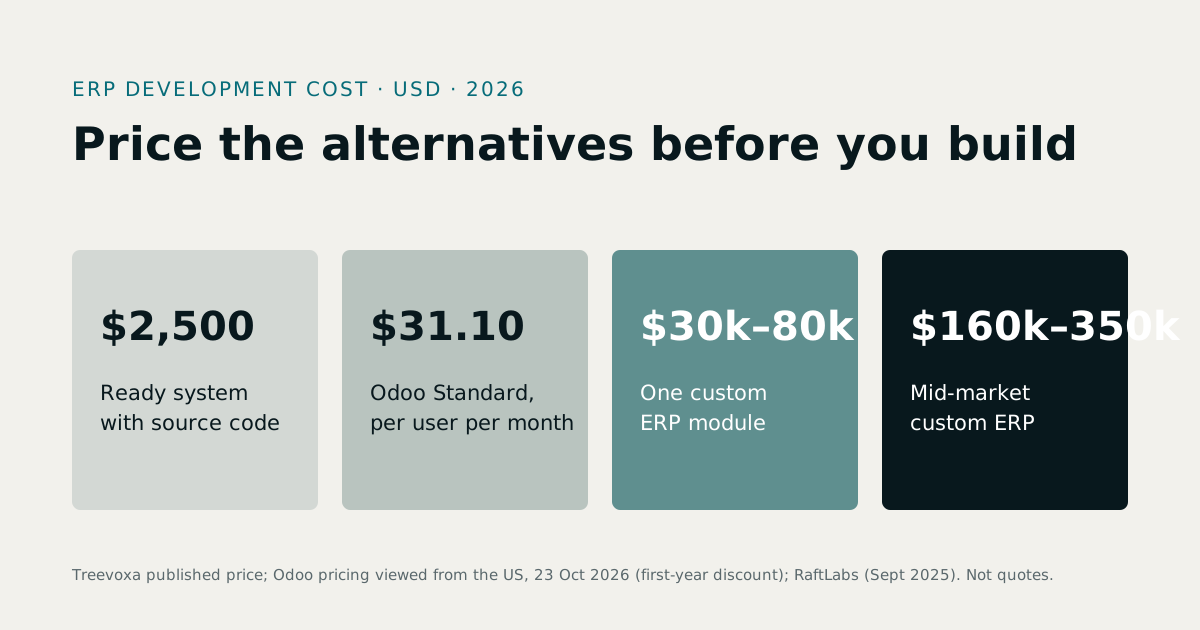
We won't quote prices here, because they vary too much by scope to be useful. For a quick estimate of a custom build, try the software cost calculator. See ERP development cost for what a custom ERP really costs, and software development rates for how rates differ by region.
10What are the red flags in an ERP demo?
Watch for these:
- The demo is slides, not live software.
- The vendor won't use your data or a sample of your process.
- Every answer to 'can it do this?' is 'that's on the roadmap'.
- Nobody can show a month-end close from start to finish.
- Reports are screenshots, not live queries.
- There's no import tool for your existing data.
- Migration help is vague ('we'll sort it out together').
- Pricing appears only after you sign up.
- There are no references in your sector.
- Support terms are unclear: hours, response times, what's included.
A good demo runs on your scenario. It posts a real-looking purchase order, receives goods, books the supplier invoice, sells the item and closes the month, all live. Ask to try an import yourself, and ask what happens when something goes wrong.
11Who should write the list, and how?
- Map what you do now. Include the spreadsheets and WhatsApp groups. They are your current system, and they hide your real requirements.
- Interview each department head. Ask what takes the most time, what goes wrong, and what they would never give up.
- Collect pain points. Each one is a candidate requirement.
- Write one-line statements. 'Post a supplier invoice against a goods received note' beats 'good purchasing'.
- Rank them. Must, Should, Later. Cap the Musts at about 15 to 20.
- Test with demos. Run the same scenario at every vendor.
- Score. Use the 1 to 5 method above.
Two things sink projects that the checklist can't fix alone. The first is data migration. Treat it as its own requirement: clean customers, items and opening balances early, because bad data in a new system is still bad data. The second is staff adoption. Name an owner for each module, plan training, and agree a date when the old spreadsheet stops being used.
12How to use your ERP requirements checklist
A good ERP requirements checklist for small business is short, ranked and tested against live demos. Keep it to about 40 items, cap the Musts at 15 to 20, and score every vendor the same way. Then let the result tell you whether to buy, configure or build.